
Prices below come from our price records or from the hosts' own pages; speed and uptime figures come from our benchmark records. Those records test a standard test site on each plan, not a Node.js application, so they show how fast and steady the server is, not how an Express or Next.js app performs on it. Node.js hosting moves fast, so confirm free-tier terms and plan limits on the host's own page before you buy.
Node.js hosting is the search where buying the "normal" thing burns you. Regular web hosting was built for PHP: the server runs your script for a moment, returns the page, and forgets you existed. A Node.js application is the opposite, a long-running process that must stay alive 24/7, hold its memory, and keep accepting connections. A host that cannot keep that process running is not Node.js hosting, whatever the sales page says.
That is why so many people get this wrong: they buy cheap PHP shared hosting, discover there is no way to run npm start, and conclude Node.js needs something exotic and expensive. It does not. It needs one of four specific hosting models, and they are all affordable now.
The other thing most "best Node.js hosting" lists skip: there is no single best host, because an Express API, a Next.js storefront, a Socket.IO chat server and a SaaS backend have genuinely different requirements. The hosting model matters more than the brand on the invoice.
So this guide works in that order. First I separate the four models (shared with Node.js support, VPS, managed cloud, and PaaS) so you know which one fits your app and your skill level. Then I compare 12 providers I would actually use across those models, with the real prices, the deployment workflow, and the catch each vendor does not advertise. By the end you will know exactly which model you need and which provider wins inside it.
Quick Answer: Best Node.js Hosting By Use Case
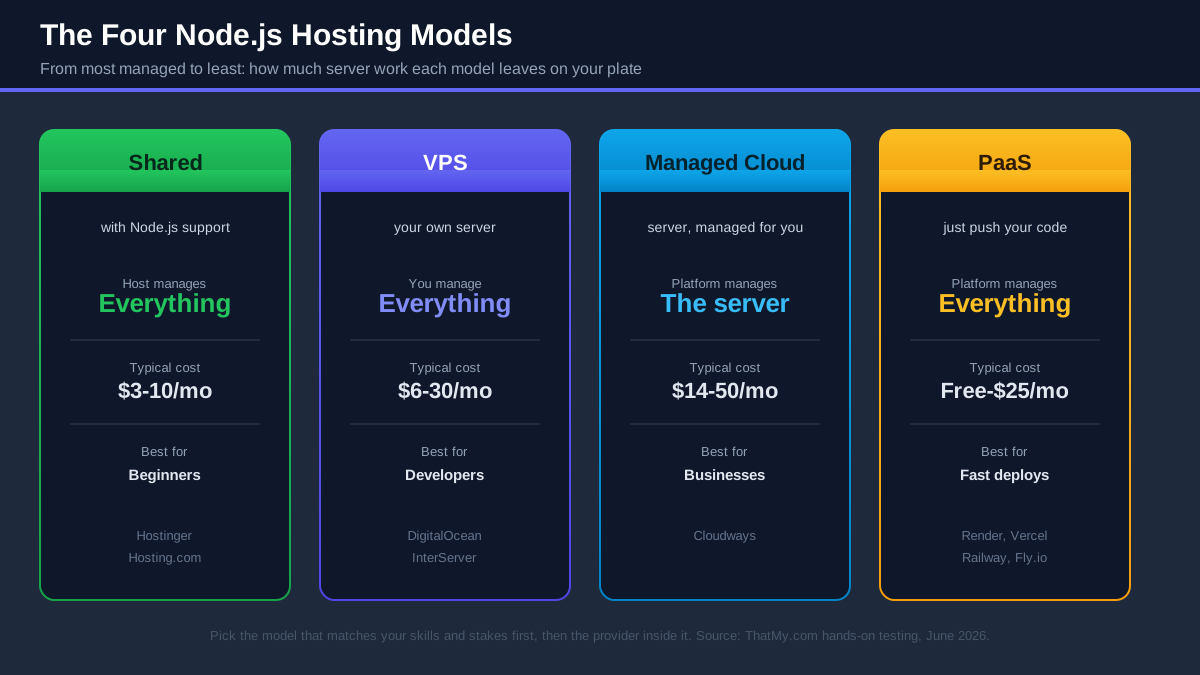
If you only have a minute, here is where I land after testing. Every pick is explained in full further down, with the trade-offs spelled out.
| Use Case | Recommendation | Why |
|---|---|---|
| Best overall | Hostinger | GitHub auto-deploys from $2.99/mo, KVM 2 VPS from $8.99/mo |
| Best managed cloud | Cloudways | Real cloud servers, zero solo sysadmin work, 48ms origin TTFB (New York, our test) |
| Best VPS | DigitalOcean | $6.00/mo Droplets, the best Node.js docs in the industry |
| Best for beginners | Hostinger | Deploy from GitHub without ever opening a terminal |
| Best for Next.js | Vercel | Made by the Next.js team, free Hobby tier |
| Best for Express.js | Render | Git push to live API with SSL, free tier to prototype |
| Best for APIs | DigitalOcean | PM2 cluster mode on a Droplet wins on throughput per dollar |
| Best for SaaS apps | Cloudways | Scaling, backups and monitoring handled while you build |
| Best cheap VPS | InterServer | 2GB RAM VPS slices billed monthly with no term to commit to |
| Best enterprise option | Liquid Web | Fully managed option, VPS and dedicated servers |
Hostinger
The first mainstream host to make Node.js feel like WordPress: connect GitHub, it detects your framework, builds and deploys with SSL. Premium shared plans from $2.99/mo (48-month term) run real Node.js apps, and the KVM 2 VPS (2 vCPU, 8GB RAM, $8.99/mo) is a low-cost Node.js server for its RAM.
See WhyCloudways
Your Node.js app on real DigitalOcean or Vultr infrastructure, with the firewall, SSL, backups, monitoring and scaling managed from one dashboard. 48ms origin TTFB from New York on our Vultr HF test server, a 3-day trial with no credit card, and code CLOUDS2022 adds free credit.
Read ReviewTable of Contents
- Quick Answer: Best By Use Case
- What Node.js Hosting Actually Means
- The Four Types Of Node.js Hosting
- Comparison Table: All 12 Providers
- #1. Hostinger (Best Overall)
- #2. Cloudways (Best Managed Cloud)
- #3. DigitalOcean (Best VPS)
- #4. Render (Best PaaS)
- #5-9. InMotion, InterServer, Hosting.com, Hostwinds, Liquid Web
- #10-12. Vercel, Railway, Fly.io (+ AWS & Google Cloud)
- Best Hosting By Project Type
- Cloudways vs Hostinger vs DigitalOcean
- What To Look For (+ My Benchmarks)
- Common Node.js Hosting Mistakes
- Is Shared Hosting Good For Node.js?
- Best Cheap Node.js Hosting
- Best Free Node.js Hosting
- How To Deploy A Node.js Application
- FAQ
- My Final Picks
What Node.js Hosting Actually Means
Before comparing providers, it is worth being precise about what you are actually buying, because "supports Node.js" on a pricing page can mean anything from "a real production runtime" to "there is a CGI hack in cPanel". Most hosting disappointments are really definition problems: the customer and the host mean different things by the same words.
Why Node.js Is Different From PHP Hosting
PHP hosting works like a food truck. The kitchen (Apache or LiteSpeed, see my web servers explainer) is provided by the host and always on. When a visitor orders a page, the server fires up your PHP script, cooks that one response, serves it, and the script dies. Nothing of yours stays running between requests. That model is why PHP shared hosting can pack hundreds of sites on one machine for budget rates.
Node.js does not work that way. Your application is the server. When you run node app.js, a process starts, binds to a port, loads your code into memory once, and then sits there handling every request from that same long-lived process, for days or months. That is the source of Node's speed (no per-request startup cost) and the source of its hosting requirements:
- The process must stay alive. If it crashes at 2am, something has to restart it, or your app is down until you wake up.
- The process needs memory it can keep. Your app holds connections, caches and state in RAM continuously, which is exactly what cheap PHP hosting is designed to prevent you doing.
- The process needs a port and something in front of it. Node listens on a port like 3000; visitors arrive on 80 and 443. Something has to bridge that gap.
So "PHP hosting with Node.js mentioned in the FAQ" and "Node.js hosting" are different products. The first runs your script briefly and kills it. The second keeps your application alive as a first-class, supervised process. Everything in this guide is about the second kind.
The Runtime Requirements (What Production Node.js Needs)
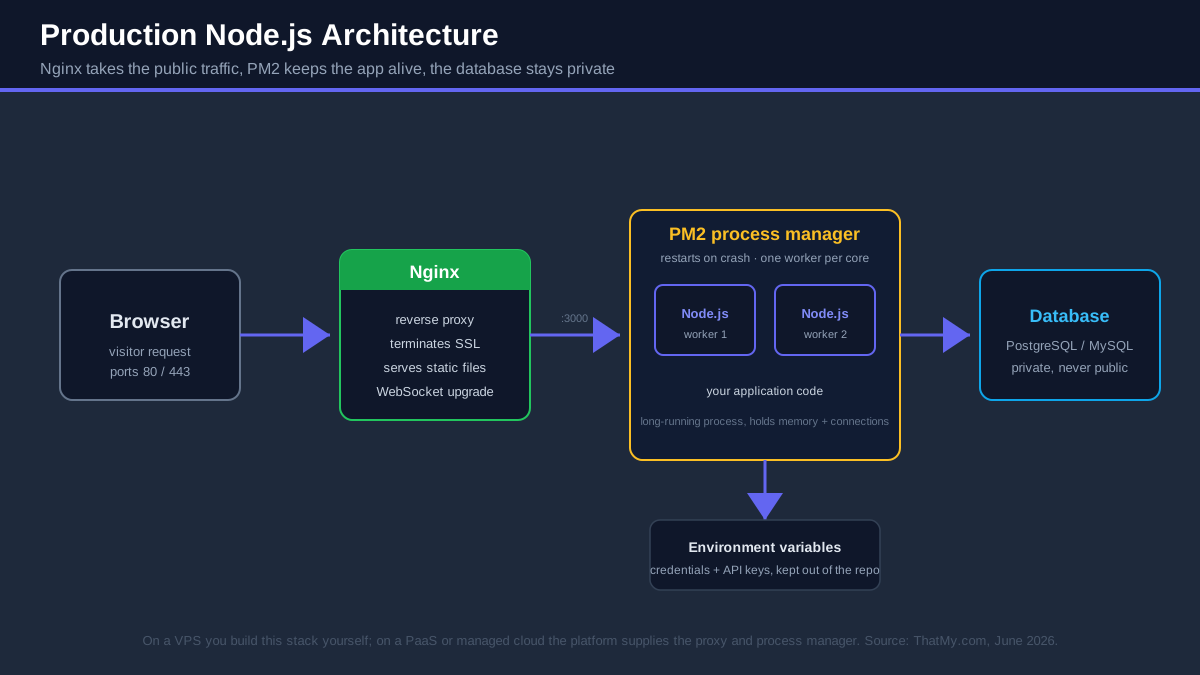
Whatever hosting model you pick, a production Node.js deployment has four moving parts. On a PaaS the platform supplies them invisibly; on a VPS you supply them yourself. Either way, you should know they exist:
- The Node runtime itself. Production apps should run an LTS version (20.x or 22.x in 2026) and you want the ability to choose and upgrade the version, because a host stuck on an ancient runtime will eventually block a dependency you need. On a VPS the standard tool is nvm; platforms like Hostinger, Render and Railway let you pick the version in a dashboard or config file.
- A process manager. The supervisor that restarts your app when it crashes, starts it on server reboot, and (on multi-core servers) runs one worker per CPU core so a single-threaded runtime can use the whole machine. PM2 is the standard on servers you control. PaaS platforms bake this in, which is half of what you are paying them for.
- A reverse proxy. Nginx (or the platform's equivalent) sits on ports 80/443, terminates SSL, serves static files efficiently, and forwards application traffic to your Node process on its internal port. Running Node directly on port 80 as root is the classic beginner mistake; the proxy layer is also where WebSocket upgrades and load balancing happen.
- Environment variables. Database credentials and API keys live in the environment, not in your repository. A good Node host gives you a clean way to set them (a dashboard panel or an
.envyou manage over SSH) and keeps them out of build logs.
Features Every Node.js Host Should Support
When I evaluate a Node.js host, these are the non-negotiables I check before price:
- SSH access (or a deliberate replacement for it). On a VPS, SSH is how you exist on the server. On a PaaS, Git deploys and a web console replace it. What you should avoid is a host with neither.
- Git deployment. Production deploys should be
git push, not dragging files into an FTP window. Hostinger, Render, Railway, Vercel and DigitalOcean App Platform all deploy straight from GitHub; on a raw VPS you wire it up once with a hook. - Node version control. You choose the version, you upgrade on your schedule.
- Free SSL. Let's Encrypt made paid certificates pointless; a host that charges for SSL in 2026 is telling you something about how it bills.
- A scaling path. More RAM and CPU on demand (vertical), or more instances behind a balancer (horizontal). The day you need it, you do not want the answer to be "migrate".
The Four Types Of Node.js Hosting
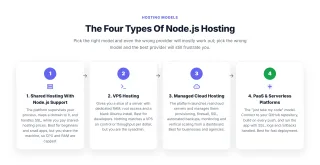
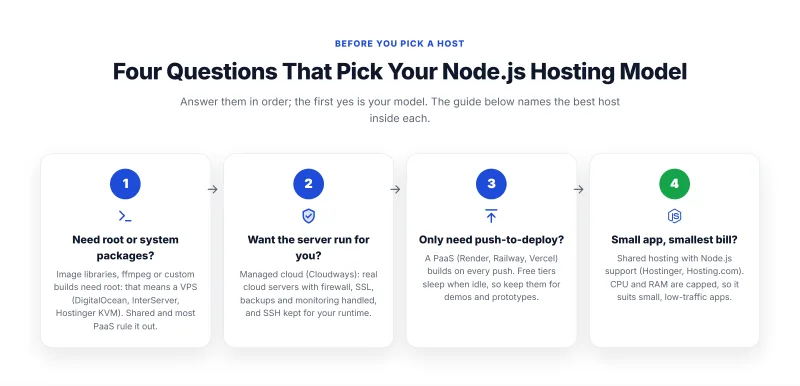
Every provider in this guide fits one of four models. This is the most important section on the page: pick the right model and even the "wrong" provider will mostly work out, pick the wrong model and the best provider in it will still frustrate you.
1. Shared Hosting With Node.js Support
The newest category, and the one that did not meaningfully exist a few years ago. Hosts like Hostinger (web apps hosting on Business and Cloud plans) and Hosting.com (cPanel's Node.js Selector) now run real, persistent Node.js applications on shared infrastructure: the platform supervises your process, maps a domain to it, and handles SSL, while you pay shared-hosting prices from budget rates.
Best for: beginners and small apps. The trade-off is resources. You share the machine, so CPU and RAM are capped, and a traffic spike or a memory-hungry build can hit those caps. Perfect for a portfolio project, a small client site with a Node backend, a Discord bot, or a low-traffic API. Wrong for a production SaaS.
2. VPS Hosting
The developer's default. A VPS gives you a slice of a server with dedicated RAM, root access and a blank Ubuntu install. You put on it whatever you want: your Node version via nvm, PM2 in cluster mode, Nginx, a database on the same box if you like. DigitalOcean is the standard, InterServer is the price-lock bargain, InMotion adds managed support and a phone number.
Best for: developers. Few options match a VPS on control per dollar; the benchmark records further down show what the servers underneath do. The honest cost is your time: you are the sysadmin, so security updates, firewalls, monitoring and that 2am crash are all yours. If reading "configure Nginx as a reverse proxy" sounds like a fun Saturday, this is your model.
3. Managed Cloud Hosting
The middle path, and the model I recommend to anyone running Node.js for a business. A platform like Cloudways launches real cloud servers (DigitalOcean, Vultr, Linode, AWS or Google Cloud) and then manages them: provisioning, firewall, SSL, automated backups, monitoring and one-click vertical scaling, all from a dashboard, while you keep SSH access for your runtime and code.
Best for: businesses and agencies. You get VPS-grade performance without being the only person responsible for the server. It costs more than the bare VPS underneath it (Cloudways starts around $11 a month versus $6.00/mo for a raw Droplet), and that margin buys the management layer. For an agency running ten client apps, that trade pays for itself the first time something breaks on a weekend.
4. PaaS & Serverless Platforms
The "just take my code" model. Platforms like Render and Vercel (plus Railway and Fly.io) connect to your GitHub repository, build on every push, and run the app with SSL, logs and rollbacks handled. No server exists from your point of view. Render runs persistent services (classic Node processes); Vercel runs serverless functions that spin up per request.
Best for: fast deployment. Nothing gets a Node.js app live faster, and the free tiers are real (with real catches, covered below). The costs are control and pricing predictability: you cannot tune the server, long-running connections may not fit the serverless variant at all, and usage-based bills need watching once traffic grows.
One distinction inside this model trips people constantly, so let me draw it clearly. A PaaS like Render or Railway runs your app as a normal, persistent Node process on a container it manages: WebSockets work, in-memory state survives between requests, cron jobs run beside the web service. A serverless platform like Vercel runs your code as short-lived functions that wake per request and vanish: brilliant for SSR and stateless APIs, structurally wrong for Socket.IO, queues you poll, or anything holding a connection open. Both market themselves with the same "just push your code" language. They are not the same product.
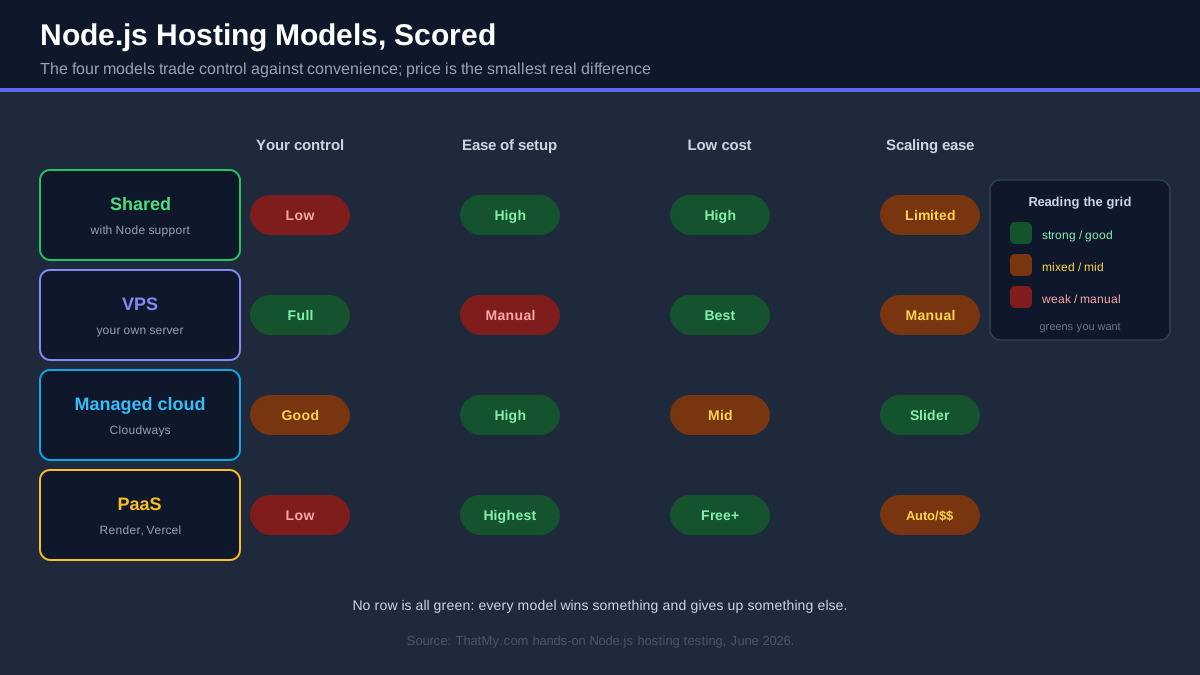
Here is the whole section as one table. Find your row, and the rest of this guide tells you which provider wins inside it:
| Model | Who Runs The Server | Typical Cost | Setup Work | Pick It For | You Outgrow It When |
|---|---|---|---|---|---|
| Shared with Node.js | The host, fully | Lowest | Minutes, GUI only | First apps, bots, small APIs | CPU/RAM caps bite under load |
| VPS | You, fully | Low to moderate | An hour, terminal | APIs, full control, best $/throughput | Sysadmin time costs more than hosting |
| Managed cloud | Platform + you split it | Moderate | Minutes + SSH for runtime | SaaS, agencies, revenue apps | You hire actual DevOps staff |
| PaaS / serverless | The platform, invisibly | Free to usage-based | Minutes, Git push | Prototypes, launches, Next.js | The usage bill outruns a VPS |
Node.js Hosting Comparison Table: All 12 Providers
Every ranked provider in this guide on one screen. "Managed" means someone other than you is responsible for keeping the server healthy. Prices come from our price records or the hosts' own pages; promotional rates change, so treat them as the ballpark and check at signup.
Best Node.js Hosting Providers In 2026
The detailed reviews. The comparisons below come from each platform's own documentation plus our benchmark and price records (see what our records say), not from a Node.js test suite of our own. Tier 1 gets the full treatment, Tier 2 a focused write-up, Tier 3 the honest quick mention.
#1. Hostinger: Best Node.js Hosting Overall

Hostinger is my best overall pick for one reason: it collapsed the price gap between "cheap hosting" and "real Node.js hosting". For years those were different purchases. Now the same $2.99/mo Premium plan (48-month term) that runs a WordPress site will pull a Node.js app from GitHub, detect the framework, build it, and serve it over SSL, with automatic redeploys every time you push.
The flow is genuinely beginner-grade. You connect your GitHub account in hPanel, pick the repository and branch, and Hostinger auto-detects what it is looking at (Express, Next.js and the other major frameworks are recognized without any YAML or build configuration). It installs dependencies, runs the build, attaches your domain and SSL, and from then on every push deploys. Hostinger also patches known dependency vulnerabilities automatically on apps deployed this way, which is more security attention than most beginners' apps ever get. The practical limitation to know: one hosting plan connects to one GitHub account at a time, so all the Node apps on that plan deploy from the same account.
Here is how the deployment goes as Hostinger documents it, because "easy" claims deserve specifics (we have not timed it ourselves):
- In hPanel, open Websites → Add website → Web app and choose Node.js.
- Authorize GitHub once. Pick the repository and the branch you want to ship from.
- Hostinger detects the framework, picks sensible build and start commands, and shows you both before running anything (override them if your project is unusual).
- First build runs, dependencies install, and the app comes up on a temporary URL.
- Attach your domain; SSL issues automatically. From now on every push to that branch redeploys.
Environment variables get a proper panel (no .env juggling over FTP), build logs are readable, and you can roll back to a previous deployment when a push goes wrong. It is not as deep as Render's platform (no preview environments per pull request, no built-in cron UI for web apps), but at a third of the price it does not need to be.
When your app outgrows shared resources, Hostinger's answer is a low-priced 8GB VPS: KVM 2 at $8.99/mo for 2 vCPU, 8GB RAM and 100GB NVMe (it renews at $14.99/mo). That RAM figure is not a typo: DigitalOcean's 8GB Droplet is $48.00/mo. You get full root access, OS templates with Node.js ready to go, a browser terminal, and on our benchmark the KVM 2 test server (hosted in Frankfurt) answered in 56ms from our Frankfurt location and 141ms from New York (origin TTFB, no CDN), and averaged 120ms with 100 concurrent users and no errors. The jump from "managed shared" to "my own server" happens inside one account instead of a migration to a new vendor.
| Plan | Price | What You Get | Right For |
|---|---|---|---|
| Premium shared | $2.99/mo intro | Web apps via GitHub, capped resources | A first Node app, portfolio projects |
| Unlimited shared | $4.99/mo intro | More headroom than Premium, capped resources | Small production apps and client work |
| Cloud plans | From $9.99/mo intro (Cloud Startup) | Dedicated resources, same GitHub deploy flow | Apps that hit shared caps but want zero server admin |
| KVM 2 VPS | $8.99/mo intro | 2 vCPU, 8GB RAM, 100GB NVMe, full root | PM2, custom stacks, real production control |
The honest caveats: the shared headline price assumes a 48-month term, and renewals are higher (Premium renews at $10.99/mo, roughly three and a half times the intro rate; the KVM 2 VPS renews at $14.99/mo), so read the checkout total before celebrating. Shared is still shared: hard CPU and memory caps mean a heavy build step or a traffic spike can hit limits a VPS would shrug off, and on our benchmark the Premium shared plan averaged 520ms with 100 concurrent users, against 120ms on the KVM 2 VPS. That gap is the upgrade signal: when sustained traffic arrives, move to the KVM plan rather than away from Hostinger.
Hostinger Node.js hosting at a glance
- GitHub connect, auto-detect, auto-deploy on push
- Real Node.js hosting from $2.99/mo (48-month term)
- KVM 2 VPS: 2 vCPU / 8GB RAM at $8.99/mo
- Free SSL, automated vulnerability patching
- hPanel is the friendliest panel in budget hosting
- Best prices need a 48-month commitment
- Renewal rates are higher than intro rates
- Shared plans cap CPU and RAM under load
- One GitHub account per hosting plan
From $2.99/mo (shared) · $8.99/mo (KVM 2 VPS) · Deploy GitHub auto-deploy · Best for beginners and budget production
My take: the best overall Node.js host of 2026. Beginners get a no-terminal GitHub deploy for pocket money; growing apps get a generously specced $8.99/mo VPS in the same account. Read my full Hostinger review for the wider platform picture.
#2. Cloudways: Best Managed Cloud For Node.js
Cloudways answers the question every business eventually asks about Node.js hosting: "who is responsible for this server at 2am?" On a raw VPS the answer is you. On Cloudways the answer is the platform, and you still keep the cloud infrastructure, the SSH access and the performance.
The model is simple to picture: Cloudways does not own data centers. You pick the underlying cloud (DigitalOcean, Vultr, Linode, AWS or Google Cloud), a size and a region, and Cloudways launches and manages that server for you: OS hardening, firewall, free SSL, automated off-server backups, monitoring with alerts, and vertical scaling from a slider. You get SSH and SFTP access the whole time, which is what makes it real Node.js hosting rather than a locked box.
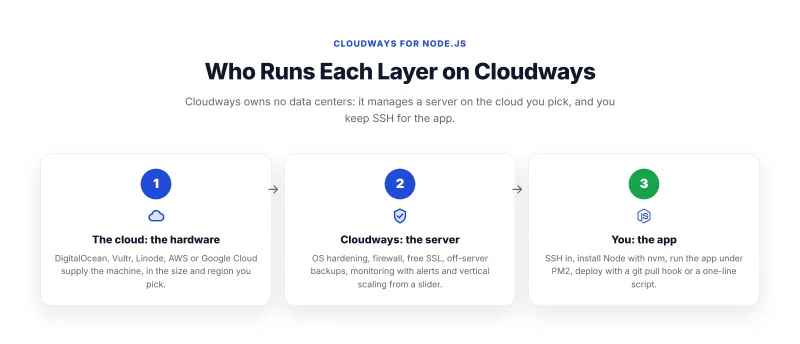
The Node.js workflow looks like this in practice. Launch a server (DigitalOcean 1GB is the usual starting point), SSH in, install your Node version with nvm, and start your app under PM2 exactly as you would on any Linux box. From there the dashboard takes over the parts you do not want to own: environment variables managed per application, one-click restarts after deploys, real-time CPU and RAM graphs so you can see what your event loop is doing, and scheduled backups you can restore from a button. Deploys are a git pull hook or a one-line script over SSH.
Performance is cloud-grade because it literally is the cloud underneath. Our benchmark records (a standard test site, not a Node.js app) show the Vultr High Frequency server answering in 48ms TTFB (origin, no CDN, from New York) and averaging 74ms with 100 concurrent users, with 0% errors. The DigitalOcean Standard server we tested answered in 59ms and averaged 98ms at 100 users, with 99.981% uptime over a 54-day monitoring window. We have not run a WebSocket or Socket.IO test on any host, so we make no connection-count claim.
Scaling and recovery are dashboard operations, not projects. Vertical scaling to a bigger instance takes a few minutes from a slider. Automated backups run on your schedule, store off-server, and restore from a button (test a restore before you rely on any backup). Cloning the whole server (to a bigger size, another region, or even another cloud provider) is built in, which is quietly the best migration insurance in this guide. Agencies get team member access with scoped permissions, so a contractor can deploy without holding the master keys.
| Server | Specs | Price | Right For |
|---|---|---|---|
| DigitalOcean Premium 1GB | 1 core / 1GB RAM / 25GB NVMe | $14.00/mo | The standard starting point for one app |
| Vultr HF 1GB | 1 core / 1GB RAM / 32GB NVMe, high-frequency CPU | $16.00/mo | Latency-sensitive APIs |
| Vultr HF 4GB | 2 cores / 4GB RAM / 128GB NVMe | $60.00/mo | Production SaaS, several apps per server |
| Larger sizes | Up to 8GB+ on five clouds | See Cloudways pricing | Scale up from the same dashboard |
Pricing is pay-as-you-go with no lock-in and no renewal games: the price you start at is the price it stays, billed hourly so a deleted test server costs cents. You can start with a 3-day trial that needs no credit card, and code CLOUDS2022 adds free credit while you evaluate it. Support is 24/7 chat with a real escalation path, and the knowledge base assumes you are deploying applications, not just WordPress.
What Cloudways is not: a zero-config PaaS. You install your own runtime, which is precisely the flexibility that lets you pick your Node version, run workers beside the web process, and keep Redis on the same machine (Redis and Memcached are available on the stack). And it is built for applications rather than mailboxes, so email hosting is an add-on rather than included. Both are the right trade for its audience.
Cloudways Node.js hosting at a glance
- Managed servers on 5 clouds, one dashboard
- 48ms origin TTFB from New York on our Vultr HF test server
- SSH retained: your Node version, your PM2 setup
- Automated backups, monitoring, vertical scaling
- 3-day free trial, no credit card, CLOUDS2022 = free credit
- You install the Node runtime yourself (by design)
- Email hosting is an add-on, not included
- Costs more than the bare VPS underneath it
From $14.00/mo (DO Premium 1GB) · TTFB 54ms origin, New York · Deploy SSH + git, PM2 yours · Best for SaaS, agencies, production apps
My take: the best managed cloud for Node.js and my recommendation for any app with revenue behind it. You keep the control that matters (runtime, process manager, code) and delegate the parts that wake people up at night. Full platform detail in my Cloudways review.
#3. DigitalOcean: Best VPS For Node.js
DigitalOcean is where Node.js developers go when they want the server to themselves. It earns the best-VPS slot for two reasons: the $6.00/mo Basic Droplet is the reference machine for a self-managed Node deployment, and no other provider's documentation comes close. DigitalOcean's community tutorials on production Node.js setups (nvm, PM2, Nginx, SSL, the whole stack) are so good that developers on other hosts follow them anyway.
Droplets are the classic path. A fresh Ubuntu VM with full root access where you install Node via nvm, run PM2 in cluster mode (one worker per vCPU), and put Nginx in front as the reverse proxy. On our benchmark, the 1GB Droplet answered in 61ms (origin TTFB, no CDN, from New York) and averaged 128ms with 100 concurrent users, no errors. That test used a standard test site, not a Node.js app, so treat it as a sign of a steady server rather than a Node throughput figure. The payoff for the hour of setup is control per dollar: you size the machine and the PM2 workers yourself.
The Droplet ladder is simple: $6.00/mo buys 1 vCPU and 1GB RAM (enough for one lean Express API under PM2), the $12.00/mo tier doubles the RAM, and Premium Droplets also exist. DigitalOcean offers many regions, so you can put the server near your actual users instead of defaulting to US-east like half the internet still does.
App Platform is DigitalOcean's own PaaS answer for the days you do not want root: point it at a GitHub repository and it builds, deploys and serves with SSL, redeploying on every push. Dynamic Node.js services are billed by usage (check its pricing page for the entry rate), with horizontal scaling on the shared-CPU tiers and vertical options when one container needs more muscle. Workers, scheduled jobs and managed databases attach as components of the same app, each priced separately (which is both the convenience and the way the bill grows). It is the natural halfway house if you live in the DigitalOcean ecosystem but want Render-style ergonomics.
| Scenario | Pick | Why |
|---|---|---|
| REST API or microservice | App Platform | Zero config, auto-deploy, auto-SSL |
| High-traffic production API | Droplet + PM2 cluster | Most throughput per dollar, full tuning control |
| WebSocket / Socket.IO app | Droplet + PM2 | Long-lived connections want a persistent server you control |
| Database-heavy app | Droplet + Managed PostgreSQL | Managed database in the same panel |
The trade-off is the same one VPS hosting always carries: on a Droplet, you are the sysadmin. Security patches, firewall rules, monitoring and 2am restarts are your job (PM2 handles the restarts if you set it up properly, which is the point of the deployment guide below). Support is ticket-based and assumes competence. None of that is a flaw; it is the contract you sign for a $6.00/mo cloud server. DigitalOcean has offered new-account credit in the past; check its current offer before you sign up.
DigitalOcean Node.js hosting at a glance
- $6.00/mo Droplets: strong control per dollar
- App Platform PaaS with GitHub deploys
- The best Node.js production documentation anywhere
- Managed Postgres, Redis and Kubernetes in the same account
- New-account credit offers (check the current one)
- Droplets assume real Linux comfort
- App Platform components (workers, jobs, DBs) each add cost
- Ticket-first support, no hand-holding
From $6.00/mo (Basic 1GB Droplet) · Deploy GitHub or SSH + PM2 · Best for developers and APIs
My take: the best VPS for Node.js and the default home for production APIs. If you can administer Linux (or want to learn properly), few options beat it per dollar; if you cannot, Cloudways runs this same hardware with the management included (see my DigitalOcean vs Cloudways comparison).
#4. Render: Best PaaS For Node.js
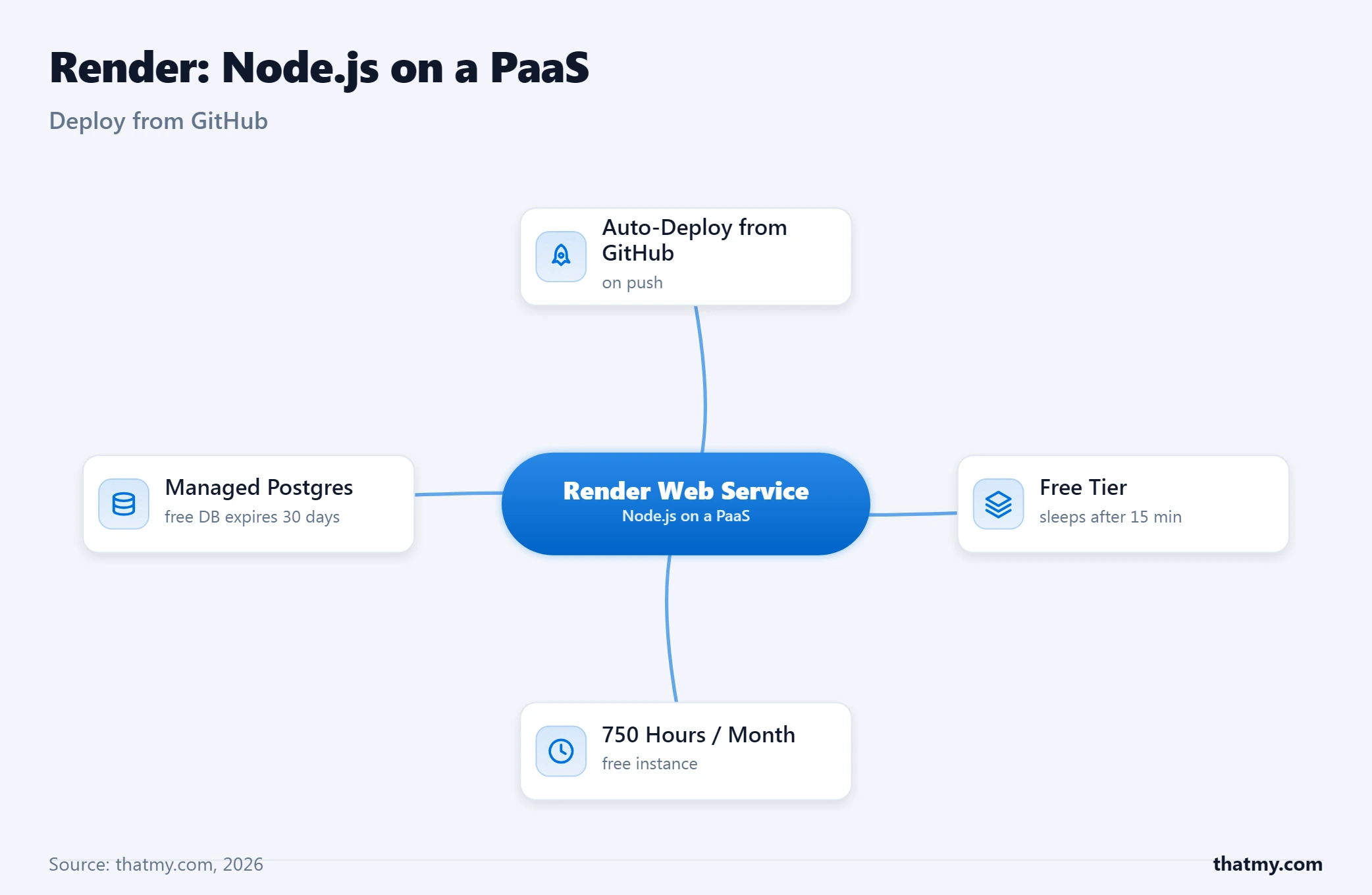
Render is what Heroku used to feel like: the platform you point at a GitHub repository and stop thinking about servers. For a classic Node.js service (an Express API, a bot, a webhook receiver, a small full-stack app) it is the fastest production-credible deploy in this guide.
The workflow is the whole product. Connect the repo, Render detects Node, runs your build command, and your service is live behind SSL on a .onrender.com URL (or your own domain) with logs streaming in the dashboard. Every push to the branch redeploys automatically; pull requests can spin up preview environments. Background workers and cron jobs are first-class service types, and managed PostgreSQL and Redis live alongside the app, so a real production stack assembles in an afternoon without a single SSH session. Crucially for Node.js, Render runs persistent services, not per-request functions: WebSockets and Socket.IO work normally on paid instances.
The free tier deserves its reputation, with its catches understood. Free web services spin down after 15 minutes without traffic, and the next request waits up to a minute while the service wakes. You get 750 free instance hours per workspace per month, and the free PostgreSQL database expires after 30 days (with a 14-day grace period to upgrade before the data is deleted). In other words: a perfect prototype tier and a terrible production tier, exactly as designed. Always-on paid instances start at a budget rate, which is the honest entry price of "Render in production". These free-tier terms are Render's documented terms; we did not re-read its pricing page, so confirm them on render.com.
| Factor | Free | Paid (from budget rates) |
|---|---|---|
| Always on | ❌ Sleeps after 15 min idle | ✅ Persistent |
| Wake-up delay | Up to ~1 minute | None |
| Monthly allowance | 750 instance hours | Per-instance pricing |
| PostgreSQL | 1GB, expires in 30 days | Persistent, paid |
| WebSockets / Socket.IO | ⚠️ Work, until the sleep kills them | ✅ Fully supported |
| Right for | Demos, hobby apps, testing | Small production services |
The limits worth knowing before you commit: there is no SSH (a web shell covers most debugging), you cannot tune the machine under your app, and at sustained scale the per-instance pricing climbs past what the same throughput costs on a Droplet or a Cloudways server. Render's sweet spot is the long stretch between "first deploy" and "we need infrastructure engineering".
Render Node.js hosting at a glance
- Git push to live Express API with SSL, zero config
- Real free tier for prototypes (no card required)
- Persistent processes: WebSockets work normally
- Managed Postgres, Redis, workers and cron built in
- Preview environments per pull request
- Free services sleep after 15 minutes of inactivity
- Free PostgreSQL expires after 30 days
- No SSH and no server tuning
- Costs rise faster than VPS at sustained scale
From free (sleeps) · budget rate always-on · Deploy GitHub auto-deploy · Best for Express.js apps and fast launches
My take: the best PaaS for classic Node.js services and my Express.js pick. Prototype free, pay a budget rate when it matters, and graduate to a VPS or managed cloud only when the bill says so.
#5. InMotion Hosting: Managed VPS With A Phone Number
InMotion's pitch is the thing raw cloud providers structurally cannot offer: a human on the phone. Its managed VPS plans come with cPanel and WHM pre-configured, US-based support reachable by phone and chat, and and a money-back guarantee window (check InMotion's page for the current length, which we could not read).
Node.js on InMotion runs two ways. The simple path is cPanel's Setup Node.js App tool (InMotion maintains its own step-by-step guide for it): pick a Node version, point it at your startup file, and the platform supervises the process. The full path is SSH root access on the VPS plans, where you install nvm and PM2 and build the standard production stack yourself, with the difference that InMotion's support team will actually help when something server-side misbehaves.
The plan we benchmarked is Cloud VPS 4GB, at $29.99/mo on its introductory term and $64.99/mo on renewal, so budget on the renewal number. InMotion markets free cPanel and WHM on its managed VPS plans. On our benchmark (a standard test site, not a Node.js app) that plan answered in 80ms from New York (origin TTFB, no CDN), averaged 150ms with 100 concurrent users and had a 0.4% error rate. Those are usable numbers, a step behind the cloud-native picks above.
The structural limitation is geography: InMotion's servers are in the United States, so distance shows up in the numbers. On the same plan our benchmark measured 80ms from New York and 162ms from Frankfurt (origin TTFB). For a US-audience app that does not matter; for a global API it should steer you elsewhere.
From $29.99/mo (Cloud VPS 4GB) · Deploy cPanel Node app or SSH + PM2 · Best for US businesses that want phone support
My take: the managed VPS for teams that value a support relationship over raw specs. US audiences only, and read the renewal price before you commit.
#6. InterServer: Best Cheap Node.js VPS
InterServer wins the cheap-VPS slot on one number: RAM per dollar. Its VPS page lists a 1-slice VPS at $3 a month with 1 core, 2GB RAM and 40GB SSD, which is double the memory DigitalOcean's $6.00/mo Droplet gives you, and RAM is usually the binding constraint on small Node.js servers. Our price record holds the 2-slice VPS at $6.00/mo, month-to-month. The page says it is billed monthly with no quarterly or yearly discount, so there is no long term to commit to and no teaser rate to expire; we could not find a written price-lock promise on that page, so confirm the renewal rate when you order.
What you get is a proper, unfussy VPS: full root SSH on the distro of your choice, optional control panels if you want them, and slices that stack linearly when you need more capacity (slices stack, so two slices double the resources and the price). The Node.js setup is the standard manual stack (nvm, PM2, Nginx), exactly as in the deployment guide below; nothing about the platform fights you and nothing holds your hand.
We have no benchmark record for InterServer, so we make no speed claim for it. Expect a budget VPS: shared hosts of this kind can have noisy neighbors, so latency-critical workloads belong on the premium clouds, and you should load-test your own app before you trust it.
The honest framing: InterServer is infrastructure, not an experience. The panel is dated, there is no GitHub-deploy magic, and the polish of DigitalOcean's ecosystem is absent. What you are buying is specs per dollar and simple monthly billing, and at that job it is the best in this guide.
From $3/mo (1 slice: 1 core / 2GB) · Deploy SSH + PM2 · Best for budget production VPS
My take: the best cheap Node.js VPS of 2026. Most RAM per dollar on this page; read the renewal terms at checkout.
#7. Hosting.com: cPanel Node.js On Shared Plans
Hosting.com is the rebranded home of the former A2 Hosting platform, now part of the World Host Group family of brands. For this guide it earns its slot as the second credible shared-hosting-with-Node.js option after Hostinger, with a different flavor: where Hostinger built its own deploy pipeline, Hosting.com gives you the standard cPanel Node.js Selector, documented step by step in its own knowledge base.
The Selector flow will feel familiar to anyone who has run PHP apps on cPanel: create an application, choose the Node.js version from a dropdown, set the application root and startup file, and the platform runs and supervises the process, mapping it to your domain. It is a GUI over a real persistent runtime, suitable for small apps, bots and APIs at shared prices: the Starter plan is $2.99/mo intro and renews at $13.99/mo, so budget on the renewal number, not the teaser.
Beyond shared, the LiteSpeed-based Turbo platform the A2 brand was known for carries over, and VPS plans with full root cover the manual PM2 route when an app outgrows the Selector's resource caps. Two practical things to check: the Selector's supervised process restarts on crashes but gives you less visibility than PM2 (logs live in cPanel, not your terminal), and Node version availability follows what the host has installed in CloudLinux, so check the dropdown offers a current LTS before committing a project that needs it.
If you already think in cPanel, this is the most familiar way to run Node.js without changing how you work; if you do not, Hostinger's pipeline is the smoother on-ramp at the same intro price. Worth knowing about the company itself: the brand consolidation under World Host Group is recent, so check current user reviews for the support experience before a long prepay, and judge it on the renewal price you will actually pay.
From $2.99/mo intro (renews $13.99/mo) · Deploy cPanel Node.js Selector · Best for cPanel users running small Node apps
My take: the cPanel-native way to host small Node.js apps on shared infrastructure. Know the renewal price going in.
#8. Hostwinds: Flexible VPS With Hourly Billing
Hostwinds occupies a useful niche: VPS hosting with cloud-style flexibility at traditional-host prices. Our price record has its Basic plan from $5.24/mo, hourly billing is advertised, and plans can be taken managed or unmanaged. We did not read Hostwinds' own pages for this guide, so confirm the specs and the managed price on its site.
For Node.js the story is the standard self-managed stack: full root, install nvm and PM2, wire up Nginx, deploy over SSH. Snapshots and instant rebuilds make it a comfortable lab for testing deployment automation before pointing it at production, and treat any host's own uptime SLA as a goal with service credits attached rather than a physics guarantee. Windows VPS plans exist too, one of the few in this guide, if you have a Node-on-Windows constraint somewhere in your stack.
Where the managed option earns its few extra cents: Hostwinds' team handles the OS layer (updates, firewall, initial hardening) while you keep root for your Node stack, which makes it a low-cost "someone else patches the server" arrangement. It is not Liquid Web-grade proactive management, more a safety net than a co-pilot.
The honest read: Hostwinds is a generalist. It does not have DigitalOcean's documentation gravity, InterServer's price lock, or a GitHub pipeline. What it has is flexibility per dollar (managed or not, hourly or monthly, Linux or Windows) that no one else in this tier matches in one place.
If the Windows half is the actual requirement rather than a nice-to-have, licensing changes the price maths enough to deserve its own comparison. See the best Windows VPS hosting providers for what a Server licence really adds per month.
From $5.24/mo (Basic) · Deploy SSH + PM2 · Best for flexible labs and budget managed VPS
My take: the flexible mid-tier VPS. Pick it for hourly billing and the cheap managed option rather than for any single headline spec.
#9. Liquid Web: Enterprise Node.js Hosting

Liquid Web is the answer when the question changes from "what does it cost?" to "what happens when it breaks?". This is fully managed hosting in the literal sense: proactive monitoring by actual sysadmins, guaranteed support response times, and infrastructure SLAs with teeth. Businesses do not start here; they graduate here after the first outage that cost real money.
For Node.js workloads the relevant products are the managed Linux VPS plans (Liquid Web's page lists a 1GB entry VPS at $5.00/mo, self-managed or fully managed, and prices rise with size) and dedicated servers when you need the whole machine. You keep full root, so the Node stack is yours to shape (nvm, PM2, Nginx, your build pipeline), while Liquid Web's team owns the server layer: hardening, patching, monitoring, and being awake at 2am. The split is similar to Cloudways' model but with deeper human involvement and correspondingly deeper pricing.
The numbers are steady rather than spectacular. On our benchmark (a standard test site, not a Node.js app) the managed 8GB VPS answered in 70ms from New York (origin TTFB, no CDN), averaged 125ms with 100 concurrent users with 0% errors, and held 99.999% uptime over a 54-day window. Liquid Web's page advertises 99.99% uptime; it does not spell out the SLA terms there, so read them before you rely on them.
Be clear about what "managed" covers: the infrastructure, not your application code. Their admins will fix a failed disk or a misbehaving service; they will not debug your event loop. For a revenue-critical Node.js application with compliance requirements or an SLA of its own to honor, that division of labor can be cheap insurance. For a hobby API, it is the wrong aisle entirely, and that is fine: this pick exists for the readers whose downtime is measured in dollars per minute.
From $5.00/mo (1GB VPS) · Deploy SSH + PM2, root retained · Best for enterprise and revenue-critical apps
My take: the enterprise option. Buy it for the humans and the SLAs, not the specs.
#10. Vercel: The Next.js Home Ground
Vercel builds Next.js, and hosting Next.js on Vercel feels like it: push to GitHub and the framework's every feature (server components, ISR, image optimization, edge middleware) just works, with preview URLs on every pull request that remain the best collaboration trick in web deployment. The Hobby tier is free with one hard rule: it is for personal, non-commercial projects only. Paid plans are priced per seat; see Vercel's pricing page.
The architectural catch matters for this guide: Vercel runs your backend as serverless functions, not a persistent process. Functions have execution time limits, keep no state between invocations, and cannot hold a WebSocket open, so Socket.IO apps and long-lived connections do not belong here. APIs, SSR and static-plus-functions sites thrive; anything that needs a daemon does not.
My take: the automatic answer for Next.js, the wrong tool for persistent Node services. Vercel's pricing page spells out the Hobby limits.
#11. Railway: Fastest Prototype-To-Production
Railway is the platform developers fall for in the first ten minutes: connect a repo, it detects the stack, and the app, a PostgreSQL database and a Redis instance are running in a visual project canvas before most platforms finish their onboarding tour. New accounts have been offered a trial credit; after that a small monthly plan includes some usage, with resource consumption metered beyond it. Check Railway's pricing page for today's amounts, which we did not read.
It runs real persistent processes (WebSockets fine), supports cron and workers, and the developer experience is arguably the best in the PaaS tier. The discipline it asks for is billing awareness: usage-based pricing rewards small efficient services and quietly punishes memory-hungry ones left running. Set the spend limits, and it is a joy.
My take: the fastest way from idea to running stack in 2026. Watch the usage meter as you grow.
#12. Fly.io: Node.js Close To Your Users
Fly.io runs your Node app as lightweight micro-VMs in many regions, so a global API can answer from hardware near each user instead of one distant origin. It is CLI-first (fly launch reads your project and deploys it), bills per second, pay-as-you-go, so a minimal always-on machine costs very little and a realistic small production setup costs more; see Fly.io's pricing page.
Know before you go: Fly.io no longer has a permanent free tier (check its page for any trial credit; usage is metered), and the platform assumes you are comfortable in a terminal and reading machine logs. In exchange you get the easiest multi-region Node deployment that exists and first-class WebSocket support.
My take: the global-edge pick for APIs and microservices, priced fairly, free no longer.
What about AWS and Google Cloud? You can absolutely run Node.js on the hyperscalers: EC2 or Lightsail on AWS, Compute Engine or the excellent Cloud Run on Google. I left them outside the ranked list deliberately, because for individuals and small teams they are platforms you assemble, not hosting you buy: networking, IAM, billing alarms and a hundred services stand between you and npm start, and an unwatched account can bill you real money for a mistake. If your employer runs on them, use them and their free credits. If you are choosing your own Node.js host, every option above gets you live faster with fewer sharp edges; my cloud hosting explainer covers when graduating to raw cloud actually makes sense.
Best Node.js Hosting By Project Type
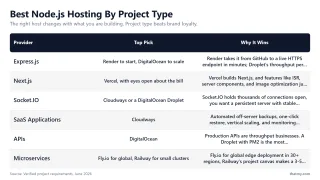
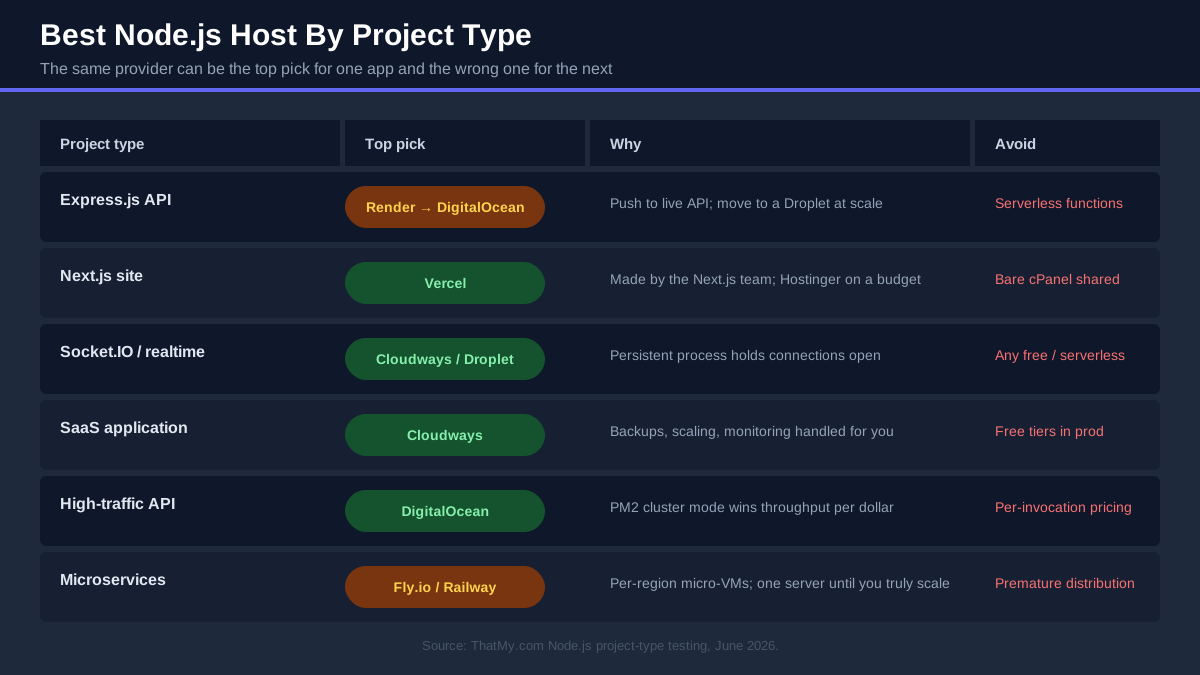
Generic rankings hide the most useful truth in this market: the right host changes with what you are building. A Socket.IO server and a Next.js storefront have almost opposite requirements. So here is the section I wish every roundup had, my actual recommendation per project type, with the reasoning attached.
Best Hosting For Express.js
Pick: Render to start, DigitalOcean to scale. An Express API is the simplest thing to host well in 2026: it is one persistent process with no build exotica. Render takes it from GitHub to a live HTTPS endpoint in minutes, free while you prototype, about a budget rate once it needs to stay awake. The migration trigger is sustained traffic: when you are paying for multiple Render instances, the same load may fit one $12.00/mo DigitalOcean Droplet with PM2 cluster mode (size and load-test it yourself; we have no Node throughput test). Budget alternative: Hostinger's shared plans run small Express APIs with GitHub deploys from $2.99/mo on a 48-month term.
Best Hosting For Next.js
Pick: Vercel, with eyes open about the bill. Vercel builds Next.js, and features like ISR, server components, image optimization and per-PR preview URLs work there with zero configuration. Hobby is free for personal projects; commercial projects need a paid plan, and function-heavy apps should watch usage pricing. Budget alternative: Hostinger deploys Next.js from GitHub on its shared plans, a fraction of the cost for sites that mostly render and cache. Control alternative: a Cloudways or DigitalOcean server running next start behind Nginx, when your app needs a persistent backend, WebSockets, or a database on the same machine.
Best Hosting For Socket.IO
Pick: Cloudways or a DigitalOcean Droplet. Never serverless. Socket.IO holds thousands of connections open simultaneously, which is exactly what serverless functions cannot do (they live for one request) and what free PaaS tiers do badly (a sleeping service drops every socket). You want a persistent server with stable memory: we have not run a WebSocket test on any host, so size the RAM honestly on either one (each connection holds buffers; thousands of clients need gigabytes, not megabytes). One technical note: if you run PM2 in cluster mode under Socket.IO, enable sticky sessions or use the Redis adapter, or clients will bounce between workers and lose their session handshake.
Best Hosting For SaaS Applications
Pick: Cloudways. A SaaS app is the case where the boring operational features become the product: automated off-server backups (your customers' data), one-click restore (your incident response), vertical scaling (your growth plan), monitoring with alerts (your sleep), staging via server clone (your release process), and team access (your hires). Cloudways bundles all of it on real cloud hardware from $11 a month, which is why it is my SaaS default. Alternative: DigitalOcean with discipline, if you have the experience to assemble backups, monitoring and a deploy pipeline yourself and want the lower raw cost; that is a real choice for a technical founder and a trap for everyone else.
Best Hosting For APIs
Pick: DigitalOcean. Production APIs are throughput businesses, and raw VPS capacity wins them. A Droplet with PM2 running one worker per vCPU is the most requests-per-second per dollar in this guide, latency stays predictable because nothing else shares your process, and managed PostgreSQL or Redis attach from the same panel when the data layer grows. Start at $6.00/mo, scale vertically to $12.00/mo and up as the worker count grows, and put the server in the region where your API's consumers actually are. Low-ops alternative: DigitalOcean's own App Platform or Render, for internal APIs and webhooks where convenience beats cost per request.
Best Hosting For Microservices
Pick: Fly.io for global, Railway for small clusters. Microservices multiply everything: deploys, environment variables, internal networking. Fly.io's model fits it naturally (each service is a micro-VM, billed per second, deployable to 30+ regions so latency-sensitive services sit near users), and its private networking between apps is genuinely pleasant. Railway's project canvas makes a 3-5 service cluster with shared databases visually manageable for small teams. The honest caveat: if your "microservices" are really one team and one product, a single Cloudways or DigitalOcean server running three processes under PM2 is cheaper, simpler, and easier to debug than any distributed setup. Distribution is a scaling tool, not a starting point.
Cloudways vs Hostinger vs DigitalOcean For Node.js
These three win most of the use cases above, and they map almost perfectly onto the three ways people actually buy hosting: by easiest, by cheapest-capable, and by most control. Here is the head-to-head, then the verdicts by who you are.
| Feature | Cloudways | Hostinger | DigitalOcean |
|---|---|---|---|
| Ease of use | ✅ Dashboard for everything | ✅ Easiest deploy (GitHub connect) | ⚠️ Droplets assume Linux; App Platform easy |
| Root access | ❌ SSH yes, root no (managed stack) | ✅ On KVM VPS plans | ✅ Full root on Droplets |
| Git deploy | ⚠️ Git pull / hooks over SSH | ✅ GitHub auto-deploy built in | ✅ App Platform auto-deploy |
| Managed level | ✅ Server fully managed | ✅ Shared/cloud managed, VPS self | ❌ Self-managed (App Platform aside) |
| Scaling | ✅ Vertical slider + clone | ⚠️ Upgrade plan / VPS tier | ✅ Resize, load balancers, autoscale PaaS |
| Backups | ✅ Automated, off-server, 1-click restore | ✅ Daily on Business and up | ⚠️ Paid add-on |
| Support | ✅ 24/7 chat, app-aware | ✅ 24/7 chat, fast but scripted first line | ⚠️ Tickets, assumes competence |
| Pricing | $14.00/mo flat (DO Premium 1GB), no renewal games | $2.99/mo shared to $8.99/mo KVM 2 intro, renewals higher | $6.00/mo (Basic 1GB), usage add-ons |
| Our benchmark records (origin TTFB, New York; avg at 100 users) | 54ms; 86ms | KVM 2 VPS (Frankfurt server): 141ms; 120ms | Basic 1GB: 61ms; 128ms |
Best For Beginners: Hostinger
No terminal, no YAML, no servers in sight: connect GitHub, pick a repo, your app is live with SSL. The low entry price makes the first production mistake cheap, hPanel keeps everything findable, and the KVM VPS is waiting in the same account when you outgrow shared. Neither competitor gets a beginner from zero to deployed as gently.
Best For Developers: DigitalOcean
Root on a $6.00/mo Droplet, the industry's best tutorials, managed databases one tab away, and a PaaS in the same account for the projects that do not deserve sysadmin time. Developers do not need the management layer Cloudways charges for or the hand-holding Hostinger optimizes for; they need clean primitives and good docs, and nobody does those better.
Best For Businesses: Cloudways
A business needs the app up, backed up, monitored and recoverable, without hiring for it. Cloudways turns those into dashboard features on cloud hardware, with support that picks up at 3am. The extra monthly cost over a raw Droplet is the cheapest ops engineer you will ever hire. That is the calculation, and for most businesses it lands the same way.
Best For Agencies: Cloudways
Agencies multiply everything by the client count: ten apps, ten backup schedules, ten staging environments, ten "is it down?" calls. Cloudways consolidates them onto a few servers with per-app isolation, team access with scoped permissions, server cloning for staging, and one bill. The alternative (a fleet of Droplets, hand-rolled backups, your weekend) is how agencies learn the value of managed hosting exactly once.
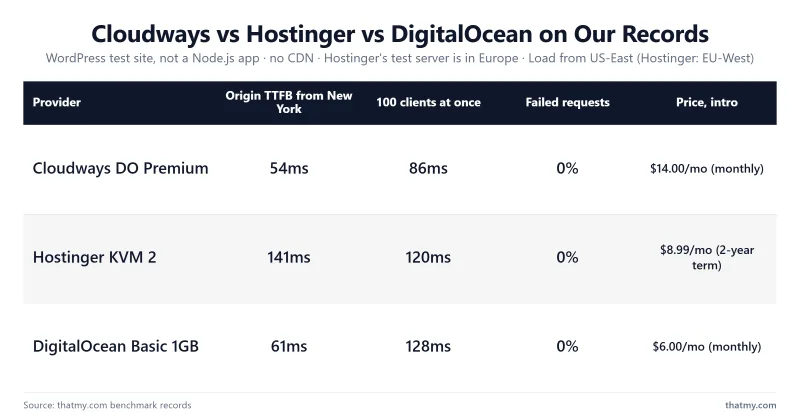
Deeper dives if you are weighing two of these directly: my Cloudways vs Hostinger and DigitalOcean vs Cloudways comparisons run the full feature-by-feature analysis.
What To Look For In Node.js Hosting
The checklist I actually run before putting a Node.js app on any host, in rough priority order. Nine items, each with the question to ask the sales page:
- 1. SSH access. Can I get a shell, and is it full root or a jailed user? Root means total control (and total responsibility); a jailed shell is fine on managed platforms as long as the platform covers what root would. No shell at all means you are trusting the platform's tooling completely; that is acceptable on Render or Vercel, alarming anywhere calling itself a VPS.
- 2. Git integration. Is deployment a push, a pull, or an FTP upload? Auto-deploy from GitHub (Hostinger, Render, Railway, Vercel, App Platform) removes the most error-prone step in small-team operations. On raw servers, settle for a one-line deploy script over SSH; never settle for dragging files.
- 3. PM2 support, or its replacement. On any self-managed server, you need permission and resources to run PM2 (trivially true with SSH). On platforms, ask what supervises the process: Render and Railway restart crashed services automatically, Hostinger's web-app runtime does the same. Somebody must be the supervisor.
- 4. Root access where you need it. Some apps need system packages (image libraries, ffmpeg, custom builds). Those need root, which rules out shared and most PaaS. Know before you buy, not after
apt-getfails. - 5. Node version control. Current LTS available, and you choose when to upgrade. A dropdown stuck on Node 16 is a red flag for the platform's whole maintenance culture.
- 6. Free SSL, automated. Let's Encrypt issuance and renewal should be invisible. Manual cert uploads in 2026 mean the host's automation budget went elsewhere.
- 7. A scaling story. What is the move when traffic doubles: a slider (Cloudways), a resize (DigitalOcean), a plan jump (Hostinger), more instances (Render)? Any answer is fine; "migrate away" is not.
- 8. Monitoring and logs. CPU/RAM graphs and accessible application logs at minimum. You cannot fix what you cannot see, and "the app feels slow" tickets age badly without graphs.
- 9. Backups you can restore. Automated, off-server, and tested. A backup that has never been restored is a hope, not a backup.
What Our Benchmark Records Say
Numbers beat adjectives, but only if they say what they measured. Our benchmark suite runs one standard test site on each plan: TTFB from 10 locations with no CDN and no cache (the table shows the New York figure, our test servers sat in New York, or in Frankfurt for Hostinger), a 60-second load ramp to 250 concurrent clients (from US-East for every plan in the table except the two Hostinger plans, which were loaded from EU-West because their servers sat in Frankfurt), and a 54-day uptime window. It is not a Node.js application test: we have no Express throughput run, no Next.js run and no WebSocket test on any host, so none is claimed on this page.
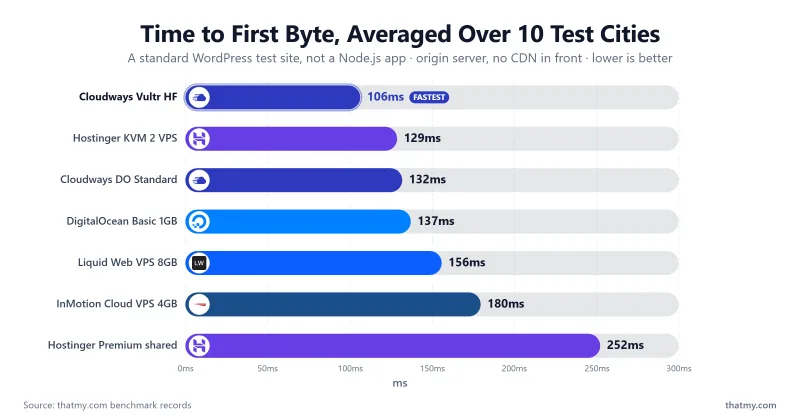
| Provider (plan tested) | Origin TTFB, New York | Average at 100 users | Error rate (load run) | Notes |
|---|---|---|---|---|
| Cloudways (Vultr HF) | 48ms | 74ms | 0% | Fastest of the plans listed here |
| Cloudways (DigitalOcean Standard) | 59ms | 98ms | 0% | 99.981% uptime over 54 days |
| DigitalOcean (Basic 1GB Droplet) | 61ms | 128ms | 0% | Raw VPS, no management layer |
| Hostinger (KVM 2 VPS) | 141ms | 120ms | 0% | Server in Frankfurt: 56ms from our Frankfurt location |
| Hostinger (Premium shared) | 276ms | 520ms | 0.8% | Server in Frankfurt: 109ms from our Frankfurt location; shared caps show under load |
| Liquid Web (managed VPS 8GB) | 70ms | 125ms | 0% | Steady under load |
| InMotion (Cloud VPS 4GB) | 80ms | 150ms | 0.4% | US-only servers: 162ms from Frankfurt |
| InterServer, Hostwinds, Hosting.com VPS, PaaS platforms | Not benchmarked for this page (Render, Vercel, Railway and Fly.io are platforms, not plans in our benchmark records). | |||
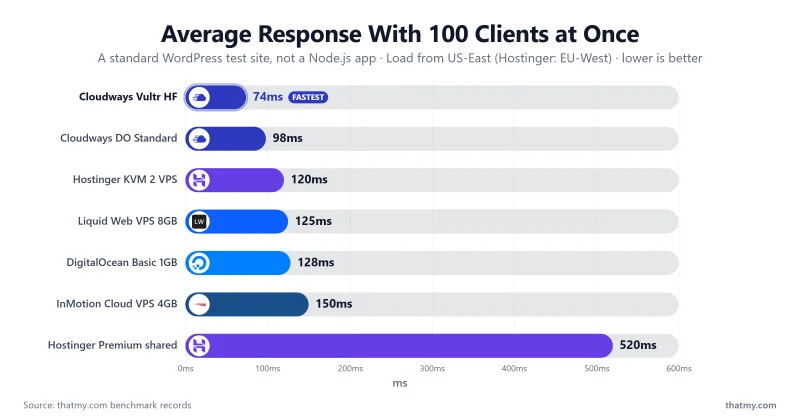
What the table does and does not show: a steady, quick server is a good base for a Node app, but the figures say nothing about event-loop behavior, WebSocket limits or how your own code scales. Free PaaS tiers that sleep when idle and shared hosting's process caps are limits you can read from each vendor's documentation; load-test your own app on a trial before you commit.
Common Node.js Hosting Mistakes
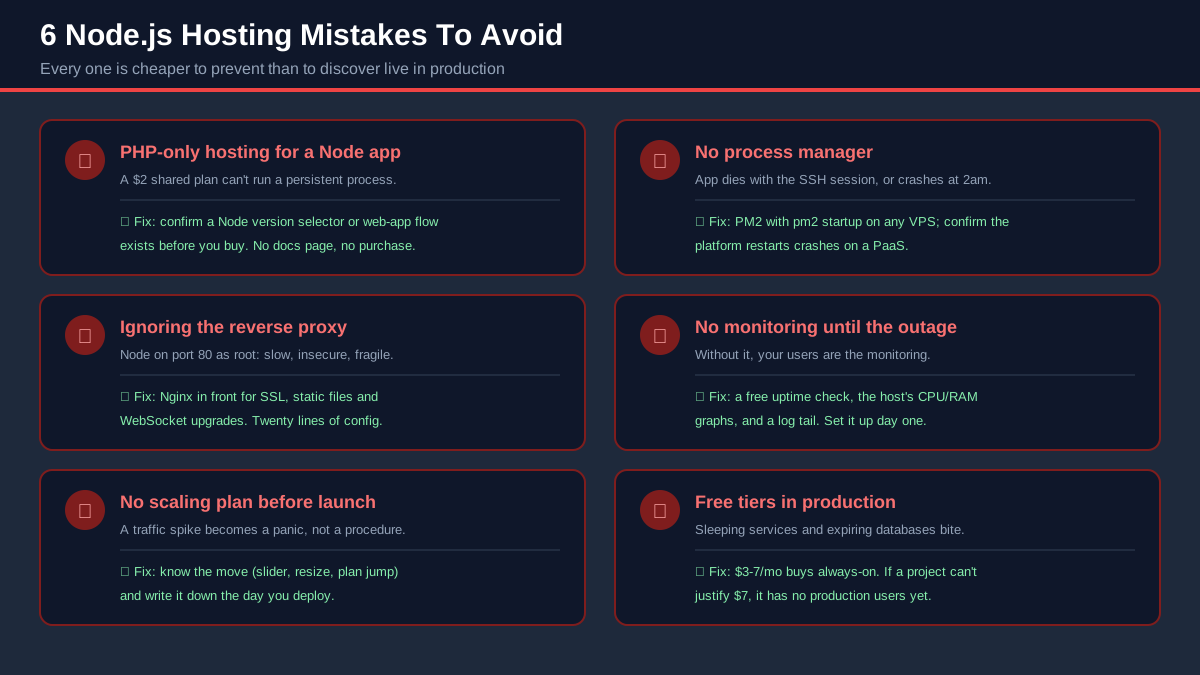
These are the mistakes that come up again and again when people move a Node.js app to hosting. They are cheap to avoid and expensive to learn live.
1. Buying PHP-Only Hosting For A Node.js App
The classic. A $2 shared plan gets bought, the app gets uploaded, and only then does the search for "how to run npm install on cPanel" begin. If the plan does not name Node.js support explicitly (a version selector, a web-app deployment flow, or SSH with persistent processes allowed), it cannot host Node, full stop. Before buying, find the host's actual documentation page for deploying Node.js; if the only result is a community forum workaround from 2019, walk away.
2. Running With No Process Manager
The app works in the SSH session, the terminal gets closed, the app dies with it. Or it runs under nohup for three weeks until an unhandled rejection kills it at 2am, and nothing restarts it until a customer emails. On any server you manage, PM2 (with pm2 startup configured so it survives reboots) is non-negotiable; on platforms, confirm the platform restarts crashed processes. "It has not crashed yet" is not a strategy, because every Node app eventually meets the exception it was not written for.
3. Ignoring The Reverse Proxy
Running Node directly on port 80 means running as root (dangerous), terminating SSL in your app (slow and fiddly), serving static files through JavaScript (wasteful), and handling malformed requests with your own code (hope you fuzz-tested). Nginx in front fixes all four in twenty lines of config, and it is where WebSocket upgrade headers and load balancing across PM2 workers live. The DigitalOcean guide below includes the exact config. On managed platforms this layer exists invisibly; on your own server, it is your job.
4. No Monitoring Until The First Outage
Without monitoring, your users are the monitoring. An external uptime check (plenty of free ones ping every minute), the host's CPU/RAM graphs, and a log tail you actually look at cover most incidents for little or no money. The expensive version of this lesson is discovering a week of downtime from a customer churn email. Set the uptime check up the same hour you deploy; it takes five minutes and it is the highest-ROI five minutes in this guide. My uptime explainer covers what the nines actually mean.
5. No Scaling Plan Before Launch
You do not need to scale on day one; you need to know what the move is, so a traffic spike is a procedure instead of a panic. On Cloudways the answer is a slider. On DigitalOcean it is a resize or another PM2 worker. On Hostinger shared it is the jump to KVM VPS. On Render it is a bigger instance. Write the answer down when you deploy. If your host's honest answer is "migrate somewhere else", you bought the wrong host, and it is cheaper to know that today.
6. Using Free Tiers For Production
Free tiers are built to be outgrown, and their limits are designed to be felt: Render's free tier sleeps when idle (the first visitor waits while it wakes), its free database expires, Vercel Hobby forbids commercial use outright, and Fly.io's free tier no longer exists. Every one of those is fine for a prototype and a betrayal of paying customers in production. The arithmetic that settles it: the cheapest always-on production hosting in this guide costs a few dollars a month. If your project cannot justify a budget monthly spend, it does not have production users yet, and when it does, it will cover lunch money. The free hosting section below covers what free tiers are actually for.
Is Shared Hosting Good For Node.js?
Honest answer: it is good for exactly one job, and most articles either oversell or dismiss it. Shared hosting with real Node.js support (Hostinger's web apps, Hosting.com's Node.js Selector) is the right call when the app is small, the budget is small, and the operator does not want to think about servers: a portfolio backend, a bot, a form handler, a club website's API. For budget rates you get a supervised process, a domain, SSL and a GUI. Nothing else on this page delivers a working Node app for less money or less knowledge.
What it cannot do is also clear-cut, and it is structural rather than a pricing trick. You share the machine, so the host caps your CPU, RAM and process count to protect the neighbors. Our Hostinger benchmark makes the ceiling visible: the Premium shared plan answered in 109ms from Frankfurt (where the server sat) and 276ms from New York, but averaged 520ms with 100 concurrent users and a 0.8% error rate, where the same company's KVM 2 VPS averaged 120ms in the same test. Caps, not incompetence: the product is working as designed.
So the ladder looks like this in practice:
- Shared with Node support (lowest cost): first apps and low-traffic services. Upgrade signal: response times climbing under normal traffic, or builds failing on memory.
- VPS (low to moderate cost): real production control and the best throughput per dollar, if you can run a Linux box (or pay InMotion/Liquid Web to help).
- Managed cloud (moderate cost): production performance with the ops handled, the default once revenue depends on the app.
- PaaS (free to usage-based): the fastest deploys at every stage, until the usage bill crosses what a server costs.
If you are weighing the bottom two rungs specifically, my shared vs VPS hosting comparison goes deeper on the architecture difference. The one-line version: shared hosting is a fine place for a Node.js app to be born and a bad place for it to grow up.
Best Cheap Node.js Hosting
"Cheap" in hosting has two failure modes: teaser pricing that triples at renewal, and prices that are low because the product cannot actually run Node. Filtering for hosts that are genuinely inexpensive AND genuinely run production Node.js leaves a short list, and the renewal column is the one to read twice:
| Host | Intro Price | What Renews At | What You Get | The Catch |
|---|---|---|---|---|
| Hostinger Premium shared | $2.99/mo | $10.99/mo | GitHub deploys, managed runtime, SSL | 48-month term for the intro rate |
| Hostinger KVM 2 VPS | $8.99/mo | $14.99/mo | 2 vCPU / 8GB RAM / full root | You manage the server; 24-month term for the intro rate |
| InterServer VPS | $3/mo (1 slice) | Billed monthly, no term discount | 1 core / 2GB RAM / SSD | You do the setup; confirm the renewal rate at checkout |
| DigitalOcean | $6.00/mo | $6.00/mo | Basic 1GB Droplet, best docs | Backups and extras add cost |
| Cloudways | $11.00/mo | $11.00/mo, flat | Fully managed cloud server | Cheapest managed, not cheapest absolute |
My read of that table: Hostinger wins the first term on price alone, and the intro rates are real if you accept the long term. InterServer and DigitalOcean are simpler to budget because they bill monthly with no multi-year teaser. And $11.00/mo Cloudways is what "cheap" looks like once your time is worth anything: the cheapest plan where the 2am problem belongs to someone else. Avoid anything cheaper than these that does not explicitly document Node.js support; saving $2 a month on a host that cannot run your app is the most expensive deal in hosting.
Best Free Node.js Hosting
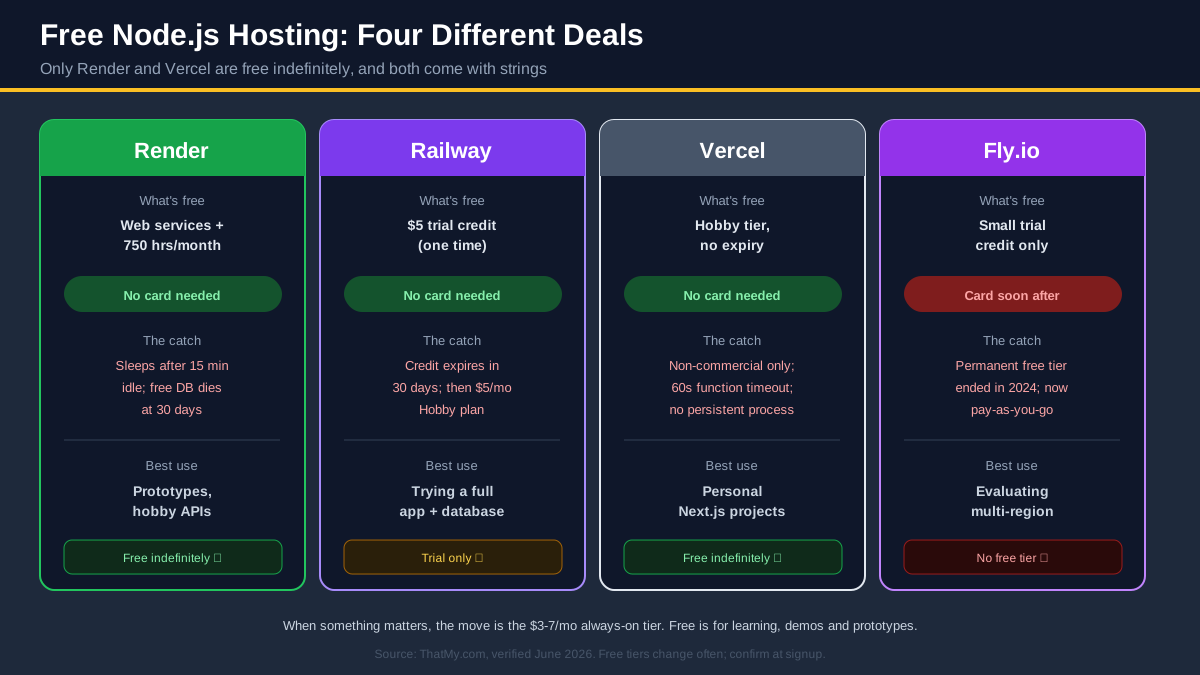
Free Node.js hosting exists, it is genuinely useful, and it is widely misunderstood, because the four platforms people mean by it offer four different deals. Here they are side by side, catches included:
| Platform | What Is Actually Free | Card Needed | The Catch | Best Use |
|---|---|---|---|---|
| Render | Web services + monthly free instance hours | No | Sleeps when idle; free Postgres expires after a set period | Prototypes, demos, hobby APIs |
| Railway | Trial credit (check the current amount) | No | Credit runs out; then a paid plan | Trying a full app + database stack |
| Vercel | Hobby tier, free indefinitely | No | Non-commercial only; function time limits; no persistent processes | Personal Next.js projects |
| Fly.io | Small trial credit only | Yes, soon after | No permanent free tier | Evaluating multi-region deploys |
The pattern across the industry is one-directional: free tiers keep shrinking (Heroku ended free dynos, Fly.io followed, Railway moved from monthly free usage to a one-time credit). Treat any free tier as a courtesy that can be withdrawn, not infrastructure to build a business on.
What free tiers are for, used well: learning a platform before recommending it, demos for a client call, hackathon projects, a staging copy of a small app, and APIs whose consumers genuinely do not mind a one-minute cold start (a personal dashboard, a cron-triggered report). Used badly, the failure is always the same story: the sleeping service drops the customer's first request, or the expiring database takes real data with it. The moment something matters, the move is the cheap tier above: a few dollars a month buys always-on. For the bigger picture on free infrastructure, including the cloud giants' credit programs, see my free cloud hosting guide and the wider free web hosting roundup.
How To Deploy A Node.js Application (On Each Top Pick)
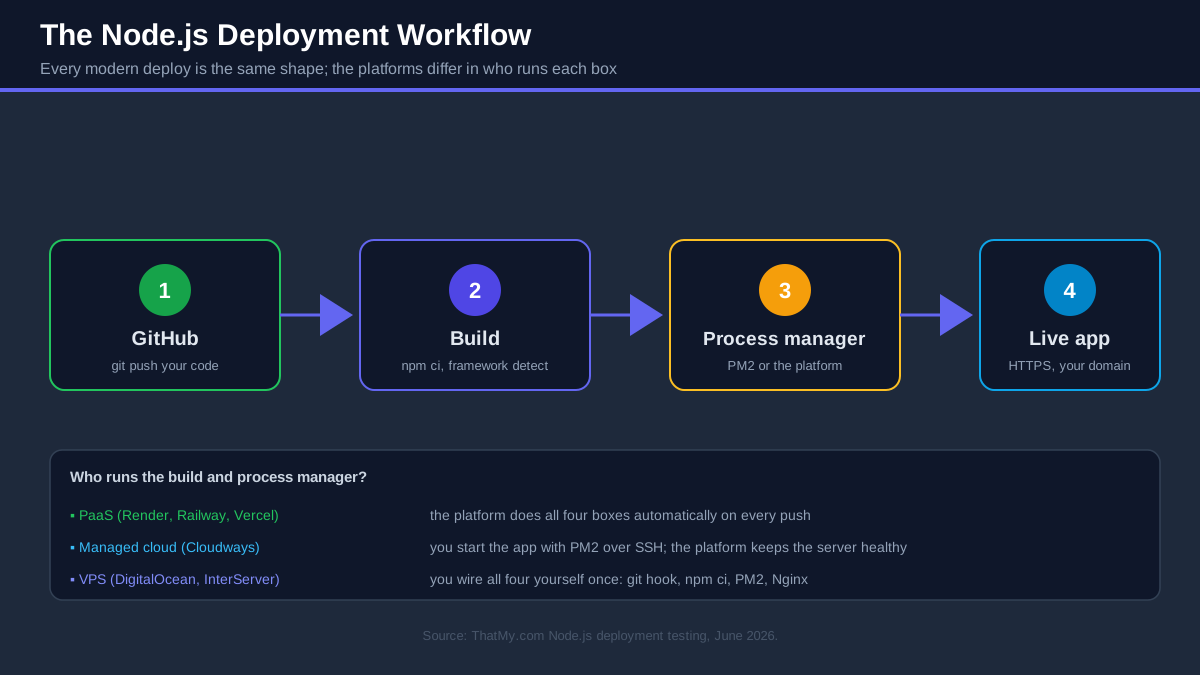
Four deployment paths for a small Express app, as each platform documents them (we have not timed them), so you can judge the workflows before you commit to any of them.
Deploy On Hostinger (GUI)
- Push your app to a GitHub repository. Make sure
package.jsonhas a workingstartscript, because that is what the platform will run. - In hPanel: Websites → Add website → Web app (Node.js).
- Authorize GitHub and select the repository and branch.
- Confirm the detected build and start commands (override if your project is unusual).
- Add your environment variables in the panel (database URL, API keys).
- Deploy. Attach your domain, and SSL issues automatically. Every future push to the branch redeploys on its own.
Deploy On Cloudways (Managed Server)
- Start the 3-day trial (no card), apply code CLOUDS2022 for free credit, and launch a server: DigitalOcean 1GB in the region nearest your users is the standard first pick.
- When the server is live (a few minutes), grab the SSH credentials from the dashboard and connect.
- Install your Node version with nvm and PM2 globally:
nvm install 20 && npm install -g pm2. - Clone your repository, install dependencies, set the environment variables in the application settings panel, and start the app:
pm2 start app.js -i max. - Point your domain at the server, enable the free SSL from the dashboard, and schedule the automated backups (do this on day one, not after the first scare).
- Future deploys are a
git pull && pm2 reload allover SSH, or wire the same two commands into a GitHub Action.
Deploy On DigitalOcean (Raw VPS)
The full self-managed path, and the skills transfer to InterServer, Hostwinds, Hostinger KVM or any Linux server. Create an Ubuntu LTS Droplet ($6.00/mo for 1GB), SSH in as root, create a deploy user, then:
Step 1: Node via nvm (never apt-get install nodejs; the distro version is always stale):
curl -o- https://raw.githubusercontent.com/nvm-sh/nvm/v0.40.1/install.sh | bash
source ~/.bashrc
nvm install 20 && nvm alias default 20
Step 2: PM2 in cluster mode (one worker per vCPU, restart on crash, survive reboots):
npm install -g pm2
pm2 start app.js -i max --name my-api
pm2 save
pm2 startup   # run the command it prints, once
Step 3: Nginx as the reverse proxy (apt install nginx, then this server block, which includes the WebSocket upgrade headers most tutorials forget):
server {
    listen 80;
    server_name yourdomain.com;
    location / {
        proxy_pass http://localhost:3000;
        proxy_http_version 1.1;
        proxy_set_header Upgrade $http_upgrade;
        proxy_set_header Connection 'upgrade';
        proxy_set_header Host $host;
        proxy_set_header X-Real-IP $remote_addr;
    }
}
Step 4: SSL with Certbot (apt install certbot python3-certbot-nginx && certbot --nginx; renewal is automatic). From here, deploys are git pull && npm ci && pm2 reload my-api, and that one-liner belongs in a script or a GitHub Action so every deploy is identical.
Deploy On Render (Git Push)
- Sign in with GitHub and create a New Web Service from your repository.
- Render detects Node; confirm the build command (
npm ci) and start command (npm start). - Pick free (prototype) or an always-on starter instance (budget rate), add environment variables, and create the service.
- The first build runs and your app is live on an
.onrender.comURL with SSL; add a custom domain in settings. Every push redeploys automatically.
Node.js Hosting FAQ
What is the best Node.js hosting?
It depends on how much server work you want to do. Hostinger is the best overall pick: its Business and Cloud plans deploy a Node.js app straight from GitHub with automatic framework detection, and its KVM 1 VPS starts at $5.99/mo if you want full control. Cloudways is the best managed cloud (your app runs on DigitalOcean or Vultr infrastructure while the platform handles the server), and DigitalOcean is the best raw VPS for developers who are comfortable with PM2 and Nginx.
Can Node.js run on shared hosting?
Only on shared hosting that explicitly supports it. Traditional PHP-only shared hosting cannot keep a long-running Node.js process alive. Hosts like Hostinger (web apps hosting on Business and Cloud plans) and Hosting.com (cPanel Node.js Selector) run real Node.js applications on shared infrastructure. Expect resource caps: these plans suit small apps, portfolio projects and low-traffic APIs, not production SaaS workloads.
Is VPS required for Node.js?
No. What Node.js requires is a persistent process, and you can get that three ways: a VPS you manage yourself, a managed cloud platform like Cloudways, or a PaaS like Render that runs the process for you. A VPS gives you the most control per dollar (DigitalOcean from $6.00/mo, InterServer from $6.00/mo for two slices), but beginners often ship faster on a platform that hides the server entirely.
Is Cloudways good for Node.js?
Yes, and it is my pick for businesses and agencies. Cloudways gives you managed servers on DigitalOcean, Vultr, Linode, AWS or Google Cloud: provisioning, firewalls, SSL, backups and monitoring are handled from one dashboard, and our Cloudways Vultr High Frequency test server answered in 48ms (origin TTFB, no CDN, measured from New York). You keep SSH access for your Node.js runtime and process manager, so you get cloud performance without doing the sysadmin work alone. Code CLOUDS2022 adds free credit.
Is Hostinger good for Node.js?
Yes. Hostinger now treats Node.js as a first-class citizen: connect a GitHub repository and it auto-detects your framework, builds, and deploys with SSL on its Business and Cloud plans, no YAML configuration needed. If you outgrow that, the KVM 2 VPS ($8.99/mo for 2 vCPU and 8GB RAM, renewing at $14.99/mo) is a low-cost Node.js server for its RAM. That price-to-RAM ratio is why it is my best overall pick for 2026.
Is Render free for Node.js?
Render has a free tier for Node.js web services, with two big catches as Render documents them (we did not re-read its pricing page, so confirm the figures there): free services spin down after 15 minutes without traffic (the next visitor waits up to a minute while it wakes), and you get 750 free instance hours per month. The free PostgreSQL database also expires after 30 days. It is excellent for demos, hobby projects and testing; paid instances start a budget rate when you need an always-on app.
Is DigitalOcean good for Node.js?
DigitalOcean is the developer standard for Node.js VPS hosting. A $6.00/mo Basic Droplet (1 vCPU, 1GB RAM) can run a small production Express API once you set up PM2 and Nginx, the App Platform PaaS deploys from GitHub if you want zero server work, and DigitalOcean's Node.js tutorials are the best in the industry. It has offered new-account credit in the past; check the current offer on its site.
What is the best hosting for Next.js?
Vercel makes Next.js, so its zero-config deployment, edge network and preview URLs are the gold standard (the Hobby tier is free for personal projects). For a commercial Next.js site on a budget, Hostinger deploys Next.js from GitHub on plans from budget rates, and a Cloudways server handles SSR apps that need a persistent backend, custom cron jobs or a database on the same machine.
What is the best hosting for Express.js?
Render is the easiest home for an Express API: push to GitHub, it builds and deploys with SSL automatically, and the free tier is enough to prototype. Once the API matters or traffic grows, a DigitalOcean Droplet with PM2 in cluster mode gives you far more throughput per dollar, and Cloudways gets you close to that performance without managing the server alone.
Which Node.js host supports SSH?
All the serious ones. DigitalOcean, InterServer, Hostwinds, InMotion and Liquid Web give you full root SSH on VPS plans. Cloudways provides SSH and SFTP access to every managed server. Hostinger includes SSH on its hosting plans and full root on its KVM VPS. The platforms that do not expose SSH (Render, Vercel, Railway) replace it with Git-based deploys and web shells, which is the trade you make for zero server management.
Which Node.js host supports PM2?
PM2 runs anywhere you control the process: DigitalOcean Droplets, InterServer, Hostwinds, InMotion and Liquid Web VPS plans, Hostinger KVM VPS, and Cloudways servers all run PM2 in cluster mode happily. On PaaS platforms (Render, Railway, Vercel, DigitalOcean App Platform) you do not need PM2 at all: the platform supervises and restarts your process itself, which is half the reason those platforms exist.
Is Node.js hosting expensive?
No, it got cheap. Real Node.js hosting starts at $2.99/mo (Hostinger Premium shared with GitHub deploys, on a 48-month term), a credible VPS is $6.00/mo (DigitalOcean), and a managed cloud server is about $11 a month (Cloudways DigitalOcean 1GB). The expensive mistake is the other direction: free tiers pressed into production duty, or serverless platforms billing per-invocation once traffic spikes. Budget a moderate monthly spend for a production app and you are covered.
Can I host Node.js on Cloudways?
Yes. Launch a server on your preferred cloud (DigitalOcean is the usual pick), and you get a managed Linux machine with SSH access where you install your Node.js version and run your app with PM2. Cloudways handles the firewall, SSL, backups, monitoring and vertical scaling from the dashboard. The 3-day trial needs no credit card, so you can deploy a real app before paying anything.
Can I deploy Node.js from GitHub?
On most modern hosts, yes. Hostinger connects your GitHub account and auto-deploys on push (Business and Cloud plans). Render, Railway and Vercel are built entirely around Git deploys. DigitalOcean App Platform watches a branch and redeploys on every commit. On a raw VPS or a Cloudways server you wire it yourself with a git pull hook or a GitHub Action over SSH, which is a one-off setup job.
Which Node.js host is best for beginners?
Hostinger. The GitHub-connect deployment flow means you never see a terminal: pick the repo, it detects the framework, builds and serves it with SSL. Render is the runner-up for beginners who live in Git anyway, and Cloudways is the gentlest step up when you need a real server but do not want to be the sysadmin. I would not start on a raw VPS unless learning Linux is part of the goal.
My Final Picks For 2026
After separating the four hosting models and comparing the providers inside them, the picture is not "one best host", it is a short list of right answers to different questions. Here is where I land:
My Node.js hosting winners for 2026
- 🏆 Best overall: Hostinger: GitHub deploys from $2.99/mo, the $8.99/mo KVM 2 VPS as the growth path.
- 🏆 Best managed cloud: Cloudways: real cloud servers, ops handled, 48ms origin TTFB from New York on our test, free credit with CLOUDS2022.
- 🏆 Best VPS: DigitalOcean: $6.00/mo Droplets, the best docs, strong control per dollar.
- 🏆 Best PaaS: Render: Git push to production, free to prototype, budget always-on.
- 🏆 Best for Next.js: Vercel: the framework's home ground, free for personal projects.
- 🏆 Best cheap option: InterServer: 2GB RAM slices billed monthly from $3.
If you remember one thing from this guide: pick the model first, then the provider. A beginner on a raw Droplet and a funded SaaS on a sleeping free tier are both miserable for the same reason, good provider, wrong model. Match the model to your skills and stakes, and every recommendation above follows.
And if you want my shortest possible advice: a beginner or budget project should start on Hostinger and grow into its VPS; anything with real users or revenue belongs on Cloudways, tested through the free trial before a dollar is spent.
Start Cloudways Free, Code: CLOUDS2022 (free credit) ➦
Deploy Node.js On Hostinger From $2.99/mo ➦