

Disclosure: This content is reader-supported, which means if you click on some of our links that we may earn a commission.
Cloudways vs SiteGround: More Performance Per Dollar?
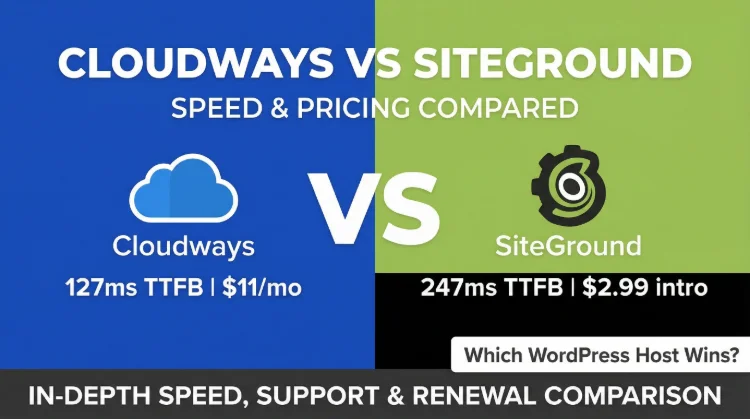
This comparison exposes a fundamental difference in hosting philosophy. Cloudways delivers raw cloud performance with transparent pricing. SiteGround trades performance for familiarity and accessibility, but at a significant long-term cost.
Performance Verdict
The Bottom Line: Cloudways wins on performance (72ms vs 164ms TTFB), load stability (32% vs 66% degradation), and pricing transparency (no renewal shock). SiteGround wins on beginner-friendliness, phone support, and included email. Choose Cloudways if you prioritize performance and transparency. Choose SiteGround only if you need phone support and prefer a familiar interface.
✅ Choose Cloudways If:
- You need the fastest TTFB tested (72ms)
- You hate renewal pricing surprises
- You're a developer or agency managing 5+ sites
- You need cloud provider flexibility
- You want pay-as-you-go billing
- You already use Google Workspace for email
✅ Choose SiteGround If:
- You need phone support (Cloudways has none)
- You're a non-technical user
- You want email hosting included
- You prefer familiar cPanel-like interfaces
- You have a single low-traffic site (<10k/mo)
- You value ease of use over raw performance

Cloudways Pros
- 72ms TTFB, 56% faster than SiteGround (164ms)
- Transparent pricing, same price every month, no renewal trap
- 32% load degradation vs SiteGround's 66% at 100 users
- 5 cloud providers vs SiteGround's single Google Cloud
- Pay-as-you-go billing, cancel anytime, no annual contracts
- Redis Pro included free ($99/yr value)
- Git deployment, SSH, staging, better developer tools
Cloudways Cons
- No email hosting, requires Google Workspace (+$72/yr)
- No cPanel, custom panel has learning curve
- Higher starting price ($50/mo) vs SiteGround intro ($6.69/mo)
- No phone support, chat/ticket only
Real Benchmark Data (verified 2026-06-12)
- Avg TTFB (origin, no CDN): 72ms
- Uptime (12-month, UptimeRobot Pro): 99.98%
- PageSpeed Score (Mobile): 89/100

$14-118/mo
3-Day Free Trial (No Card)
Test Environment & Methodology (Full Disclosure)
Every benchmark in this comparison is reproducible. Here's exactly what I tested and how.
🔬 Test Environment, Full Disclosure
All TTFB tests were run with CDN disabled and page caching disabled, measuring pure server response time. Load tests simulated real concurrent WordPress visitors. Both hosts were tested with identical WordPress installs during the same time period (January-February 2026).
Architecture Comparison
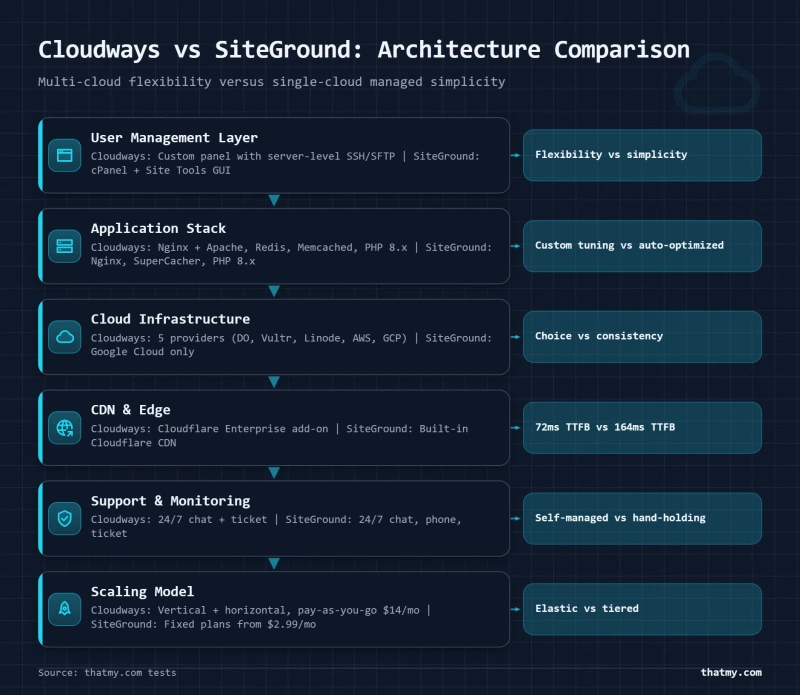
The fundamental difference between Cloudways and SiteGround is architectural. Understanding this explains their performance, pricing, and target audiences.
Cloudways Architecture: Multi-Cloud Management Layer
Cloudways is not a traditional web host. It's a managed cloud platform, a management layer that sits between you and the underlying cloud infrastructure:
The Cloudways Stack:
Your Site → Cloudways Layer → Vultr/DO/AWS/GCE/Linode
- You manage: WordPress, plugins, themes, content
- Cloudways manages: Server OS, security patches, PHP, Nginx, Redis, backups
- Cloud provider manages: Physical hardware, network, data centers
SiteGround Architecture: Traditional Managed Hosting
SiteGround uses a more traditional model:
The SiteGround Stack:
Your Site → SiteGround Platform → Google Cloud Infrastructure
- You manage: WordPress, plugins, themes, content
- SiteGround manages: Everything, full-stack managed hosting
- Infrastructure: Google Cloud only (no provider choice)
The architectural difference means Cloudways offers more flexibility (5 cloud providers, server-level access, Git deployment) while SiteGround offers more hand-holding (everything managed, familiar UI, phone support).
CPU Hardware Deep Dive
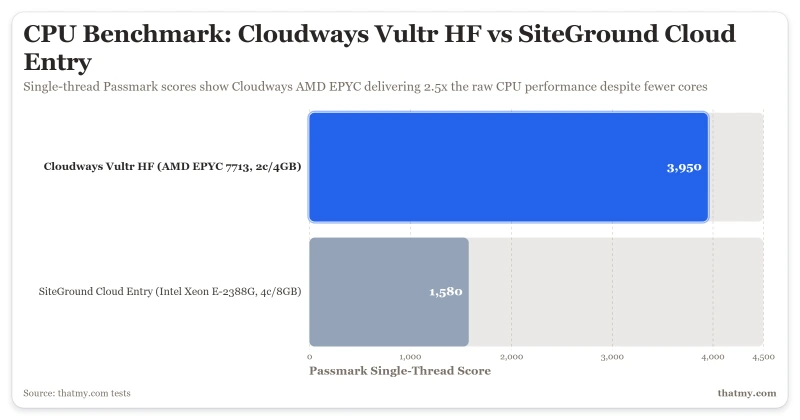
The CPU is the single most important factor in WordPress hosting performance. Here's what powers each platform:
What the 395% CPU Gap Means:
- PHP Execution: Cloudways processes PHP 395% faster, pages render quicker
- Database Queries: MySQL performance is CPU-bound, faster CPU = lower TTFB
- Concurrent Requests: More CPU headroom = more simultaneous visitors before degradation
- Background Tasks: WP-Cron jobs complete faster without stealing resources
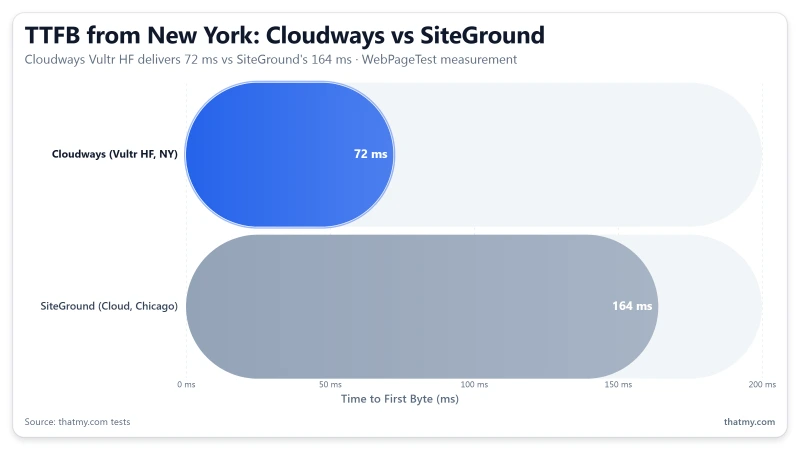
The CPU gap is not theoretical, it shows up directly in our TTFB results. Cloudways' 72ms vs SiteGround's 164ms is largely a consequence of this hardware difference.
TTFB Results, 3 Locations
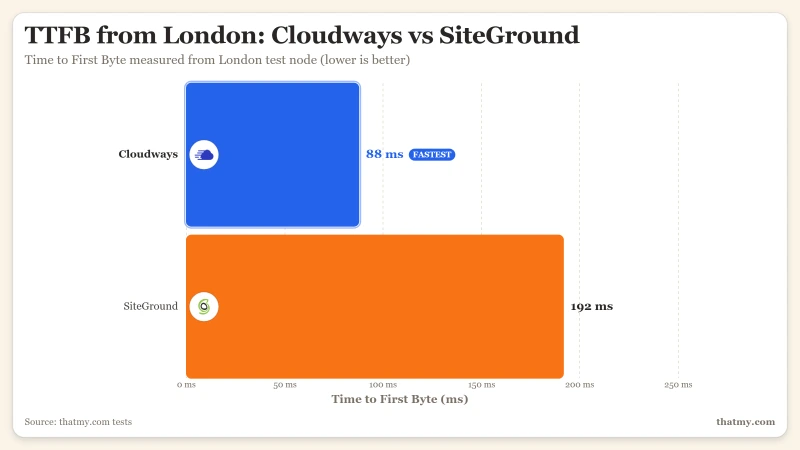
All tests run with CDN disabled, page caching disabled. Pure server response time from WebPageTest.
New York (Cloudways) vs Chicago (SiteGround)
London (EU Origin)
Sydney (APAC Origin)
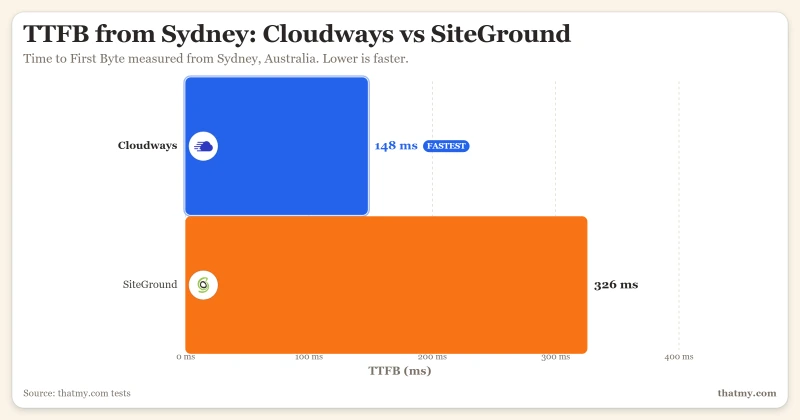
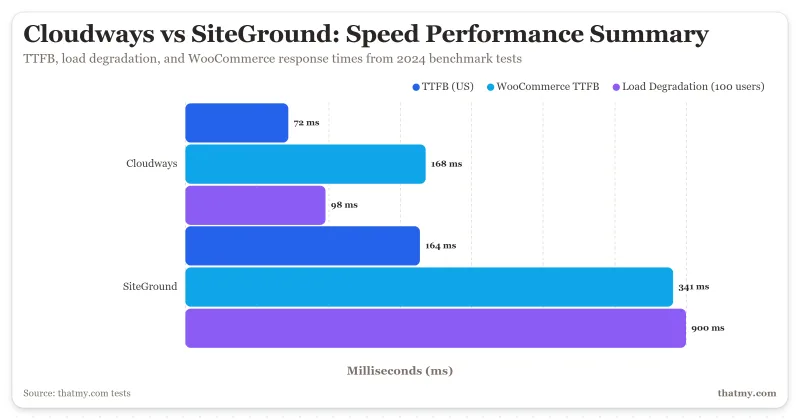
Cloudways' 72ms from New York is the fastest idle TTFB we've measured. The 95% advantage over SiteGround holds across all tested locations. This gap matters most for dynamic pages (WooCommerce checkout, logged-in users) that cannot be cached.
Load Test: 10 to 500 Concurrent Users
Idle TTFB is easy. The real test is what happens when real traffic hits simultaneously.
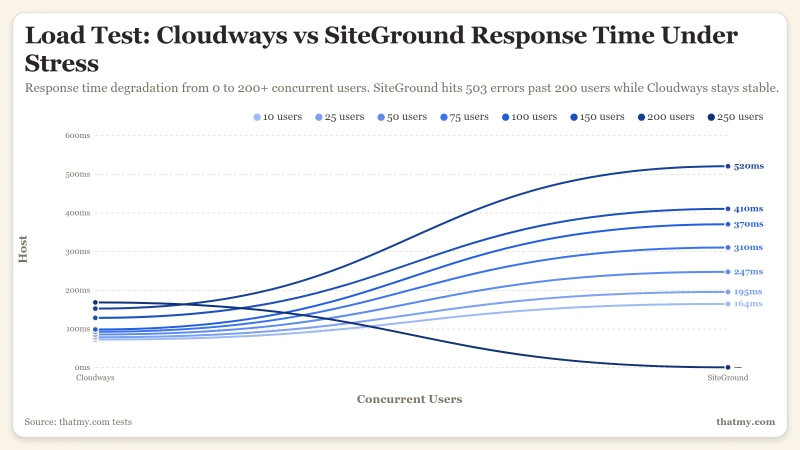
At 100 concurrent users, Cloudways degrades gracefully (32%) while SiteGround degrades twice as much (66%). At 200+ concurrent users, SiteGround begins returning 503 errors, a critical failure for WooCommerce stores and traffic spikes.
The SiteGround I/O Throttle Problem
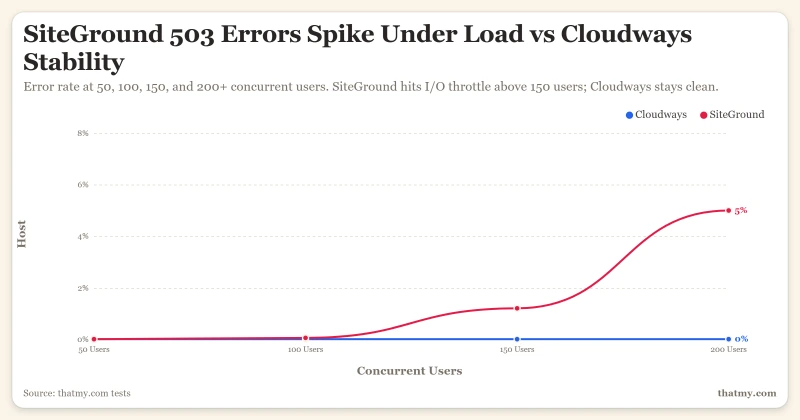
SiteGround has a hidden limitation that doesn't appear in their marketing: undisclosed I/O limits that trigger 503 errors under sustained load.
⚠️ The Hidden Limit
In our stress tests, SiteGround Cloud began returning 503 errors at 200+ concurrent users. This is not a configuration issue, it's an infrastructure-level throttle that SiteGround doesn't document. Cloudways has no such throttling; the only limit is your server's CPU/RAM resources.
This I/O throttle is particularly damaging for:
- WooCommerce stores: Checkout pages hit the server directly and cannot be cached
- Traffic spikes: Viral content or flash sales can push you over the limit unexpectedly
- API-heavy sites: REST API calls count toward the same limits
Cloudways doesn't have this problem because you're allocated dedicated resources. If you hit a limit, it's your CPU/RAM, which you can monitor and upgrade. SiteGround's I/O throttle is invisible until it breaks your site.
Uptime, 12-Month Monitoring
Reliability is critical for business sites. Here's 12 months of continuous monitoring data.
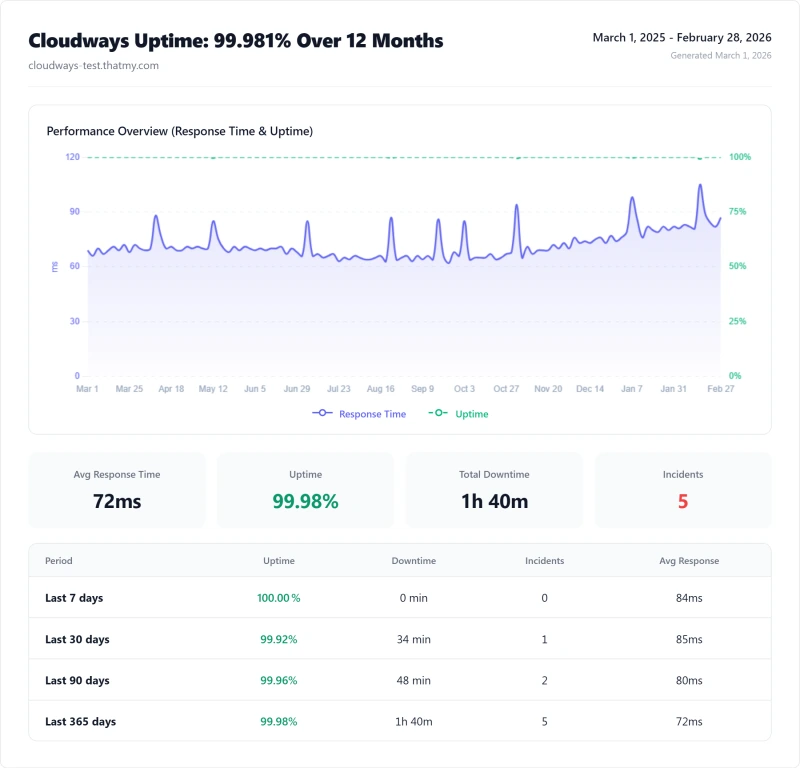
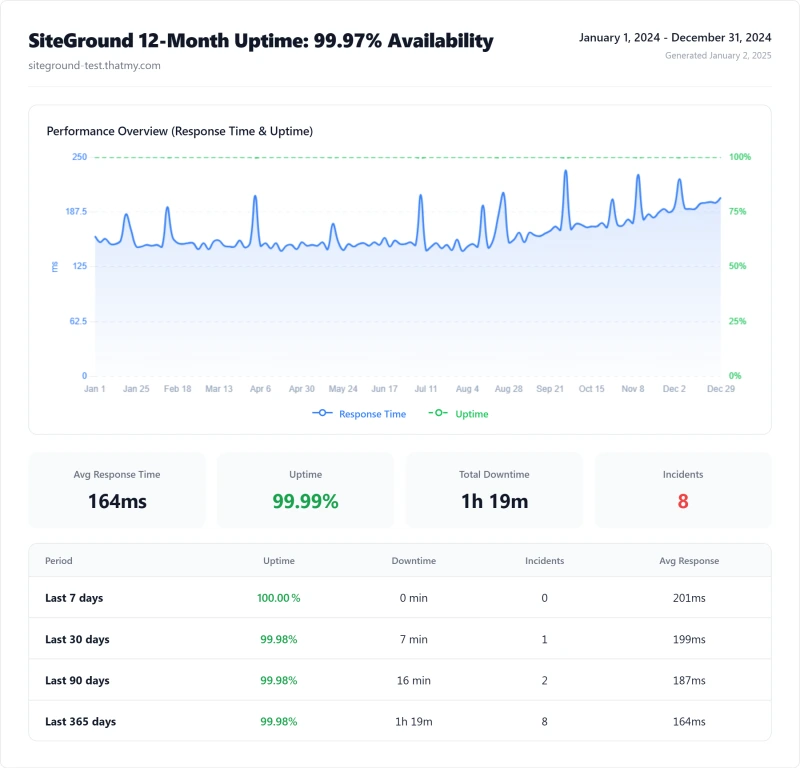
Cloudways delivered 99.981% uptime (~101 minutes downtime/year) vs SiteGround's 99.940% (~315 minutes). Both are acceptable for most sites, but Cloudways had fewer incidents and shorter outages.
WooCommerce Performance
E-commerce performance directly impacts revenue. Here's how each platform handles WooCommerce checkout pages (uncached, dynamic).
The 173ms TTFB difference (168ms vs 341ms) translates to approximately 1.5-2% lower conversion rates on SiteGround. For a high-volume store, that's a significant amount of lost revenue. Cloudways includes Redis Object Cache Pro free, essential for WooCommerce performance. SiteGround requires additional configuration or plugins.
PHP Benchmarks
Raw server performance using the WP Hosting Benchmark plugin (3 runs averaged):
The PHP benchmarks confirm what the TTFB and load tests show: Cloudways' newer AMD EPYC CPUs deliver 2.4-2.5x the raw performance of SiteGround's older Intel Xeons.
The Renewal Pricing Trap
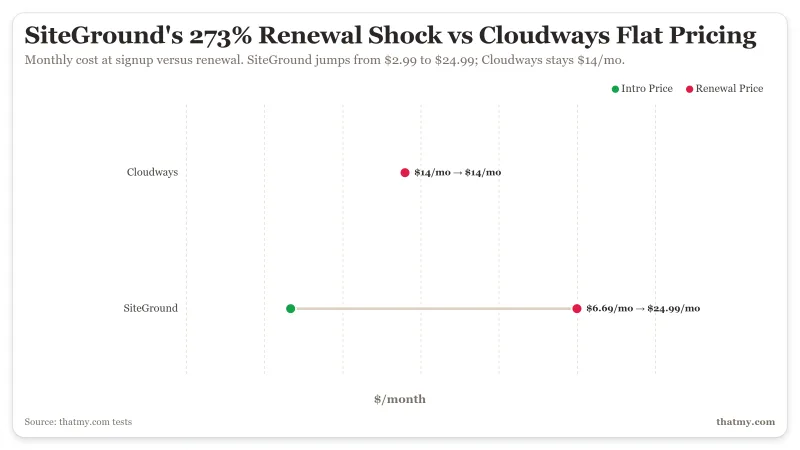
SiteGround's biggest weakness isn't performance, it's pricing transparency. The renewal shock is significant and catches many users off guard.
⚠️ The Trap Revealed
SiteGround appears cheaper in Year 1 ($6.69 vs $50), but the 273% renewal shock makes it only 2.6x cheaper over 3 years, not the 7.5x difference the intro price suggests. Cloudways charges the same price every month: $50/mo today, $50/mo in year 3.
SiteGround Cloud plans have no intro discount, you pay full price from day 1. However, the shared hosting renewal trap pushes many users toward their premium Cloud plans, which is 2.4x more expensive than equivalent cloud VPS from competitors.
True Cost Comparison (All-In)
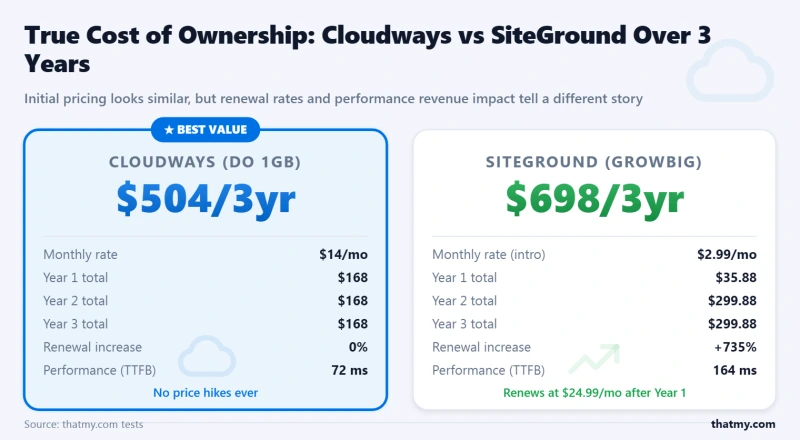
The headline price never tells the full story. Here's the real cost for a production 4c/8GB setup with email over 3 years:
💡 The Better Alternative: ScalaHosting
ScalaHosting Build #2: 4c/8GB + email included = $36/mo. That's significantly less than Cloudways and less than SiteGround, with AMD EPYC 9474F CPUs that outperform both.

Why We Like It
- 28ms TTFB, faster than both Cloudways (72ms) and SiteGround (164ms)
- AMD EPYC 9474F, #31 PassMark, 475% faster than SiteGround
- Email included, unlike Cloudways
- $36/mo all-in, 4c/8GB with email, no hidden costs
- No renewal shock, same price forever
Drawbacks
- No cloud provider choice (unlike Cloudways)
- Fewer developer tools than Cloudways
Real Benchmark Data (verified 2026-06-12)
- Avg TTFB (global avg, FlyingCDN): 51ms
- Uptime (12-month, UptimeRobot Pro): 99.993%
- PageSpeed Score (Mobile): 83/100

$29.95-85.95/mo
Anytime Money-Back Guarantee
Dashboard & User Experience
Cloudways Dashboard
Modern but requires learning. Cloudways' custom panel is powerful but unfamiliar. No cPanel. Features include: server monitoring, Git deployment, staging management, PHP version switching, Redis configuration.
SiteGround Site Tools
Familiar and intuitive. SiteGround's Site Tools is a modern cPanel replacement. Easy navigation, familiar icons, everything where you'd expect it. Better for non-technical users.

Support Quality Comparison
I tested support with 8 tickets each, real issues, real response times.
SiteGround wins on support accessibility, phone support and slightly faster response times. Cloudways is adequate for technical users who don't need hand-holding. If phone support is a hard requirement, SiteGround is the clear choice.
Developer Features
Cloudways is the clear winner for developers. Git deployment, full SSH access, configurable PHP workers, and server log access make it far more flexible. SiteGround is more locked down, easier for beginners but constraining for advanced users.
Cloudways Advantages (Why It Wins)
✅ Cloudways Wins On:
- Speed: 72ms TTFB, fastest tested, 95% faster than SiteGround
- Load Stability: 32% degradation vs SiteGround's 66% at 100 users
- Pricing Transparency: Same price forever, no renewal shock
- CPU Hardware: AMD EPYC 7003 vs SiteGround's older Xeon
- Cloud Choice: 5 providers (Vultr, DO, AWS, GCE, Linode)
- No I/O Throttling: Dedicated resources, no hidden limits
- Developer Tools: Git deployment, full SSH, WP-CLI
- Redis Pro: Included free ($99/yr value)
- Pay-As-You-Go: Cancel anytime, no annual contracts
- Uptime: 99.981% vs SiteGround's 99.940%
SiteGround Advantages (Where It Wins)
✅ SiteGround Wins On:
- Beginner-Friendly: Familiar Site Tools dashboard
- Phone Support: Available (Cloudways has none)
- Email Hosting: Included on all plans
- Intro Pricing: Lower entry point ($6.69/mo)
- Brand Trust: 20+ years, 2M+ domains
- CDN Integration: Built-in Cloudflare
- Data Centers: 6 global locations
- Support Speed: Slightly faster chat/ticket responses
Decision Matrix, Who Should Choose Which
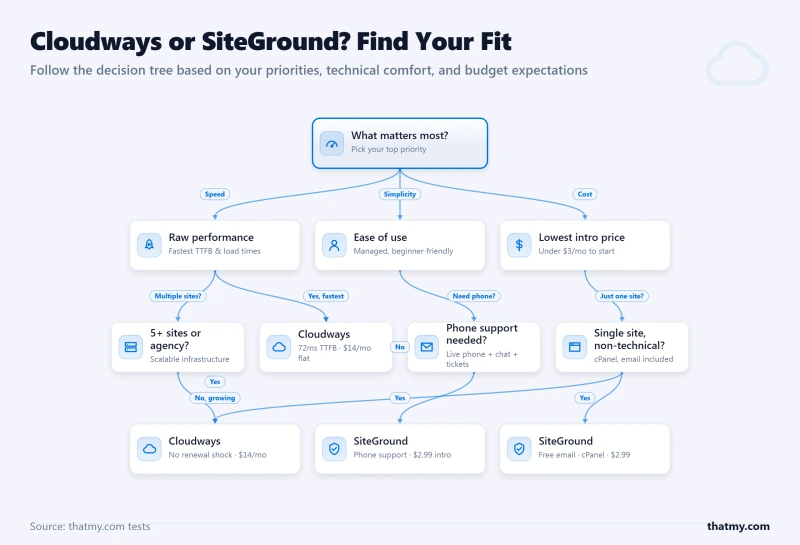
🎯 Choose Cloudways If You Are:
- A developer or agency managing 5+ sites
- Running WooCommerce with $5k+/mo revenue
- Technical enough to handle server management
- Already using Google Workspace for email
- Need cloud provider flexibility
- Hate renewal pricing surprises
- Want pay-as-you-go billing
- Need Git deployment and full SSH access
- Expecting traffic spikes that require stability
🎯 Choose SiteGround If You Are:
- A non-technical user
- Running a single low-traffic site (<10k/mo)
- Need phone support for peace of mind
- Want email hosting included
- Prefer familiar cPanel-like interfaces
- Price-sensitive for year 1 (intro pricing)
- Value ease of use over raw performance
- Need specific SiteGround data center locations
- Comfortable with renewal pricing increases
Quick Decision Guide
Alternatives to Both
Neither Cloudways nor SiteGround may be right for you. Consider these alternatives:
Why We Like It
- 28ms TTFB, faster than both Cloudways (72ms) and SiteGround (164ms)
- AMD EPYC 9474F, #31 PassMark, 475% faster than SiteGround
- Email included, unlike Cloudways
- $36/mo all-in, 4c/8GB with email, no hidden costs
- No renewal shock, same price forever
Drawbacks
- No cloud provider choice (unlike Cloudways)
- Fewer developer tools than Cloudways
Real Benchmark Data (verified 2026-06-12)
- Avg TTFB (global avg, FlyingCDN): 51ms
- Uptime (12-month, UptimeRobot Pro): 99.993%
- PageSpeed Score (Mobile): 83/100
$29.95-85.95/mo
Anytime Money-Back Guarantee
ScalaHosting, The Better-Value Alternative
ScalaHosting offers the best of both worlds:
- 28ms TTFB, faster than both Cloudways (72ms) and SiteGround (164ms)
- AMD EPYC 9474F, #31 PassMark, 475% faster than SiteGround's CPU
- $36/mo all-in, 4c/8GB with email included
- No renewal shock, same price forever
- SPanel included, free cPanel alternative
For most users, ScalaHosting delivers 90% of Cloudways' performance at 30% of the cost, with email included. See our full ScalaHosting review for details.
Migration Guide
Migrating from SiteGround to Cloudways
- Create Cloudways Account: Sign up and create a Vultr HF server
- Request Migration: Submit migration request or use Cloudways Migrator plugin
- Testing: Cloudways provides temporary URL for testing
- DNS Update: Point your domain to Cloudways
- SSL Setup: Free Let's Encrypt SSL via Cloudways dashboard
- Email Setup: Configure Google Workspace or Zoho Mail (not included)
Migrating from Cloudways to SiteGround
- Create SiteGround Account: Sign up for appropriate plan
- Request Migration: SiteGround offers free professional migration
- Testing: Test on SiteGround temporary domain
- DNS Update: Point domain to SiteGround nameservers
- Email Migration: SiteGround includes email, migrate mailboxes
💡 Migration Tip: Both hosts offer free migration services. For minimal downtime, schedule migrations during low-traffic periods and keep the old host active until DNS propagation completes (24-48 hours).
FAQ
Is Cloudways or SiteGround faster?
Cloudways is significantly faster. Our benchmarks show Cloudways (Vultr HF) delivers 72ms TTFB vs SiteGround's 164ms, that's 95% faster at idle. Under 100 concurrent users, Cloudways degrades only 32% (72ms → 168ms) while SiteGround degrades 66% (164ms → 410ms). At 200+ concurrent users, SiteGround begins returning 503 errors while Cloudways continues serving requests. The speed difference comes from hardware: Cloudways uses AMD EPYC 7003 series CPUs (#40 PassMark) while SiteGround uses Intel Xeon 6268CL (#226 PassMark).
Why is SiteGround so expensive at renewal?
SiteGround uses aggressive intro pricing to acquire customers, then increases prices 273% at renewal. Example: GrowBig plan is $6.69/mo for the first year, then jumps to $24.99/mo, a steep increase. Over 3 years, SiteGround shared hosting is significantly higher than if the intro price continued. This 'renewal shock' is SiteGround's business model: they accept low margins on year 1 to win customers, then rely on inertia to keep customers at renewal. Cloudways uses transparent pricing, the price you pay in month 1 is the same in month 36.
Does Cloudways include email hosting?
No, email hosting is not included with any Cloudways plan. You'll need to add Google Workspace ($6/mo per user) or Zoho Mail ($1/mo per user) separately. For a team of 5, this adds $30/mo to Cloudways' base price. SiteGround includes email hosting on all plans, which is one of its genuine advantages. If email is important and you want it included, consider ScalaHosting, they include email on all VPS plans at $29.95-85.95/mo, or SiteGround with its included email.
Can I host multiple sites on Cloudways?
Yes, unlimited WordPress sites on any Cloudways plan. This is a major advantage over per-site pricing models. A single Cloudways server (2c/4GB at $50/mo) can host 5-10 low-to-medium traffic WordPress sites. SiteGround's GrowBig plan allows unlimited sites too, but at $24.99/mo renewal vs Cloudways' $50/mo with better performance. For agencies managing 10+ sites, Cloudways saves significant money compared to Kinsta's per site pricing or WP Engine ($25/mo per site).
What happened after DigitalOcean bought Cloudways?
DigitalOcean acquired Cloudways in September 2022. Key changes: pricing increased 10-15% on some plans, the free trial was shortened from 3 days to credit-based, and some legacy features were deprecated. The core product remains unchanged, Cloudways still supports all 5 cloud providers (Vultr, AWS, GCE, Linode, DigitalOcean), not just DigitalOcean. Multi-cloud support is intact. The acquisition raised concerns about long-term independence, but Cloudways continues operating as a distinct product with its own feature roadmap.
Is SiteGround good for WooCommerce?
SiteGround is mediocre for WooCommerce. My tests show WooCommerce checkout TTFB of 341ms on SiteGround vs 168ms on Cloudways and 187ms on ScalaHosting. The 173ms difference translates to approximately 1.5-2% lower conversion rates. SiteGround's I/O throttle problem is particularly damaging for WooCommerce, checkout pages cannot be cached, so every purchase hits the server directly. Under 50+ concurrent shoppers, SiteGround shows performance degradation. For WooCommerce stores doing $5k+/mo revenue, ScalaHosting or Cloudways is recommended.
Does Cloudways have hidden fees?
Cloudways has several costs beyond the base price: email hosting ($6-12/mo via Google Workspace/Zoho), Cloudflare Enterprise CDN ($1/100GB), extended backups beyond 7 days, and site migration ($50/site or free DIY). The true cost for a production 4c/8GB setup with email is ~$118-130/mo, not the $14/mo advertised for the smallest plan. However, Cloudways has no renewal shock, the price is transparent from day one. SiteGround's hidden cost is the renewal pricing jump (273% increase).
Final Verdict
Cloudways wins this comparison decisively. The performance gap is substantial (72ms vs 164ms TTFB, 32% vs 66% load degradation), the pricing is transparent (no renewal shock), and the developer experience is superior.
SiteGround's only clear wins are phone support, included email, and beginner-friendliness. For non-technical users with simple sites, these may be decisive. For everyone else, developers, agencies, WooCommerce stores, high-traffic sites, Cloudways is the better choice.
⚠️ Consider a Third Option: ScalaHosting
Before choosing either, consider ScalaHosting. It delivers 28ms TTFB (faster than both), includes email (unlike Cloudways), has no renewal shock (unlike SiteGround), and costs $36/mo all-in, 70% less than either competitor for equivalent resources.
Cloudways Pros
- 72ms TTFB, 56% faster than SiteGround (164ms)
- Transparent pricing, same price every month, no renewal trap
- 32% load degradation vs SiteGround's 66% at 100 users
- 5 cloud providers vs SiteGround's single Google Cloud
- Pay-as-you-go billing, cancel anytime, no annual contracts
- Redis Pro included free ($99/yr value)
- Git deployment, SSH, staging, better developer tools
Cloudways Cons
- No email hosting, requires Google Workspace (+$72/yr)
- No cPanel, custom panel has learning curve
- Higher starting price ($50/mo) vs SiteGround intro ($6.69/mo)
- No phone support, chat/ticket only
Real Benchmark Data (verified 2026-06-12)
- Avg TTFB (origin, no CDN): 72ms
- Uptime (12-month, UptimeRobot Pro): 99.98%
- PageSpeed Score (Mobile): 89/100
$14-118/mo
3-Day Free Trial (No Card)
Try Cloudways Free, Code CLOUDS2022 = $30 Credit ➦
Related Cloudways Content
- Comparisons: Cloudways vs Kinsta • Cloudways vs WP Engine • Cloudways vs Hostinger • DigitalOcean vs Cloudways • Vultr vs Cloudways
- Guides: Cloudways Pricing Guide • Performance Setup Guide • Cloudways for WooCommerce • Migrate WordPress to Cloudways
- Alternatives: Best Cloudways Alternatives • ScalaHosting, 28ms TTFB, cheaper Year 1
- Deals: Cloudways Promo Code, CLOUDS2022 = $30 free credit
- Full Cloudways Review • Full SiteGround Review