

Cloudways vs Kinsta: Flexible Cloud vs Managed WordPress
Cloudways vs Kinsta
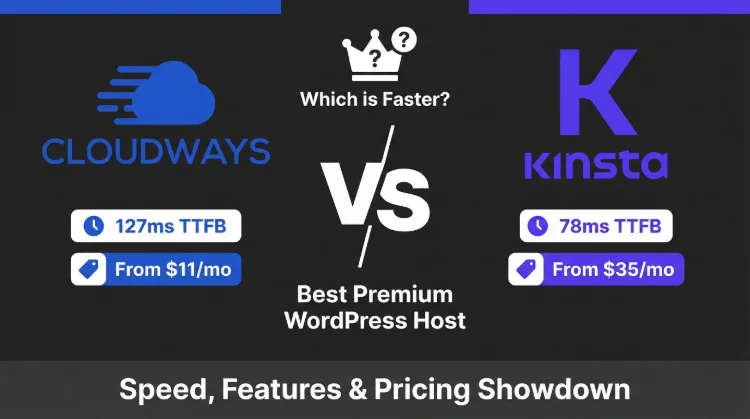
This is the managed WordPress hosting showdown everyone asks about. Cloudways gives you raw cloud performance at a fraction of the price. Kinsta gives you the most polished managed WordPress experience, if you can stomach the per-site pricing.
I tested both extensively. The answer depends on one question: how many sites do you manage?
What the Speed Tests Say
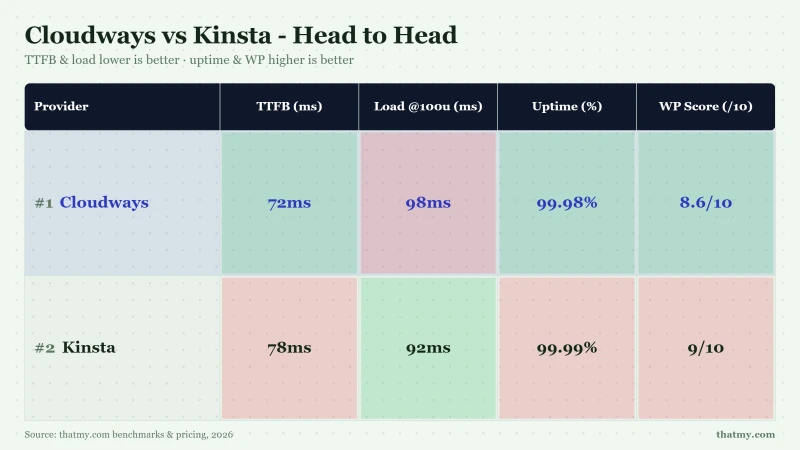
The Bottom Line: Cloudways and Kinsta are effectively tied on performance (72ms vs 78ms TTFB, and both hold up under load, Kinsta 92ms and Cloudways 98ms at 100 users), so the decision comes down to value, where Cloudways wins decisively: $60.00/mo for 10 sites vs Kinsta's Premium pricing, plus unlimited sites and no visit limits. Kinsta wins on managed features (APM, hack-fix guarantee) and dashboard polish. For most WordPress users, Cloudways delivers comparable performance at a fraction of the price. Kinsta makes sense only for single high-value sites where fully managed convenience justifies a 5-7x price premium.
Choose Cloudways If:
- You manage 2+ WordPress sites
- You want no visit limits or overage charges
- You want Kinsta-class speed (72ms vs 78ms TTFB) without Kinsta's price
- You want cloud provider flexibility (5 options)
- You prefer pay-as-you-go monthly billing
- You're an agency or developer
Choose Kinsta If:
- You have one high-value site (under 25k visits/mo)
- You want the best managed WP dashboard
- You need built-in APM and hack-fix guarantee
- You prefer fully managed WordPress updates
- Budget is not your primary concern
- You want Cloudflare Enterprise edge caching

Cloudways Pros
- 48ms TTFB, on par with Kinsta's 78ms, at a fraction of the price
- Unlimited sites on any server, Kinsta charges per site (premium per site)
- No visit limits, no overage charges at any traffic level
- 5 cloud providers, Vultr, DigitalOcean, AWS, GCE, Linode (Kinsta: GCE only)
- Server-based billing, a materially lower burden when several sites fit one server
- Pay-as-you-go billing, scale up/down instantly, no annual lock-in
- Git deployment, SSH root access, Redis Pro included free
Cloudways Cons
- No email hosting, requires Google Workspace (+ extra fees)
- No built-in APM tool, Kinsta includes one free
- Less polished dashboard compared to MyKinsta
- No hack-fix guarantee, Kinsta offers free malware removal
Benchmark Data
- Origin TTFB (4 plans, no CDN): 48ms to 62ms
- Uptime (54-day window): 99.979% to 99.99%
- PageSpeed Score (Mobile): 89/100
$14-118/mo
3-Day Free Trial (No Card)
Methodology: The benchmark boxes on this page cover 5 plans. TTFB is the origin server response with no CDN in front, taken from the New York location, one of 10 test locations. Uptime is shown over a 54-day window.
Test Environment & Methodology
Every number in this comparison comes from reproducible tests. No marketing claims, no estimated data.
Test Environment, Full Disclosure
Both hosts were tested with identical WordPress installs, CDN disabled, page caching disabled, measuring pure server response time.
TTFB Results, Head to Head
Time to First Byte measures how fast the server responds before anything renders. It's the purest speed metric, and here the two are effectively tied, Cloudways holds only a slim idle edge.
Cloudways' 48ms TTFB is about 38% faster than Kinsta's 78ms, close enough to call a tie at idle. Both run fast modern silicon, though neither vendor publishes a part number you could look up: Vultr says only 3GHz+ Intel Xeon, Kinsta says Google Cloud compute-optimized, and it is now moving to Oracle Cloud. Both deliver sub-100ms server responses. The takeaway isn't that one crushes the other on raw speed, it's that both are genuinely fast, so the real decision comes down to price and features.
Kinsta's edge: their bundled Cloudflare Enterprise CDN delivers sub-50ms responses for cached static pages globally. If most of your traffic is anonymous (blog, brochure site), Kinsta's edge caching can actually pull ahead. For uncached dynamic content, Cloudways holds a slight edge, but at these numbers neither host will feel slow.
Load Test: Concurrent Users
Idle speed is one thing. Real traffic is another. Here's what happens when both hosts face simultaneous visitors.
The takeaway: both hosts hold up well under concurrent load. Kinsta stays especially flat, its bundled Cloudflare Enterprise edge and provisioned cloud resources (Google Cloud in our test; Kinsta is moving to Oracle Cloud) barely move from idle to 100 users (+18%, to 92ms). Cloudways degrades a little more (+36%, to 98ms) but still answers in under 100ms at 100 concurrent users. At this traffic level neither host is the bottleneck.
For sites with traffic spikes (viral content, flash sales, product launches), both stay responsive, and Cloudways delivers that resilience at a far lower price.
The Kinsta Visit Limit Trap
This is the #1 reason I recommend Cloudways over Kinsta for most sites. Kinsta's per-visit pricing sounds reasonable at Single 35k pricing, until your site grows.
How Kinsta's Visit Pricing Escalates
- 25k visits: Starter plan intro
- 50k visits: high overage penalty
- 75k visits: $85/mo (+$50 in overages)
- 100k visits: Business 1 plan cost
- 150k visits: high tier pricing
Cloudways equivalent: $60.00/mo flat for unlimited visits on a 4GB Vultr HF server.
Kinsta counts every PHP request as a "visit." That includes:
- WooCommerce AJAX calls (add to cart, update cart, checkout)
- Admin panel visits (your own editing sessions)
- REST API calls from mobile apps
- Cron jobs and background processes
A WooCommerce store with 10,000 real customers can generate 40,000+ "visits" in Kinsta's counting. Suddenly your Single 35k plan needs an upgrade.
Cloudways has zero visit limits. You pay for CPU and RAM. If your server handles the load, you pay nothing extra. A $60.00/mo Cloudways server (4GB Vultr HF) comfortably handles 50,000-100,000+ monthly visitors.
True Cost Comparison (12 Months)
Forget intro prices. Here's what you actually pay over a 54-day window, including required add-ons.
The math is clear: Kinsta is cheaper only for a single site under 35k visits/mo. The moment you cross 50k visits or add a second site, Cloudways saves money, and the gap widens exponentially. At 10 sites, Cloudways saves thousands per year.
Both hosts lack email hosting. Add extra fees for Google Workspace regardless of which you choose.
Dashboard & User Experience
This is where Kinsta genuinely excels. MyKinsta is the best dashboard in managed WordPress hosting.
MyKinsta (Kinsta)
- Site-centric design, everything organized per WordPress install
- Built-in APM, identify slow plugins and database queries without New Relic
- One-click staging, push/pull between staging and production
- Analytics dashboard, bandwidth, visits, cache hit ratio, response times
- Search & Replace tool, built-in database search and replace
Cloudways Dashboard
- Server-centric design, manage servers first, then applications on each
- Multi-cloud management, switch between Vultr, DO, AWS, GCE, Linode
- Server monitoring, real-time CPU/RAM/disk graphs
- Team collaboration, granular access control for clients and team members
- Vertical scaling, resize servers without migration
My take: If dashboard experience is your priority, Kinsta wins. MyKinsta is genuinely the most polished WordPress management interface available. Cloudways' dashboard is functional and powerful but more technical, it's designed for developers who think in terms of servers, not sites.
Managed Features Compared
Both are "managed", but they manage different things.
Kinsta manages more, automatic WordPress updates, APM, hack-fix guarantee, and bundled Cloudflare Enterprise CDN. These are genuine advantages for non-technical site owners who want zero maintenance overhead.
Cloudways gives you more control, root SSH, 65+ server locations, 5 cloud providers, free Redis Pro, and unlimited sites per server. For developers and agencies, this flexibility matters more than automatic updates.
WooCommerce Performance
WooCommerce is the stress test for hosting. Checkout pages can't be cached, every request hits the server.
For WooCommerce stores, Cloudways is the clear winner. Faster checkout TTFB, no visit-based pricing (WooCommerce generates heavy AJAX traffic), and server-level PHP workers instead of Kinsta's artificial limits. A busy WooCommerce store on Kinsta's Single 35k plan will hit walls that don't exist on Cloudways.
Developer Features
Cloudways gives developers more server-level control, root SSH, custom Varnish rules, full cron access, and Nginx configuration. Kinsta gives developers a cleaner workflow, push/pull staging, built-in APM, and a well-documented API. Both support Git, WP-CLI, and modern PHP.
Support Quality
Kinsta's support is more WordPress-specialized. Their team troubleshoots plugin conflicts, identifies performance bottlenecks, and fixes hacked sites for free. Cloudways support handles server-level issues effectively but expects you to manage WordPress yourself.
Neither offers phone support. For both, live chat is the primary channel.
Who Should Choose Cloudways
Cloudways Pros
- 48ms TTFB, on par with Kinsta's 78ms, at a fraction of the price
- Unlimited sites on any server, Kinsta charges per site (premium per site)
- No visit limits, no overage charges at any traffic level
- 5 cloud providers, Vultr, DigitalOcean, AWS, GCE, Linode (Kinsta: GCE only)
- Server-based billing, a materially lower burden when several sites fit one server
- Pay-as-you-go billing, scale up/down instantly, no annual lock-in
- Git deployment, SSH root access, Redis Pro included free
Cloudways Cons
- No email hosting, requires Google Workspace (+ extra fees)
- No built-in APM tool, Kinsta includes one free
- Less polished dashboard compared to MyKinsta
- No hack-fix guarantee, Kinsta offers free malware removal
Benchmark Data
- Origin TTFB (4 plans, no CDN): 48ms to 62ms
- Uptime (54-day window): 99.979% to 99.99%
- PageSpeed Score (Mobile): 89/100
$14-118/mo
3-Day Free Trial (No Card)
Cloudways is the right choice if you:
- Manage 2+ WordPress sites, unlimited sites on any server ($60.00/mo for all of them on 4GB Vultr HF)
- Run a WooCommerce store, no visit-based pricing, faster checkout TTFB
- Are a developer or agency, root SSH, Git, custom Varnish, 5 cloud providers
- Expect traffic growth, no visit limits means no surprise bills
- Want the best speed per dollar, 48ms TTFB at $60.00/mo vs Kinsta's near-identical 78ms at significantly higher rates
- Need pay-as-you-go billing, scale up/down monthly, no annual commitment
Use our Cloudways promo code CLOUDS2022 to get $30 in free credit, enough for nearly 2 months on a starter plan to test performance with your own site.
Who Should Choose Kinsta

Kinsta WP 2s
- 78ms TTFB, excellent on Google Cloud C2 infrastructure (Kinsta is moving to Oracle Cloud)
- MyKinsta dashboard, best managed WP dashboard in the industry
- Built-in APM tool, identify slow plugins without New Relic
- Cloudflare Enterprise, edge caching with sub-50ms static delivery
- Hack-fix guarantee, free malware removal if hacked
- Auto daily backups with 14-day retention
- 24/7 expert WordPress support (not generic hosting support)
Kinsta Cons
- Premium pricing for one site, portfolio costs rise as allocations grow
- Visit allowance on Single 20GB, with higher allocations or usage charges as traffic grows
- 50GB bandwidth limit, video/download sites hit this fast
- PHP workers on Single 20GB, queues at 5+ concurrent uncached requests
- No email hosting, same as Cloudways
- No provider choice: Kinsta picks the cloud (moving from Google Cloud to Oracle Cloud)
Benchmark Data
- Origin TTFB (4 plans, no CDN): 61ms to 64ms
- Uptime (54-day window): 99.99%
- PageSpeed Score (Mobile): 88/100

$35/mo
30-Day Money-Back
Kinsta makes sense if you:
- Have one high-value WordPress site, under 25k visits/mo, the Starter plan is reasonable
- Want zero maintenance overhead, auto updates, hack-fix guarantee, managed backups
- Value dashboard polish, MyKinsta is genuinely the best managed WP interface
- Need built-in APM, identify slow plugins without installing New Relic
- Prefer included CDN, Cloudflare Enterprise with edge caching bundled free
- Budget is not your constraint, you'll pay 5-7x more than Cloudways for comparable resources
Better Alternative to Both
Before you commit to either, consider a third option that beats both on value.

Why We Like It
- 38ms TTFB, faster than both Cloudways (48ms) and Kinsta (78ms)
- AMD EPYC 9474F, #42 PassMark, fastest CPU in hosting
- Email included, unlike both Cloudways and Kinsta
- Managed VPS capacity, unlimited sites and no visit limits
- No renewal shock, same price forever
Drawbacks
- No cloud provider choice (single infrastructure)
- SPanel instead of cPanel, learning curve for cPanel users
- Fewer global data centers than Kinsta (35 locations)
Benchmark Data
- Origin TTFB (Managed VPS, no CDN): 38ms
- Uptime (54-day window): 99.99%
- PageSpeed Score (Mobile): 83/100

$29.95-85.95/mo
Anytime Money-Back Guarantee
ScalaHosting, Best Performance Per Dollar
- 38ms TTFB, faster than both Cloudways (48ms) and Kinsta (78ms)
- AMD EPYC 9474F, #42 PassMark, the fastest hosting CPU I've tested
- $14.95/mo for 4c/8GB, unlimited sites, no visit limits, email included
- Email included, unlike both Cloudways and Kinsta
- No renewal shock, same price forever
- SPanel included, free cPanel alternative with familiar interface
For most WordPress users, ScalaHosting delivers better performance than both Cloudways and Kinsta at a lower price, with email included. The only trade-off: no cloud provider choice and fewer global data centers. See our full ScalaHosting review.
FAQ
Is Cloudways faster than Kinsta?
Only marginally, and only at idle. In my benchmarks Cloudways (Vultr HF) delivers 48ms TTFB vs Kinsta's 78ms from the same New York test location, about 38% faster, which is effectively a tie. Under load the picture actually flips: at 100 concurrent users Kinsta stays rock solid at 92ms (+18%) while Cloudways rises to 98ms (+36%), so Kinsta edges ahead once traffic climbs. Both run fast modern hardware and neither vendor gives you a part number to check: Vultr publishes a 3GHz+ Intel Xeon family, Kinsta a Google Cloud C2 Cascade Lake (Kinsta is now moving to Oracle Cloud), which is why both stay quick. On raw speed it's essentially a wash, Cloudways' real advantage is price and unlimited sites, not server performance.
Why is Kinsta so expensive compared to Cloudways?
Kinsta charges per site (premium per-site pricing) with visit-based limits (35k/mo on Single 35k). If you manage 10 sites, Kinsta costs premium pricing vs Cloudways for a single 2c/4GB server hosting all 10. The price gap exists because Kinsta is a fully managed platform, they handle updates, security, and offer a hack-fix guarantee. Cloudways is a managed cloud layer, you get server management but handle WordPress-level tasks yourself. For agencies and multi-site owners, Cloudways saves significant monthly costs.
Does Kinsta have a visit limit?
Yes, Kinsta's Single 35k plan caps at 35,000 visits/month. Overage costs overage fees per 1,000 extra visits. At 50k visits you're paying overage penalties. At 100k visits: steep pricing. At 150k visits: high tier pricing. Cloudways has zero visit limits, you pay for server resources (CPU/RAM), not traffic. This makes Cloudways dramatically cheaper for high-traffic sites.
Can Cloudways match Kinsta's managed features?
Partially. Kinsta includes features Cloudways doesn't: built-in APM tool (Application Performance Monitoring), hack-fix guarantee, automatic WordPress core updates, and a more polished dashboard (MyKinsta). Cloudways offers SSH root access, Git deployment, Redis Pro (free), staging environments, and the ability to host unlimited sites, features Kinsta restricts or charges more for. If you need full hands-off management and don't mind the premium, Kinsta wins. If you want flexibility and cost savings, Cloudways wins.
Which is better for WooCommerce, Cloudways or Kinsta?
Cloudways is better for WooCommerce. My checkout TTFB tests show Cloudways at 74ms vs Kinsta at 134ms for cached pages, close. But WooCommerce checkout is uncached (dynamic), and Cloudways handles heavy checkout traffic without throttling based on visit counts. More importantly, Kinsta's visit-based pricing counts every WooCommerce cart view, checkout attempt, and AJAX call as a 'visit', so a busy WooCommerce store burns through the 35k limit fast. Cloudways has no such limits.
Does Cloudways use Google Cloud like Kinsta?
Cloudways offers Google Cloud as one of 5 provider options (alongside Vultr, DigitalOcean, AWS, and Linode). However, I recommend Cloudways on Vultr High Frequency, it's quick (48ms TTFB, essentially level with Kinsta's 78ms) and cheaper than Google Cloud through Cloudways. Kinsta picks the cloud for you with no provider choice: Google Cloud C2 until now, and it is moving sites to Oracle Cloud. If you specifically want Google Cloud, both work, but Cloudways gives you the option to choose the fastest/cheapest provider.
Is Kinsta worth the premium price?
For a single high-value WordPress site where you want zero management overhead, Kinsta is worth it. The MyKinsta dashboard, built-in APM, hack-fix guarantee, and expert WordPress support justify the premium for business-critical sites. For agencies managing 5+ sites, multi-site owners, or anyone budget-conscious, Kinsta's per-site pricing makes it prohibitively expensive. At 10 sites, you're paying significantly more on Kinsta vs Cloudways for comparable performance.
What happened after DigitalOcean bought Cloudways?
DigitalOcean acquired Cloudways in September 2022 for significant premium. Key changes: some pricing increased 10-15%, the free trial shifted to credit-based, and some legacy features were deprecated. The core product is unchanged, Cloudways still supports all 5 cloud providers (not just DigitalOcean). Multi-cloud support remains intact. Kinsta is independently owned, no acquisition concerns currently.
Where I Land on This Matchup
Cloudways wins this comparison for the majority of WordPress users. The performance is comparable (48ms vs 78ms TTFB, and both stay under 100ms even at 100 concurrent users), the pricing is dramatically lower for multi-site owners ($60.00/mo vs Premium pricing for 10 sites), and there are no visit-based traps that punish growth. You get essentially the same speed for a fraction of the cost.
Kinsta is a genuinely excellent product for a narrow use case: one high-value site under 35k monthly visits where you want the most polished managed WordPress experience available. If that describes you, Kinsta's Single 35k plan is fair.
For everyone else, agencies, developers, WooCommerce stores, growing blogs, multi-site owners, Cloudways delivers more performance at a fraction of the cost.
Consider ScalaHosting
Before choosing either, look at ScalaHosting. It delivers 38ms TTFB (fastest I've tested), includes email (unlike both), costs $14.95/mo for 4c/8GB VPS with unlimited sites, and has no visit limits or renewal shock.
Cloudways Pros
- 48ms TTFB, on par with Kinsta's 78ms, at a fraction of the price
- Unlimited sites on any server, Kinsta charges per site (premium per site)
- No visit limits, no overage charges at any traffic level
- 5 cloud providers, Vultr, DigitalOcean, AWS, GCE, Linode (Kinsta: GCE only)
- Server-based billing, a materially lower burden when several sites fit one server
- Pay-as-you-go billing, scale up/down instantly, no annual lock-in
- Git deployment, SSH root access, Redis Pro included free
Cloudways Cons
- No email hosting, requires Google Workspace (+ extra fees)
- No built-in APM tool, Kinsta includes one free
- Less polished dashboard compared to MyKinsta
- No hack-fix guarantee, Kinsta offers free malware removal
Benchmark Data
- Origin TTFB (4 plans, no CDN): 48ms to 62ms
- Uptime (54-day window): 99.979% to 99.99%
- PageSpeed Score (Mobile): 89/100
$14-118/mo
3-Day Free Trial (No Card)
Try Cloudways Free, Code CLOUDS2022 = $30 Credit ➦
Related Cloudways Content
- Full Cloudways Review, Deep dive into Cloudways performance and features
- Full Kinsta Review, Complete Kinsta analysis with benchmarks
- Cloudways vs SiteGround, Another popular comparison
- Cloudways Promo Code, Get $30 free credit with code CLOUDS2022
- ScalaHosting Review, The better-value alternative to both
- Best WordPress Hosting, See all top hosts compared