

How this was tested: a fresh Cloudways Flexible account and server (every default and add-on price below was read in its console), plus my benchmark round on four Cloudways servers on three clouds.
A WooCommerce store is harder on a server than a blog. The cart, checkout and account pages are different for every shopper, so they can't be served from a page cache, and every one of them runs PHP and database queries. That is exactly where cheap hosting slows down on a busy day. This page covers what Cloudways gives a store out of the box, what to change, which server to buy and what it really costs.
Good for a store
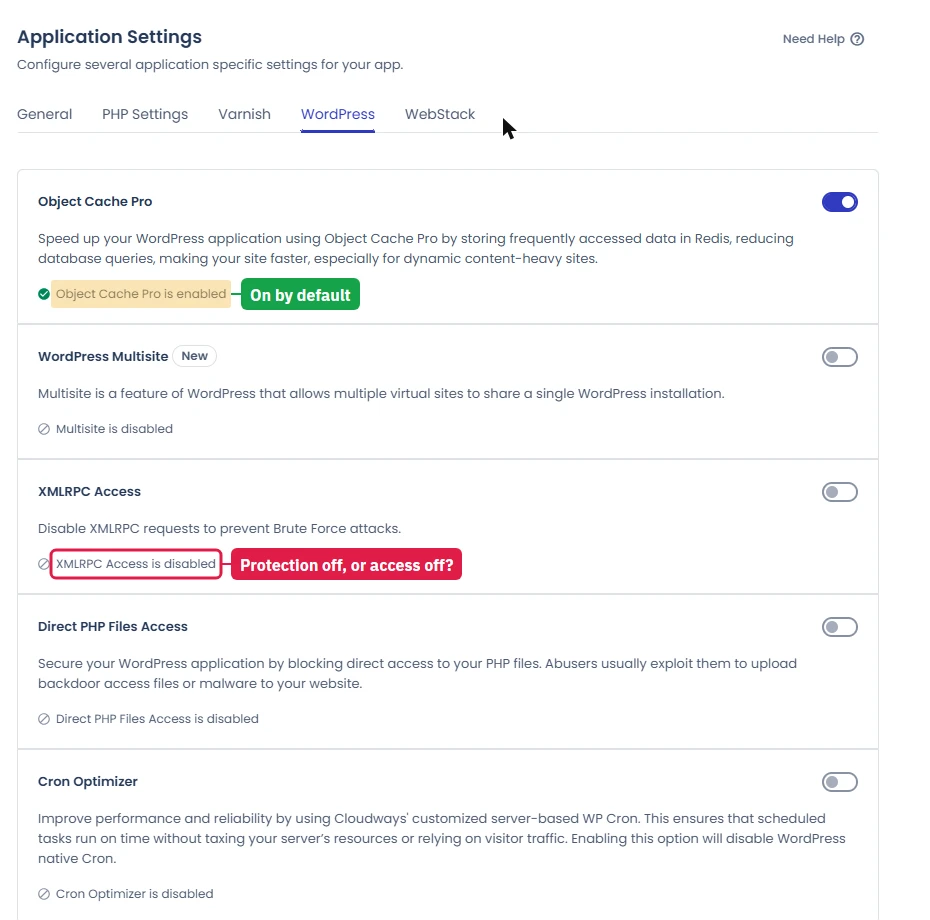
- Object Cache Pro (Redis) on by default for carts and sessions
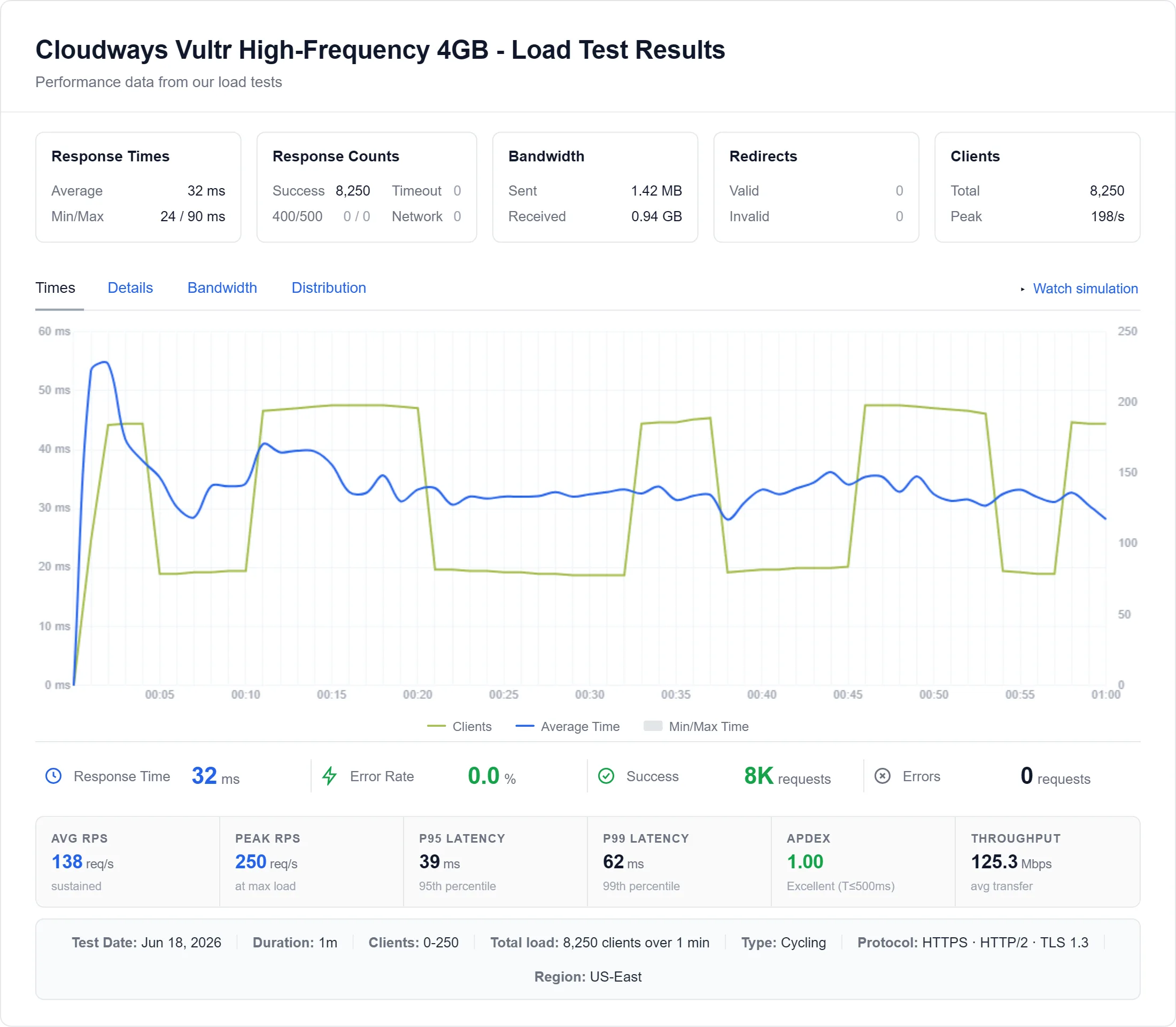
- 74ms at 100 concurrent clients on Vultr HF
- Staging in one click, password-protected
- Many stores on one server, billed by the hour
Watch out for
- No email: order mail needs an SMTP service
- Support won't touch plugins, themes or custom code
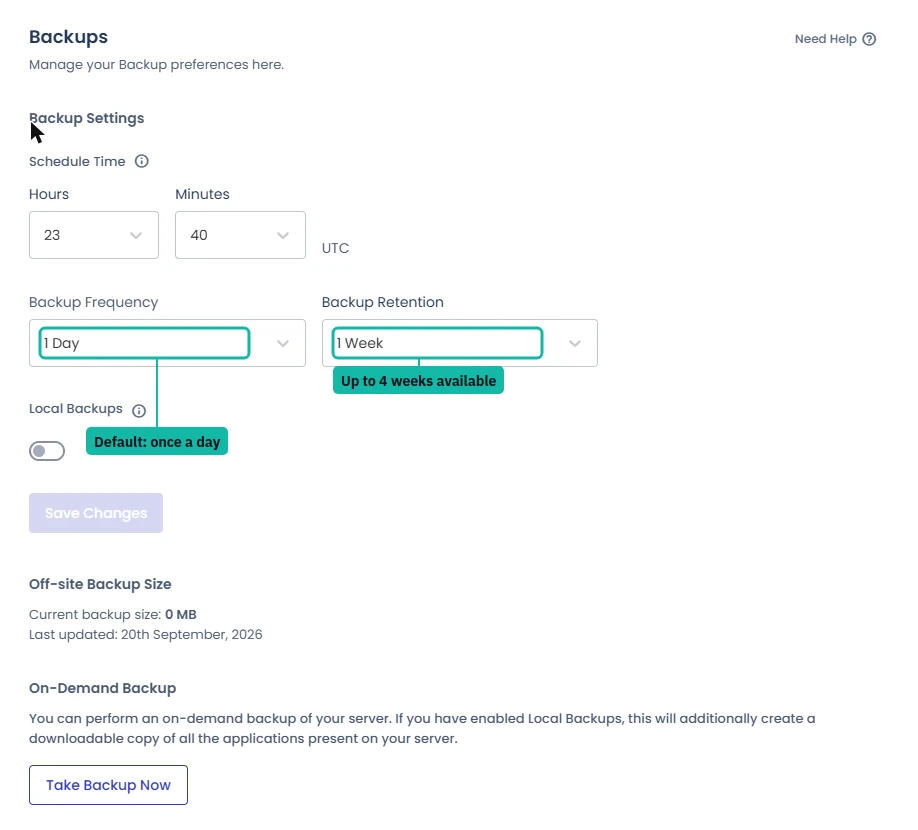
- Backups keep only 1 week by default
- Malware scanning per store is a paid add-on
How Fast Is Cloudways for a Store?
The number that matters for a store is how the server holds up when many shoppers hit uncached pages at once. From my load tests:
On Vultr High Frequency the server finished a full ramp to 250 clients with 0 failed requests. For a store, that is the difference between a checkout that stays quick during a sale and one that queues. The full method and charts are in the Cloudways review.
Which Server to Buy for WooCommerce
You can move up a size later without migrating the store (Server, Vertical Scaling), so start with the smaller option if you're unsure. When I looked, the console was offering 20% off upsizing.
What a New Store Gets Out of the Box
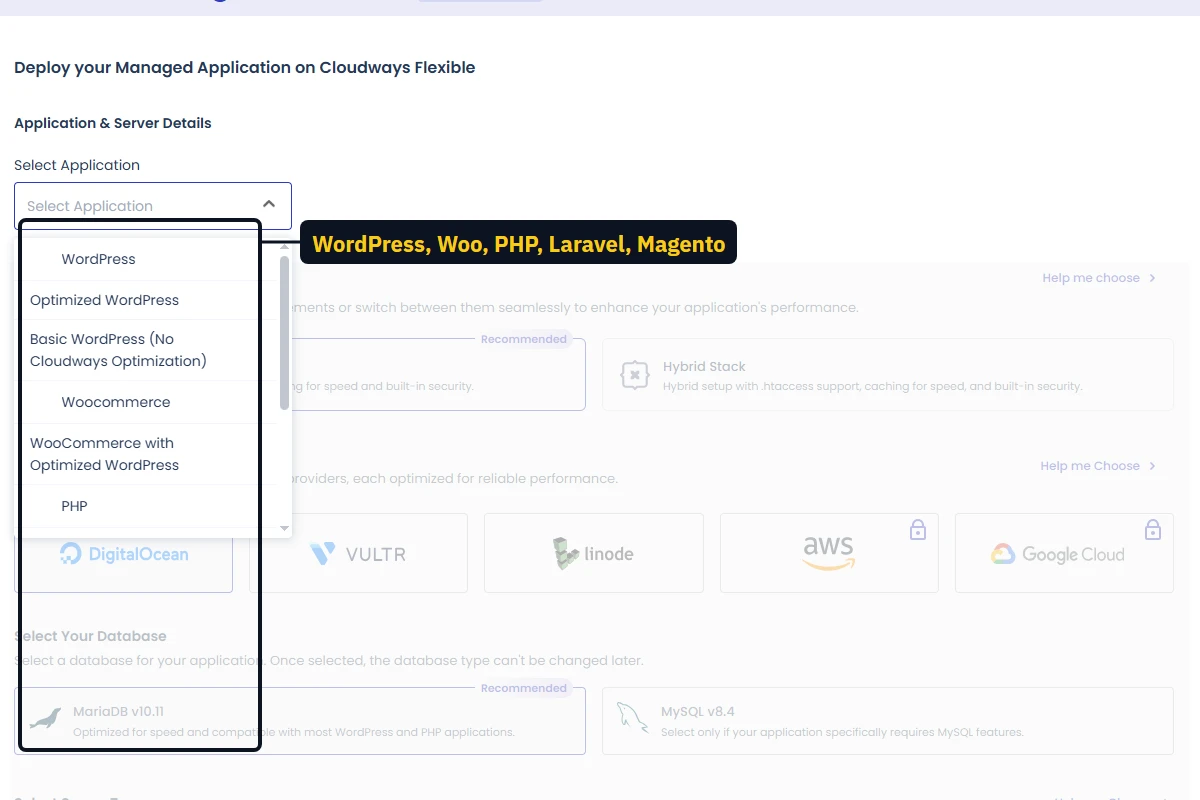
I launched a server and a WordPress app and read every setting. Cloudways' app picker also offers WooCommerce as a ready-made application.
Set Up a WooCommerce Store on Cloudways: 8 Steps
- Launch on Lightning. In the launch wizard pick the Lightning Stack, your cloud and a 4GB server or larger. MariaDB is the recommended database, and the choice can't be changed later.
- Confirm Object Cache Pro is on. Application, Application Settings, WordPress tab.
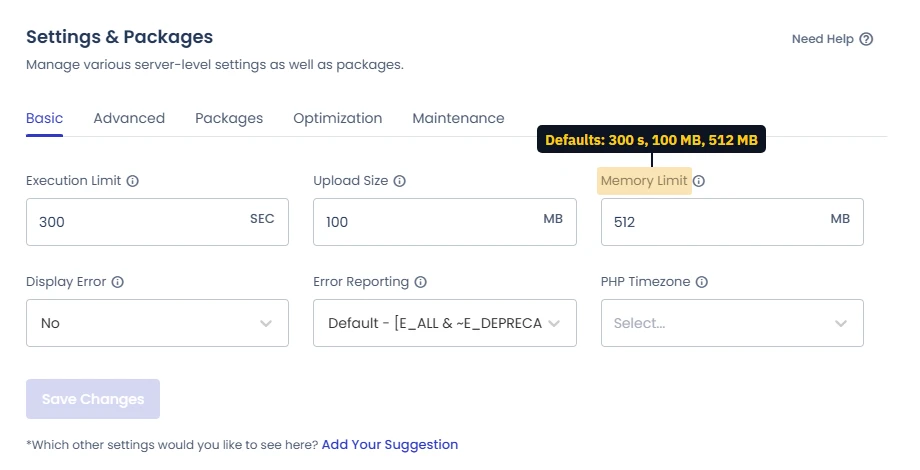
- Size the PHP workers for checkout. Every uncached checkout request needs a worker. Take the recommendation for your server size and add 30 to 50% for WooCommerce (the worker table is in the review), then watch memory on the Monitoring page.
- Pick one page cache and exclude the store pages. Breeze comes installed and excludes cart and checkout by default. If you use Varnish instead, test the cart on staging first.
- Send order email through SMTP. Cloudways has no mailboxes. Use an SMTP plugin with a transactional service (Cloudways sells Elastic Email as an add-on), or order confirmations land in spam.
- Switch off WP-Cron and add a server cron job. WooCommerce runs a lot of scheduled work; a real cron every 5 minutes (Application, Cron Jobs) keeps it off shoppers' page loads.
- Fix backups. Server, Backups: raise retention above 1 week, and add a second, off-server copy for a store that takes money.
- Consider Cloudflare Enterprise. $4.99 a domain a month (first 30 days free), with a managed firewall and edge caching for product images.
Security for a Store
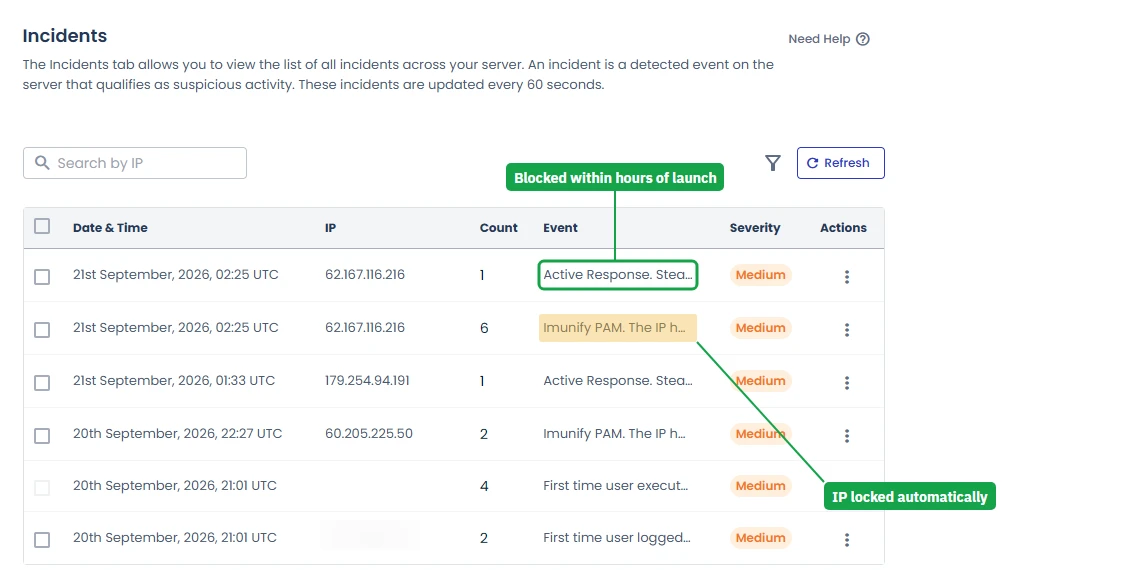
Within hours of going live, my new server's Incidents log showed SSH brute-force attempts from two outside IP addresses, both blocked with no setup from me. That server-wide protection (Imunify360 and the firewall) is free. Two things are worth adding for a store:
- Malware Protection, per store: $4 an app a month for 1 to 5 apps, $3 for 6 to 15, $2 above that.
- The Patchstack vulnerability scanner, which flags plugins with known holes. It is free (Cloudways' live chat confirmed this).
What a Store Really Costs Per Month
Add email on top (Google Workspace, Zoho Mail or Rackspace). There is no renewal jump: the price stays the same after month 3 or year 3, and there is no contract. THATMY30 takes 30% off for the first 3 months; the other codes are on the promo code page, and November's sale on the Black Friday page.
What Support Will and Won't Do for a Store
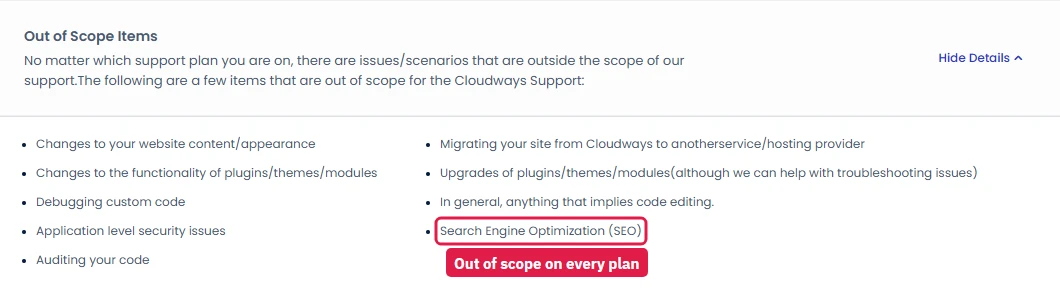
Cloudways support fixes the server and the platform. It does not fix WooCommerce itself: plugin and theme changes, custom code and site content are out of scope on every plan, including the $500-a-month Premium one. In my timed chat the AI answered in seconds and a human joined about a minute after I asked. If you want hands-on help inside the store, the Advance plan ($25 a month) adds it; otherwise keep a WooCommerce developer on call.
FAQ: Cloudways for WooCommerce
Is Cloudways good for WooCommerce?
Yes, if you size the server for checkout rather than for pageviews. On Vultr High Frequency my test server answered in 74ms at 100 concurrent clients, and a new WordPress app ships with Object Cache Pro (Redis) already on, which is what carts and sessions need. The weak spots are that email is not included and support will not fix plugins or themes.
Which Cloudways server should I pick for WooCommerce?
A 4GB server for a small store: $46.00/mo on DigitalOcean Standard, $54.00/mo on DigitalOcean Premium or $60.00/mo on Vultr High Frequency. For a busy store with steady sales, 8GB on Vultr High Frequency ($118.00/mo). Avoid 1GB and 2GB servers for a live store; they run out of PHP workers at checkout.
Is Redis on by default for WooCommerce on Cloudways?
On a new app, yes. When I created a WordPress app, Object Cache Pro (Redis) was already switched on under Application Settings, WordPress tab. On older servers, check it, and don't install a second Redis plugin on top.
Should I turn on Varnish for a WooCommerce store?
Only if you don't use another page cache, and only after testing the cart and checkout on staging. Varnish must never serve cart, checkout or account pages; WooCommerce sets cookies that bypass it, but a misconfigured rule can show one customer another customer's cart. Many stores run a caching plugin with WooCommerce rules instead.
Which stack should a WooCommerce store use, Lightning or Hybrid?
Lightning (Nginx only), which the launch wizard now marks as Recommended. It handles uncached requests, which is most of what a store does at checkout, better than the Hybrid stack. Pick Hybrid only if your store relies on .htaccess rules.
What does a WooCommerce store on Cloudways really cost?
The server plus a few add-ons. A small store on DigitalOcean Premium 4GB with Cloudflare Enterprise ($4.99 a domain) and Malware Protection ($4 an app) comes to about $62.99 a month before email. Email is extra: Cloudways doesn't include mailboxes.
Will Cloudways support fix my WooCommerce plugins?
No. On every support plan Cloudways lists plugin and theme changes, custom code and site content as out of scope. Standard support gives guidance for application issues; the Advance plan ($25 a month) adds help inside your application.
Can I test WooCommerce changes before they go live?
Yes. Staging is one button (Application, Staging Management) and the staging copy is password-protected by default, so search engines and customers don't find it. Test plugin updates and checkout changes there first.
For the whole platform (all three products, every console screen, the support test and the Terms), read the full Cloudways review. For prices of every plan and add-on, see the Cloudways pricing guide.