

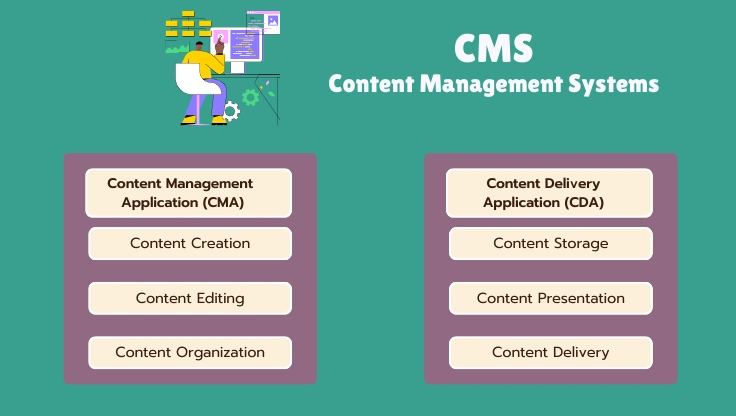
"CMS" gets thrown around as if every content management system works the same way. They do not. The architecture underneath a CMS, whether it stores content in a database, as flat files, or serves it through an API to a separate front end, determines both what the CMS can do and what you actually need from hosting to run it well.
Database-Driven CMSs: WordPress, Drupal, Joomla
The dominant architecture, and the one most people mean by default when they say "CMS." Content lives in a relational database (MySQL or MariaDB in almost every case), and every page request runs PHP code that queries the database for the relevant content, then assembles it into HTML using a theme or template before sending it to the visitor.
WordPress is the largest example by a wide margin, powering a substantial share of all websites on the internet, followed at real distance by Drupal and Joomla, both of which remain significant but serve narrower, often more technically demanding audiences. All three share the same core hosting requirement: PHP execution and a MySQL-compatible database, meaning performance depends heavily on server CPU speed (for PHP execution) and storage speed (for database queries), which is exactly why hosting reviews benchmark hosts specifically on WordPress performance so often.
The advantage of this architecture is a mature plugin and theme ecosystem, decades of accumulated tooling mean almost any feature you want (e-commerce, membership, forums, page building) already exists as a plugin rather than something you have to build. The cost is that every request typically does real work, PHP execution plus one or more database queries, which is why caching (covered in depth in the caching guide) is so central to making a database-driven CMS perform well at scale.
Flat-File CMSs: Grav, Kirby, Statamic
A flat-file CMS stores content as structured text files (often Markdown with metadata) directly on the file system, with no database layer at all. When a visitor requests a page, the CMS reads the relevant file, processes it, and returns HTML, there is no query to a separate database service in the request path.
This removes an entire category of performance variable: database query time and database server load simply do not exist as bottlenecks. It also simplifies backups and version control, a flat-file site can be backed up or tracked in Git the same way you would track any other set of files, without needing a separate database export step.
The tradeoff is ecosystem size. Flat-file CMSs have real, capable plugin systems, but nothing approaching WordPress's scale, and content editors used to a database-backed admin interface sometimes find flat-file editing workflows (often file-based or a more minimal admin panel) less familiar. Flat-file CMSs suit content-focused sites, documentation, blogs, portfolios, where the content structure is simple and the performance and simplicity benefits outweigh a smaller plugin ecosystem.
Headless CMSs: Contentful, Sanity, Headless WordPress
A headless CMS separates content management entirely from content presentation. The CMS's job is to store, organize, and expose content through an API (typically REST or GraphQL); it has no built-in front end of its own that renders a public-facing website. A separately built application, commonly a React, Vue, or Next.js front end, or a static site generator, requests content from that API and handles all of the actual page rendering.
This architecture exists because a growing number of projects need the same content to power more than one surface: a website, a mobile app, a smart display, an internal dashboard, all pulling from one canonical content source instead of duplicating content management across separate systems. WordPress itself can run headless, using its REST API while a separate application handles the front end, which is a common path for teams that want WordPress's familiar editorial interface without WordPress's traditional PHP-rendered front end.
The real cost is operational complexity. A headless setup means hosting and maintaining two systems instead of one: the CMS backend (which itself may need database-driven hosting) and the front-end application (which typically needs a different kind of hosting entirely, often a static hosting platform or a Node.js-capable host). For a single website with no multi-platform content requirement, this is meaningfully more infrastructure than a traditional CMS needs for the same result, which is why headless architecture is a deliberate choice for specific requirements, not a default upgrade path.
Matching CMS Architecture to What You Actually Need
- A blog, small business site, or e-commerce store with one storefront: a database-driven CMS, almost always WordPress given its ecosystem, is the well-trodden path with the most available support, plugins, and hosting options built specifically around it.
- A documentation site, portfolio, or content-focused site with simple structure: a flat-file CMS is a genuinely lighter-weight fit, with less hosting complexity and a workflow that plays well with version control.
- An institutional site with complex content relationships and strict access control: Drupal's more granular content modeling and permissions system was built for exactly this case.
- Content that needs to power a website, a mobile app, and other surfaces from one source: a headless architecture is worth the added operational complexity specifically because it solves the multi-platform content duplication problem the other three architectures do not address.
The hosting implication of each choice is direct: database-driven CMSs need PHP and MySQL-capable hosting sized for real concurrent traffic, flat-file CMSs need less (no database provisioning at all), and headless setups typically need two different kinds of hosting working together. Picking the CMS architecture before picking hosting, rather than after, avoids ending up on hosting that is a poor match for what you actually built.
FAQ: Content Management Systems
What is a CMS in simple terms?
A content management system is software that lets you create, edit, and publish content (pages, blog posts, product listings) through a web interface, without writing HTML or touching server files directly. Before CMSs existed, updating a website meant editing raw HTML files and uploading them via FTP. A CMS separates content (stored in a database or as structured files) from presentation (a theme or template that decides how content displays), so a non-technical person can write and publish a post while a designer separately controls how every post on the site looks.
Why does WordPress power so much of the web?
Three compounding reasons. First, it launched in 2003 as a genuinely easier alternative to the CMSs available at the time, and that early-mover advantage built a large plugin and theme ecosystem before competitors caught up. Second, its plugin architecture lets it do almost anything (e-commerce via WooCommerce, membership sites, forums) without switching platforms, so it absorbed use cases that might otherwise have gone to specialized software. Third, network effects: more WordPress sites means more developers know it, more hosting companies optimize specifically for it, and more tutorials exist for any problem you hit, which makes it the default choice even for people who have not evaluated alternatives.
What is a headless CMS and why would I use one?
A headless CMS stores and manages content but does not render the front-end presentation itself, it exposes content through an API (usually REST or GraphQL) that a separately-built front end (a React app, a static site generator, a mobile app) consumes. The appeal is decoupling: the same content can feed a website, a mobile app, and a smart display simultaneously from one source, and the front end can be built with modern JavaScript frameworks without being constrained by the CMS's own templating system. The tradeoff is complexity, you are now building and hosting two separate systems (the CMS backend and the front-end application) instead of one, which is real added engineering overhead most single-website projects do not need.
Does my choice of CMS affect what hosting I need?
Significantly. A database-driven CMS like WordPress or Drupal needs a host that provisions MySQL or MariaDB, runs PHP, and has enough CPU and RAM to handle PHP execution and database queries on every dynamic request, standard requirements that most shared and VPS hosting meets by default. A flat-file CMS (Grav, Kirby) needs no database at all, which simplifies hosting and removes an entire class of performance bottleneck (database query time) but is a smaller ecosystem with fewer plugins. A headless CMS setup typically needs hosting for the CMS backend (which may itself be database-driven) plus separate hosting or a CDN for the front-end application, which is a more involved hosting decision than a single traditional CMS.
Is a flat-file CMS faster than WordPress?
For a given piece of content, yes, all else equal, because there is no database query involved in retrieving it, the content already exists as a file the web server reads directly. In practice, a well-cached WordPress site (full-page caching serving pre-built HTML) closes most of that gap for a logged-out visitor, since a cached WordPress page is also just a file being read, the database is only queried when the cache is empty or invalid. The flat-file advantage is most pronounced for dynamic, uncached, or frequently-changing content, where WordPress has to hit the database on every request and a flat-file system does not.
How is Drupal different from WordPress?
Both are database-driven, PHP-based CMSs, but Drupal was built from the start with a more granular, developer-oriented content modeling system, letting you define custom content types with precise field structures more natively than WordPress's post-and-page model, which needs plugins (Advanced Custom Fields, Pods) to reach similar flexibility. This makes Drupal a common choice for large institutional sites (government, universities, enterprises) with complex content relationships and strict access-control requirements. The cost is a steeper learning curve and a smaller pool of available developers and pre-built themes compared to WordPress's much larger ecosystem.