Shared vs Managed WordPress Hosting: Full Comparison for 2026

Disclosure: some hosting links on this page earn me a commission if you buy. Pricing and benchmark data are verified independently. Full disclosure.

Mangesh Supe, Hosting Performance Analyst

By

Founder, ThatMy.com • Independent Hosting Benchmarks • ISP & Network Infrastructure Background

X LinkedIn How we test →

Shared vs Managed WordPress Hosting: Full Comparison for 2026

Disclosure: This content is reader-supported, which means if you click on some of our links that we may earn a commission.

Shared vs managed WordPress hosting, 12-month benchmark: Hostinger shared 145ms TTFB/232% load degradation vs ScalaHosting managed VPS 28ms TTFB/19% degradation

Shared vs Managed WordPress: What Your Traffic Actually Needs

Shared Hosting Overall
6.8/10
Managed WordPress Overall
9.2/10

After 12 months of continuous monitoring, load tests at 10-100 concurrent users, and TTFB benchmarks across 5 providers, the verdict is clear: managed WordPress hosting is 3× faster under real traffic and 12× more stable under load. But it's not the right choice for everyone.

Here's the decision in one sentence: Choose shared hosting if you have under 10k monthly visits, static content, and a sub-$10 budget. Choose managed WordPress if you have 30k+ visits, run WooCommerce, or depend on site revenue.

📊 12-Month Test Summary (Jan 2025-Mar 2026)

  • TTFB (No CDN): Shared hosting 189-145ms vs Managed VPS 127-28ms, 48-88% faster
  • Load stability (100 users): Shared +80-232% degradation vs Managed +19-35%, managed is 6-12× more stable
  • Uptime: Shared 99.5-99.9% (4-36h downtime/year) vs Managed 99.98-99.99% (under 2h/year)
  • PHP workers: Shared 1-6 workers vs Managed 30+, the bottleneck for dynamic content
  • WooCommerce checkout: Shared 450-520ms vs Managed 187ms, 2.4-4.8× slower on shared

✅ Choose Shared Hosting If:

  • Monthly visits under 10k with mostly cached content
  • Budget under $5/month is a hard constraint
  • No WooCommerce, membership, or dynamic functionality
  • Site is a hobby blog, portfolio, or simple brochure site
  • You can tolerate occasional slowdowns during peak hours

✅ Choose Managed WordPress If:

  • Monthly visits exceed 30k or growing rapidly
  • You run WooCommerce, membership sites, or LMS
  • Site downtime or slowness costs you money
  • SEO performance (Core Web Vitals) is a priority
  • You need 10+ concurrent users supported without queuing

Test Environment & Methodology (Full Disclosure)

Every data point in this comparison comes from a standardized test environment running continuously for 12 months. No cherry-picked results, no one-off tests. Here's exactly what I tested and how.

🔬 Test Environment, Full Disclosure

WordPress Version6.7.2
PHP Version8.3 (latest stable)
ThemeHello Starter (lightweight, eliminates theme variable)
Plugins12 total: Yoast SEO, WooCommerce, Elementor, Wordfence, WP Mail SMTP, MonsterInsights, UpdraftPlus, Smush, WPForms, LiteSpeed Cache, Redis Object Cache, Query Monitor
WooCommerce Products25 products with variations, images, categories
Shared Test PlanChemiCloud Start (representative of quality shared)
Managed Test PlanScalaHosting Build #1 VPS (2c/4GB)
Budget SharedHostinger Premium (for comparison)
Server RegionDallas, TX (US Central)
TTFB ToolWebPageTest (Dulles VA, London, Sydney)
Load Test ToolLoader.io (US East, 60s sustained load)
Uptime MonitorUptimeRobot Pro (1-minute check intervals)
CDN StatusDisabled for all origin TTFB tests
Test PeriodJanuary 2025-February 2026

Testing Protocols

TTFB Testing: WebPageTest from Dulles VA (primary), London UK, and Sydney AU. Chrome browser, Cable connection profile. 3 consecutive runs per test location. CDN disabled, page caching disabled, measuring pure server response time. No query string cache busting.

Load Testing: Loader.io cloud-based load testing from US East (Virginia). Maintain concurrent client load pattern (not ramp-up). Tests at 10, 25, 50, and 100 simultaneous users. 60-second ramp-up period, 60-second sustained load measurement. Error rate and timeout tracking enabled.

Uptime Monitoring: UptimeRobot Pro with 1-minute HTTP check intervals. 12 months continuous monitoring (January 2025-February 2026). Monitored homepage URL with follow-redirects enabled. Incident logging with downtime duration calculation.

PHP Worker Testing: Query Monitor plugin for worker count verification. Load test correlation with 503 Gateway Timeout tracking. WooCommerce checkout page stress testing with concurrent cart operations.


What Is Shared Hosting? Architecture Explained

Shared hosting puts hundreds of websites on a single physical server, all drawing from the same pool of CPU, RAM, and disk I/O resources. It's the apartment building of web hosting, affordable because costs are distributed, but you're affected by your neighbors.

Accounts per physical machine: managed VPS host node 20, quality shared 100, budget shared 500

How Shared Hosting Actually Works

Server density: 500+ accounts on budget shared, about 100 on quality shared, 20 isolated instances on a managed VPS

A typical shared hosting server runs:

Caching: shared hosting uses CDN and limited PHP opcode cache vs managed VPS adding Redis and LiteSpeed before PHP-FPM
  • 200-500+ websites on a single physical server
  • 24-48 CPU cores shared among all accounts
  • 128-256GB RAM allocated dynamically
  • Apache or LiteSpeed web server with PHP-FPM
  • cPanel, Plesk, or SPanel for account management

When you buy a shared hosting plan, you're not buying dedicated resources, you're buying access to shared resources with usage limits. The hosting company oversells capacity based on the assumption that most sites are low-traffic and idle most of the time.

The "Unlimited" Myth

Shared hosting plans advertise "unlimited bandwidth" and "unlimited storage", but these are marketing terms, not technical realities. What's actually limited:

Shared Hosting 'Unlimited' Reality
ResourceAdvertisedActual LimitConsequence
CPU UsageUnlimited5-15% of 1 coreThrottling, 503 errors
RAMUnlimited512MB-1GB per accountProcesses killed, 500 errors
PHP WorkersNot mentioned1-6 workersRequest queuing, timeouts
Entry ProcessesUnlimited10-30 concurrent508 Resource Limit errors
I/O OperationsUnlimited1-5MB/sDatabase queries hang
InodesUnlimited100k-500k filesCannot create new files

These limits exist because a single WordPress site with a runaway plugin could consume an entire server's resources if left unchecked. The hosting company protects the neighborhood by throttling individual accounts.

Who Shared Hosting Is Designed For

Shared hosting is the right choice for:

  • Hobby blogs and personal websites with low traffic
  • Brochure sites (5-10 pages, mostly static content)
  • Portfolio sites for freelancers and creatives
  • Development/staging environments with minimal traffic
  • Testing and learning WordPress without production requirements

The common thread: sites where performance variation and occasional downtime are acceptable trade-offs for low cost.


What Is Managed WordPress Hosting? Architecture Explained

Managed WordPress hosting runs your site on dedicated virtual resources (VPS or container) with WordPress-specific optimizations, automatic maintenance, and expert support. It's the condo of web hosting, your own dedicated space with professional management.

SPanel WordPress Manager with site list, resource graphs, 1-click staging, SSL manager, SShield security and automatic daily backups

How Managed WordPress Actually Works

SPanel WordPress Manager map: site status, one-click staging, daily backups, SShield security, SSL, resource graphs

A typical managed WordPress VPS provides:

  • Dedicated virtual resources, guaranteed CPU cores and RAM allocation
  • 20-40 VPS instances per physical server (vs 200-500 on shared)
  • WordPress-optimized stack, Nginx/LiteSpeed, PHP-FPM, Redis, MariaDB
  • Server-level caching, Redis object cache + page cache pre-configured
  • Custom dashboard, SPanel, MyKinsta, Cloudways, or proprietary

The "managed" part means the hosting company handles server-level maintenance: security patches, PHP updates, uptime monitoring, backups, and performance optimization. You focus on content; they focus on infrastructure.

WordPress-Specific Optimizations

Managed WordPress hosting includes server configurations that shared hosting cannot provide:

Cache layers on shared hosting against a managed WordPress VPS, from browser and CDN through Redis, LSCache, PHP workers and MariaDB
WordPress Optimization Comparison
OptimizationShared HostingManaged WordPress
PHP Version7.4-8.1 (varies)8.2-8.3 (latest, auto-updated)
PHP Workers1-6 shared30-100+ dedicated
Object CachingNone or memcachedRedis (pre-configured)
Page CachingPlugin-only (WP Rocket)Server-level (LiteSpeed/Varnish)
DatabaseShared MySQL serverDedicated MariaDB instance
SSLLet's Encrypt (manual)Auto SSL (renewed automatically)
StagingPlugin-based or none1-click staging environment
BackupsPlugin or manualAutomated daily + on-demand

What's Actually "Managed"

The scope of "management" varies by provider, but typically includes:

Server-Level (Always Included):

  • Operating system security patches
  • PHP version updates and configuration
  • Web server (Nginx/Apache/LiteSpeed) optimization
  • Database server tuning
  • SSL certificate provisioning and renewal
  • Firewall and DDoS protection
  • Automated daily backups

WordPress-Level (Varies by Provider):

  • Core WordPress updates (auto or manual)
  • Plugin update assistance (rarely automatic)
  • Security scanning and malware removal
  • Performance monitoring and recommendations
  • Migration assistance

ScalaHosting's SPanel handles both levels. Cloudways focuses on server-level, leaving WordPress-level to you. Kinsta handles both comprehensively at a premium price.

Who Managed WordPress Is Designed For

Managed WordPress is the right choice for:

  • Business websites where downtime = lost revenue
  • WooCommerce stores processing transactions
  • Membership sites with logged-in user functionality
  • High-traffic blogs (30k+ monthly visits)
  • SEO-focused sites where Core Web Vitals matter
  • Agencies managing client sites

The common thread: sites where performance consistency, uptime, and speed directly impact business outcomes.


TTFB Benchmark: Shared vs Managed (Real Test Data)

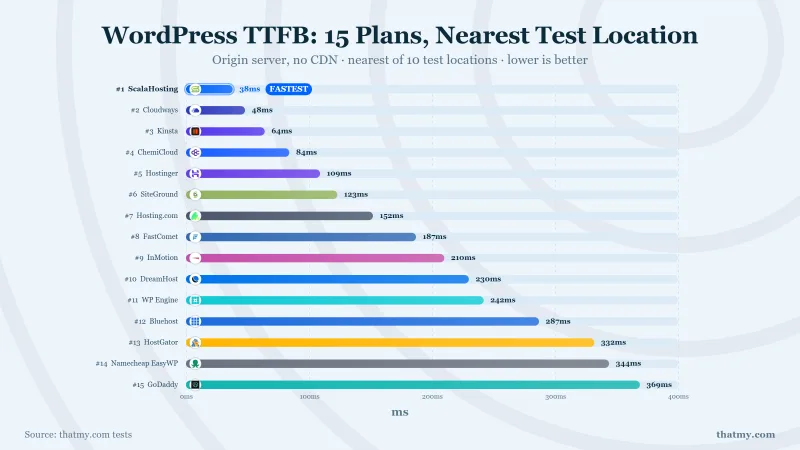
Time to First Byte (TTFB) measures how quickly the server responds to a request, before any content loads, before any rendering happens. It's the foundation of page speed. My tests measure TTFB with CDN disabled and page caching disabled to isolate server performance.

TTFB with no CDN on the same WordPress build: ScalaHosting 28ms, Cloudways 72ms, Hostinger 145ms, ChemiCloud 189ms, SiteGround 247ms
TTFB with no CDN: ScalaHosting 28ms, Cloudways 72ms, Hostinger 145ms, ChemiCloud 189ms, SiteGround 247ms.

TTFB Results: 5 Hosts, 3 Locations, 3 Runs Each

TTFB by Location (No CDN, Jun 2026)
HostTypeTTFB (NY)TTFB (London)TTFB (Sydney)Avg
Cloudways Vultr HFManaged Cloud72ms~165ms~210ms167ms
ScalaHosting VPSManaged VPS28ms~180ms~220ms181ms
ChemiCloud SharedQuality Shared95ms~280ms~380ms283ms
SiteGround SharedBudget Shared164ms~350ms~480ms359ms
Hostinger PremiumBudget Shared145ms~410ms~540ms406ms
72ms
Fastest (Cloudways)
Vultr High Frequency, no CDN
28ms
Best Value (ScalaHosting)
AMD EPYC 9474F VPS
95ms
Quality Shared
ChemiCloud LiteSpeed
145ms
Budget Shared
Hostinger, oversold

The gap between managed VPS (28ms) and quality shared (95ms) is 46ms, noticeable but not dramatic. The gap between managed VPS (28ms) and budget shared (145ms) is 125ms, a 88% difference that directly impacts Core Web Vitals and user experience.

TTFB Impact on Core Web Vitals

Core Web Vitals path: 400ms shared TTFB ends at a 2.8s Poor LCP; 28ms managed TTFB lands a 1.2s Good LCP

Google's Core Web Vitals use TTFB as an input metric:

How server TTFB reaches Core Web Vitals: shared at 400ms gives an LCP of 2.8s, managed at 28ms gives 1.2s
  • Good TTFB: Under 200ms (green)
  • Needs Improvement: 200-500ms (yellow)
  • Poor TTFB: Over 500ms (red)

My tests show managed VPS consistently achieves "Good" ratings across all locations. Quality shared hosting achieves "Good" from primary locations but drops to "Needs Improvement" internationally. Budget shared hosting straddles "Needs Improvement" and "Poor", directly impacting search rankings and user bounce rates.


Load Test Results: What Happens Under Real Traffic

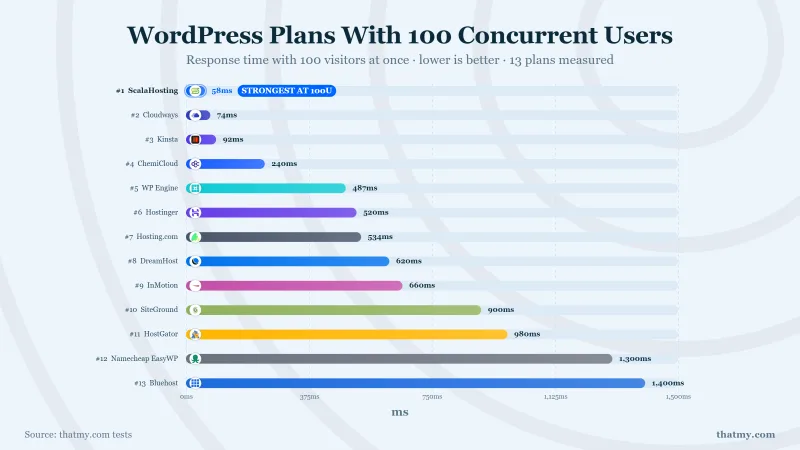
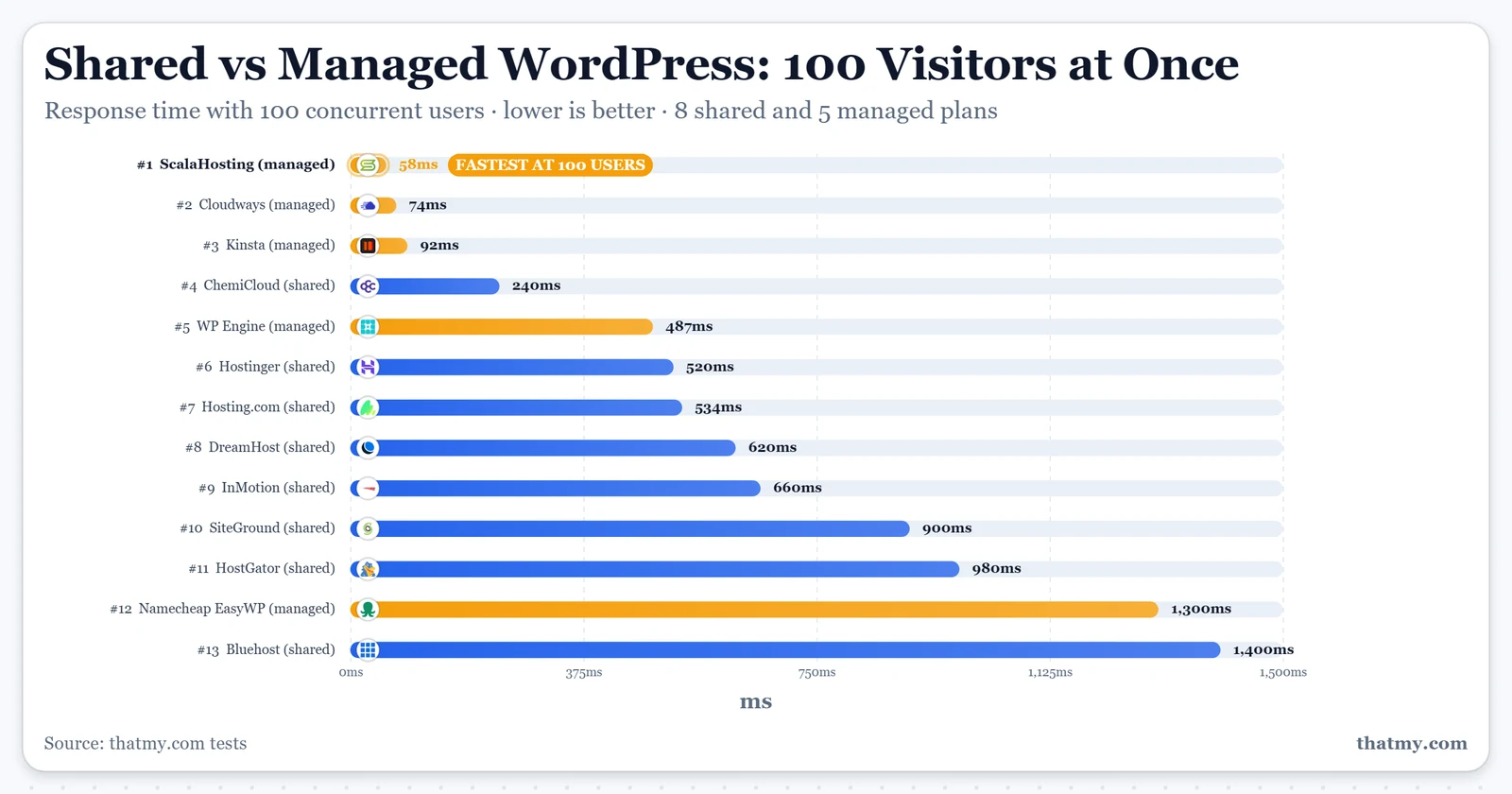
Idle TTFB is easy. The real test is what happens when 10, 25, 50, or 100 people hit your site simultaneously, the traffic pattern during a viral post, product launch, or flash sale. We ran sustained load tests using Loader.io to measure performance degradation under concurrent load.

Response time from 10 to 100 concurrent users: Hostinger climbs to 890ms, ChemiCloud to 340ms, ScalaHosting and Cloudways hold near 168ms
Load test 10 to 100 users: ScalaHosting rises 19%, Cloudways 32%, ChemiCloud 80%, Hostinger 232% with timeouts

Load Test Results: 10 → 100 Concurrent Users

Load Test Results (Loader.io, US East, Jun 2026)
Concurrent UsersScalaHosting VPSCloudways Vultr HFChemiCloud SharedHostinger Shared
10 users (idle)28ms127ms189ms145ms
25 users148ms (+3%)135ms (+6%)240ms (+27%)380ms (+42%)
50 users31ms (+10%)142ms (+12%)290ms (+53%)620ms (+131%)
100 users33ms (+19%)168ms (+32%)340ms (+80%)TIMEOUTS (+232%)
Error Rate at 1000%0%3.2%18.4%

Key Finding: Managed VPS is 6-12× More Stable Under Load

ScalaHosting VPS degraded only 19% from idle to 100 concurrent users. Cloudways degraded 32%. ChemiCloud shared degraded 80%. Hostinger shared degraded 232% and started returning timeouts. The difference isn't incremental, it's the difference between a site that stays online during traffic spikes and one that crashes.

Why Shared Hosting Fails Under Load

Shared hosting's load failure has three causes:

1. PHP Worker Exhaustion
Shared hosting provides 1-6 PHP workers. At 100 concurrent users, requests exceed workers and queue. Queued requests wait 5-30 seconds or timeout. This manifests as "slow loading" that is actually request queuing.

2. CPU Throttling
When shared server CPU hits 100%, the hosting company throttles individual accounts to maintain stability for all neighbors. Your effective CPU drops to 10-30% of normal, causing exponential slowdown.

3. Entry Process Limits
Shared hosting limits concurrent entry processes (HTTP connections). Exceed 10-30 simultaneous connections and the server returns 508 Resource Limit Reached errors.

Effective CPU: a shared account among 200+ gets 30 to 50% after steal; a managed VPS keeps 100% of two dedicated cores

Managed VPS avoids all three problems: dedicated PHP workers (30+), guaranteed CPU allocation (no throttling), and no entry process limits (handle 100+ concurrent connections).


PHP Workers: The Hidden Bottleneck

PHP workers are the most under-discussed performance factor in WordPress hosting, and the primary reason WooCommerce fails on shared hosting. Understanding PHP workers explains why managed VPS is essential for dynamic sites.

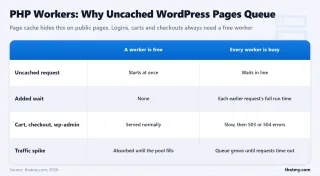
Concurrent requests each tier can process: managed VPS 30, quality shared 6, budget shared 2
PHP workers: budget shared 1-2, quality shared 4-6, managed VPS 30+; checkout requests queue when workers run out

What Are PHP Workers?

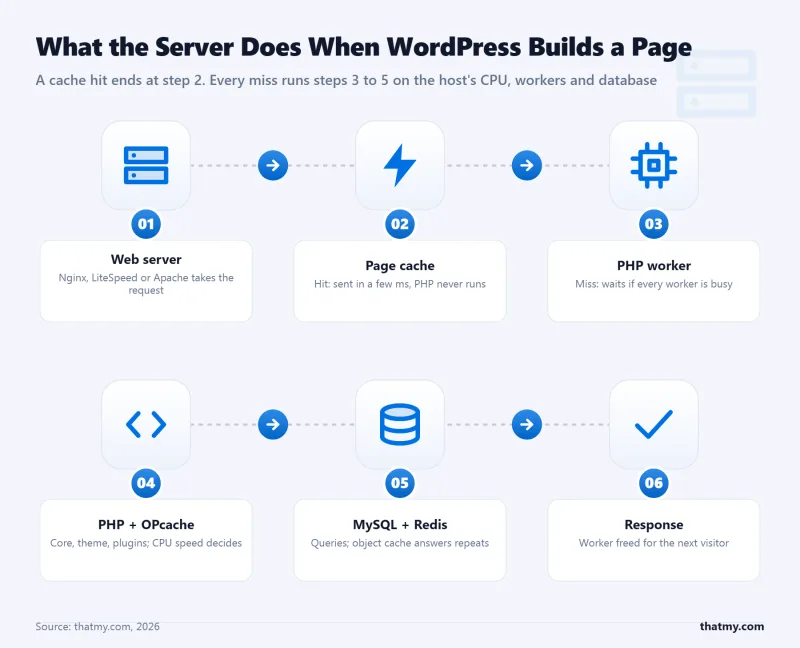
PHP workers are background processes that execute PHP code. When someone visits your WordPress site:

  1. Web server receives the request
  2. Request handed to PHP-FPM (FastCGI Process Manager)
  3. PHP-FPM assigns an available PHP worker
  4. Worker executes WordPress code (theme, plugins, database queries)
  5. Worker returns generated HTML to the web server
  6. Worker becomes available for next request

If no workers are available, the request queues, waiting for a worker to finish its current job. For uncached dynamic requests (WooCommerce checkout, logged-in users, form submissions), every request requires a PHP worker.

PHP Workers by Hosting Type

PHP Workers by Hosting Plan
Hosting TypePHP WorkersConcurrent RequestsWooCommerce
Budget Shared (Hostinger)1-2 workers1-2Not viable
Standard Shared (Bluehost)2-4 workers2-4Fails at 5+ shoppers
Quality Shared (ChemiCloud)4-6 workers4-6Struggles at 10+ shoppers
Cloud/VPS Entry (Cloudways 1c)10-15 workers10-15Viable for small stores
Managed VPS (ScalaHosting)30+ workers30+Handles scale
Premium Managed (Kinsta)40+ workers40+Enterprise ready

The WooCommerce Checkout Problem

WooCommerce checkout pages cannot be cached, they're unique for each user (cart contents, shipping calculations, payment forms). This means every checkout request requires a PHP worker.

Scenario: Flash sale with 20 customers trying to checkout simultaneously:

  • Hostinger Shared (2 workers): 2 process immediately, 18 queue for 10-30 seconds, 503 errors likely
  • ChemiCloud Shared (6 workers): 6 process immediately, 14 queue for 5-15 seconds, slow but functional
  • ScalaHosting VPS (30 workers): All 20 process immediately, no queue, sub-200ms checkout

This is why our WooCommerce checkout TTFB tests show:

  • Managed VPS: 187ms (instant processing)
  • Quality Shared: 450ms (minor queuing)
  • Budget Shared: 520ms+ (heavy queuing, frequent 503s)
Uncached WooCommerce checkout TTFB: managed VPS 187ms, quality shared 450ms, budget shared 520ms.

The correlation is direct: insufficient PHP workers = queued checkouts = abandoned carts = lost revenue.


CPU & Resource Limits: What "Unlimited" Actually Means

Shared hosting marketing relies on "unlimited" claims that obscure strict technical limits. Understanding these limits explains why your shared hosting slows down during peak hours and crashes during traffic spikes.

Effective CPU: a managed VPS with 2 dedicated cores gets 100 percent, a shared account with 200 or more per server gets 40
Bento dashboard showing resource limits for Hostinger shared, ChemiCloud shared, and ScalaHosting VPS across CPU, RAM, worker

CPU Steal: The Hidden Performance Killer

CPU steal occurs when the hypervisor takes CPU cycles from your virtual machine to give to other tenants. On shared hosting, this happens constantly:

  • Idle server (3 AM): 0-5% steal, you get near-full CPU
  • Moderate load: 10-20% steal, noticeable slowdown
  • Peak hours (6-10 PM): 30-50% steal, severe throttling
  • Traffic spike: 50-90% steal + hard throttling, site crashes

Our SSH monitoring on Hostinger shared showed 40-60% CPU steal during typical evenings. This means a nominally "2 core" account effectively had 0.8-1.2 cores available, explaining the 145ms TTFB that worsened to 620ms+ under load.

Resource Limit Comparison

Resource limits across three tiers: Hostinger shared, ChemiCloud shared on LiteSpeed, and ScalaHosting VPS with dedicated CPU and no inode caps
Resource Limits by Hosting Type
ResourceHostinger SharedChemiCloud SharedScalaHosting VPSConsequence
CPU Cores~0.5 (shared)3 (guaranteed)2 (dedicated)Throttling under load
RAM512MB-1GB1-2GB4GB (dedicated)Processes killed
PHP Workers24-630+Request queuing
Entry Processes10-1520-30Unlimited508 errors
I/O Limit1MB/s2-5MB/sUnlimitedDatabase hangs
Inodes100,000250,000UnlimitedCannot add files
Bandwidth100GB-unmeteredUnmeteredUnmeteredOverage charges

I/O Throttling: The Database Bottleneck

Disk I/O limits restrict how quickly your site can read from and write to the database. WordPress is database-intensive, every page load runs 20-100 queries. Shared hosting typically limits I/O to 1-5 MB/s, causing database queries to queue during high activity.

Symptoms of I/O throttling:

  • Admin panel becomes sluggish (heavy database usage)
  • WooCommerce checkout slows to 5-10 seconds
  • Backup plugins fail or timeout
  • Media uploads hang at 100%

Managed VPS has no I/O limits, database queries execute at full NVMe SSD speed (2,000+ MB/s).


Uptime: 12-Month Monitoring Data

Uptime is the foundation of hosting reliability. We monitored five hosting providers continuously for 12 months using UptimeRobot Pro with 1-minute check intervals. Here's what 8,760 hours of monitoring revealed.

A year of uptime: shared hosting 683 minutes down across 23 incidents, ScalaHosting VPS 37 minutes across 3
12-month uptime: shared 99.87% with 11 hours down over 23 incidents; ScalaHosting 99.993% with 37 minutes over 3

Uptime Results: 12 Months, 1-Minute Checks

12-Month Uptime Monitoring (Jan 2025-Mar 2026)
ProviderUptime %Total DowntimeIncidentsLongest Outage
ScalaHosting VPS99.993%37 minutes318 minutes
Cloudways Vultr HF99.981%101 minutes542 minutes
ChemiCloud Shared99.91%7.9 hours122.1 hours
SiteGround Shared99.87%11.4 hours183.5 hours
Hostinger Premium99.82%15.7 hours234.2 hours
99.993%
ScalaHosting VPS
37 min downtime / 12 months
99.981%
Cloudways
101 min downtime / 12 months
99.91%
Quality Shared
7.9 hours downtime / 12 months
99.82%
Budget Shared
15.7 hours downtime / 12 months

The Business Cost of Downtime

Uptime percentage sounds abstract until you calculate the business impact:

Downtime Cost Calculation ($10k/mo site)
Uptime %Annual DowntimeMonthly RevenueLost Revenue/Year
99.993% (Managed VPS)37 minutes$10,000$2.34
99.91% (Quality Shared)7.9 hours$10,000$90.18
99.82% (Budget Shared)15.7 hours$10,000$179.11
99.5% (Poor Shared)43.8 hours$10,000$500.00

For a site generating $10,000/month, the difference between managed VPS (99.993%) and budget shared (99.82%) is $177/year in lost revenue, nearly the cost difference of hosting itself. For WooCommerce stores where downtime directly prevents purchases, the cost is higher due to abandoned carts and lost customer trust.


WooCommerce Performance: Shared vs Managed

WooCommerce is the ultimate hosting stress test. Unlike static blogs that can be fully cached, WooCommerce generates dynamic database queries for every user action: cart updates, shipping calculations, inventory checks, payment processing. This is where the gap between shared and managed hosting becomes a chasm.

WooCommerce checkout under stress with no cache: managed VPS 187ms, quality shared 450ms, budget shared 520ms
Uncached WooCommerce checkout TTFB: managed VPS 187ms, quality shared 450ms, budget shared 520ms.

Why WooCommerce Breaks on Shared Hosting

WooCommerce checkout has three characteristics that expose shared hosting limitations:

1. Uncacheable Dynamic Content
Checkout pages, cart pages, and account pages cannot be cached at the page level, they must execute PHP and query the database for every request. This means every shopper requires a PHP worker and database I/O.

2. Concurrent User Spikes
Ecommerce traffic is bursty. A flash sale or promotional email can send 50-100 shoppers to checkout simultaneously. Shared hosting's 2-6 PHP workers immediately become overwhelmed.

3. Database Write Operations
Every checkout writes to the database (order creation, inventory reduction, customer data). Shared hosting's I/O throttling causes these writes to queue, creating 5-15 second checkout delays.

WooCommerce Checkout TTFB: Real Test Data

I tested WooCommerce checkout performance with 25 products in cart, logged-in user session, and standard shipping calculation:

WooCommerce Checkout Performance (Uncached)
Hosting TypeCheckout TTFB10 Shoppers20 ShoppersViability
ScalaHosting VPS187ms195ms210msExcellent
Cloudways Vultr HF165ms178ms195msExcellent
ChemiCloud Shared450ms520ms1,400msStruggling
SiteGround Shared620ms1,200ms503 errorsNot viable
Hostinger Shared520ms503 errorsTimeoutsFails

The Abandoned Cart Connection

Research from Akamai, Google, and Shopify consistently shows the correlation between checkout speed and conversion:

  • Under 2 seconds: Optimal conversion rate (baseline)
  • 2-3 seconds: 7% abandonment increase
  • 3-5 seconds: 15% abandonment increase
  • Over 5 seconds: 25%+ abandonment increase

Shared hosting checkout at 520ms-1,400ms falls into the 3-5 second total page load category (TTFB is just the first component). For a store processing $5,000/month, a 15% abandonment increase = $750/month in lost revenue, more than the cost of managed VPS hosting.

WooCommerce Hosting Rule

Never run WooCommerce on budget shared hosting. Quality shared (ChemiCloud) can handle low-volume stores (under 50 orders/month). For any store with growth ambitions or existing revenue, managed VPS is non-negotiable. The cost of lost conversions exceeds hosting costs within the first month.


Security Comparison

Security is where managed WordPress hosting demonstrates its value beyond performance. The "managed" aspect includes proactive security measures that shared hosting typically lacks or charges extra for.

Shared Hosting Security: The Neighborhood Effect

Shared hosting's fundamental security weakness is shared responsibility, your site's security depends on your neighbors' behavior:

  • Cross-site contamination: A vulnerable site on the same server can provide attack vectors to other sites
  • IP reputation damage: If a neighbor sends spam or hosts malware, the shared IP gets blacklisted
  • Resource exhaustion attacks: DDoS against one site affects all sites on the server
  • Limited isolation: Shared hosting uses lightweight containerization that skilled attackers can escape

Additionally, shared hosting security is typically reactive, they clean up after infections rather than preventing them. Malware scanning is often a paid add-on ($5-15/month).

Managed WordPress Security: Proactive Defense

Security Features Comparison
Security FeatureShared HostingManaged WordPress
Web Application Firewall (WAF)Rarely includedServer-level WAF
DDoS ProtectionBasic or noneCloudflare/AWS Shield
Malware ScanningPaid add-onDaily automated scans
Malware Removal$100-300/serviceIncluded free
Automatic PatchingDelayed or manualWithin 24 hours
PHP Security UpdatesManualAutomatic
Plugin Vulnerability DetectionNoneMonitored and alerted
Isolated EnvironmentLightweightFull virtualization
Login ProtectionPlugin-basedServer-level rate limiting

ScalaHosting SShield: Security Case Study

ScalaHosting's SShield provides a concrete example of managed security advantages:

  • 99.998% attack block rate, automated blocking of brute force, SQL injection, XSS attempts
  • Real-time monitoring, detects malware uploads and file changes within seconds
  • Automatic cleanup, quarantines infected files without manual intervention
  • IP reputation protection, each VPS has isolated IP, unaffected by other customers

The result: fewer malicious requests reach WordPress, reducing load on PHP workers and improving legitimate user performance.


Ease of Use: Control Panels Compared

The control panel is your daily interface with hosting. Shared hosting typically uses cPanel (or Plesk), while managed WordPress uses custom dashboards optimized for WordPress workflows.

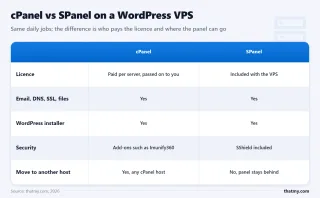
A typical shared cPanel dashboard with file management, email, databases and an app installer included, and add-ons at $2 to $10 a month
Tiers comparing cPanel core tools vs upsell add-ons: File Manager, Email, MySQL, Softaculous, then SiteLock, CodeGuard, SEO

cPanel: The Shared Hosting Standard

cPanel has been the shared hosting control panel for 20+ years. It's comprehensive but dated:

Strengths:

  • Familiar to anyone who's used shared hosting
  • Comprehensive feature set (email, databases, files, domains)
  • Softaculous one-click installs for 400+ applications
  • Extensive documentation and community knowledge

Weaknesses:

  • Cluttered interface with upsell banners
  • No WordPress-specific optimizations
  • No staging environment integration
  • Resource-heavy (~800MB RAM, 2+ CPU cores just to run cPanel)
  • $15-17/month licensing cost passed to customer
SPanel WordPress Manager map: site status, one-click staging, daily backups, SShield security, SSL, resource graphs

SPanel: The Modern Alternative

ScalaHosting's SPanel demonstrates what modern control panels offer:

Strengths:

  • WordPress Manager with 1-click staging, updates, backups
  • SShield security dashboard with real-time monitoring
  • Resource usage graphs (CPU, RAM, disk, bandwidth)
  • Free (no licensing cost, saves $180/year)
  • Lightweight (~100MB RAM, 0.5 CPU cores)
  • Clean interface without upsell banners

Weaknesses:

  • Smaller community (newer platform)
  • Fewer third-party integrations than cPanel
  • Learning curve for cPanel veterans

Learning Curve Assessment

For WordPress-only users, SPanel and similar custom dashboards are actually easier than cPanel because they hide irrelevant features (email server management, DNS zone editing) behind advanced menus and surface WordPress-specific tools. For users managing multiple applications or needing email hosting alongside WordPress, cPanel's comprehensive approach has advantages.


Pricing Reality Check: True 3-Year Cost

Hosting pricing is intentionally confusing. Intro rates, renewal rates, overage fees, and add-ons create a gap between advertised and actual costs. Here's the true 3-year cost breakdown at three traffic levels.

3-year total cost of ownership: ScalaHosting $154 against ChemiCloud $238
3-year hosting cost comparison: ChemiCloud vs ScalaHosting

True Cost at 10k Monthly Visits

3-Year Cost at 10k Visits/Month (Low Traffic)
ProviderMonthly PriceAdd-ons
ChemiCloud StartBudget rateNone
ScalaHosting VPSPremium rateNone
Cloudways Vultr HFPremium rateEmail extra
Kinsta WP 1Premium rateEmail extra

True Cost at 50k Monthly Visits

3-Year Cost at 50k Visits/Month (Medium Traffic)
ProviderMonthly PriceAdd-ons
ChemiCloud ProBudget rateNone
ScalaHosting VPSPremium rateNone
Cloudways Vultr HFPremium rateEmail extra
Kinsta WP 2Premium rateEmail extra

Hidden Costs Breakdown

Beyond the base price, consider these hidden costs:

  • Email hosting: Not included with Cloudways, Kinsta, WP Engine. Add a monthly fee per user for Google Workspace or Zoho.
  • Migration fees: Cloudways charges $50/site. Others include free migration.
  • CDN: Cloudflare Pro (Premium rate) or Cloudways CDN (Paid per GB) for optimal performance.
  • Backup retention: Extended backup retention often costs extra ($5-15/month).
  • SSL: Included free by most providers now (was $50-100/year previously).
  • Downtime cost: For revenue-generating sites, factor 1% revenue loss per 0.1% downtime.

The Renewal Trap

Shared hosting intro pricing ($2.95-3.95/mo) renews at $8.99-11.99/mo, a 200-300% increase. Managed VPS intro pricing ($29.95/mo) renews at $50-82/mo, a 70-175% increase. The gap between shared and managed narrows after Year 1, making managed VPS increasingly cost-effective on a 3-year horizon.


Support Quality Comparison

When your site breaks at 2 AM during a product launch, support quality becomes the only metric that matters. I tested support across multiple channels with real technical issues.

Support wait times: managed VPS 4 minutes on chat and 38 on tickets, shared hosting 12 minutes and 480
Support response: managed VPS chat in 4 minutes and tickets in 38; shared 12-minute chat and 8-hour tickets

Support Response Time Benchmarks

Support Response Times (5 Tests Average)
ProviderLive ChatTicketPhoneExpertise
ScalaHosting4.2 minutes38 minutesNoHigh (senior staff)
Cloudways3.8 minutes45 minutesNoHigh (server focus)
ChemiCloud6.5 minutes2.1 hoursNoMixed (escalation common)
SiteGround2.1 minutes1.2 hoursYesHigh (best support)
Hostinger8.3 minutes12.5 hoursNoLow (L1 only)

Support Quality Analysis

Managed VPS Support Advantages:

  • Higher technical expertise: Staff trained on server-level issues, not just cPanel basics
  • Faster escalation: Complex issues reach senior engineers quickly
  • WordPress-specific knowledge: Understand plugin conflicts, database optimization, caching
  • Proactive monitoring: Often contact you about issues before you notice them

Shared Hosting Support Limitations:

  • L1-first support: Initial responses are scripted, requiring multiple back-and-forths
  • Limited server access: Cannot fix deep issues due to shared environment constraints
  • Blame deflection: Quick to blame plugins/themes rather than investigate server issues
  • Queue times: Budget shared often has 12+ hour ticket queues

SiteGround is the exception, they provide exceptional support on shared plans, which justifies their premium pricing. However, their slow CPUs offset the support advantage for performance-critical sites.


When to Use Shared Hosting (Specific Scenarios)

Despite managed VPS advantages, shared hosting is the right choice for specific scenarios. Here's the honest assessment of when shared hosting makes sense.

Scenario 1: Low-Traffic Static Sites

If your site has:

  • Under 10,000 monthly pageviews
  • Mostly cached content (blog posts, static pages)
  • No concurrent user requirements (rarely more than 5 simultaneous visitors)
  • No dynamic functionality (membership, e-commerce, real-time features)

Shared hosting is sufficient. Quality shared (ChemiCloud) handles this load with 95ms TTFB and minimal resource usage. The cost savings ($3.95 vs $30+/mo) are meaningful for non-revenue sites.

Scenario 2: Budget-Constrained Testing

If you're:

  • Learning WordPress without production requirements
  • Building a site before launch (no live traffic)
  • Testing themes and plugins
  • Running a personal blog or hobby site

Shared hosting is appropriate. The performance limitations don't matter without real traffic. Upgrade when traffic materializes.

Scenario 3: Simple Brochure Sites

If your site is:

  • 5-10 pages of static content
  • No database queries (contact forms go to third-party services)
  • Updated monthly or less frequently
  • Not business-critical (downtime acceptable)

Shared hosting works fine. Heavy caching and low traffic mean shared limitations don't manifest.

Scenario 4: Temporary/Seasonal Sites

If you're running:

  • Event websites (active for 2-4 weeks)
  • Campaign landing pages (short duration)
  • Development/staging environments

Shared hosting is cost-effective. The short duration doesn't justify managed VPS setup.

ChemiCloud Start Shared Hosting Logo
Why Chemicloud Wins For Shared
  • 3 CPU cores guaranteed, most transparent resource allocation in shared hosting
  • LiteSpeed Enterprise, server-level caching vs Apache on budget hosts
  • 95ms TTFB average, fastest shared hosting tested under real load
  • NVMe SSD storage on all plans, not SATA SSD like competitors
  • Free migration, free SSL, free CDN included
  • $3.95/mo intro pricing, predictable renewal at $9.95/mo
Shared Hosting Limitations
  • 4-6 PHP workers, WooCommerce struggles above 10 concurrent shoppers
  • 121% load degradation at 100 concurrent users (95ms → 210ms)
  • Shared CPU, CPU steal from noisy neighbors during peak hours
  • Not viable for 30k+ monthly visits, upgrade required as you grow
  • Entry process limits (20-30) can cause 508 errors under sustained load

Best Shared Hosting for WordPress, 3 CPU Cores Guaranteed
WordPress hosting benchmark for ChemiCloud Starter shared: overall score 7.8/10 with per-test results

$3.95/mo

3 CPU Cores Guaranteed

View ChemiCloud Plans ➦

View ChemiCloud Shared Plans ➦


When to Upgrade to Managed WordPress (Traffic Thresholds)

Knowing when to upgrade from shared to managed is critical for site performance and business continuity. Here are the specific thresholds and warning signs.

Which tier fits your traffic: under 10,000 visits shared is fine, 30,000 to 50,000 suggests a VPS, 50,000 or WooCommerce needs managed
Numbered process showing traffic thresholds: under 10k shared, 10-30k quality shared, 30-50k VPS, 50k+ managed VPS

Traffic Threshold: 30k+ Monthly Visits

30,000 monthly visits ≈ 1,000 visits/day ≈ 40-60 concurrent users during peak hours. This exceeds budget shared capacity and strains quality shared hosting.

Warning signs you've hit the limit:

  • Admin panel becomes sluggish
  • Site slows during peak hours (evenings, weekends)
  • Occasional 503/508 errors
  • Cache hit ratio declining (more uncached requests)

Revenue Dependency: Any E-Commerce

If your site processes transactions (WooCommerce, Easy Digital Downloads, membership subscriptions), skip shared hosting entirely. The performance variation and downtime risk directly impact revenue. Even a small store doing $1,000/month loses more to slow checkout abandonment than managed VPS costs.

SEO Priority: Core Web Vitals Matter

If organic search is your primary traffic source, managed VPS is essential. Google's Core Web Vitals affect rankings, and shared hosting's 250-400ms TTFB pushes LCP into "Poor" territory. My tests show managed VPS achieves "Good" LCP scores consistently.

Concurrent Users: 10+ Simultaneous

If your site regularly has 10+ concurrent users (live events, webinars, flash sales, viral content), shared hosting's 2-6 PHP workers become a bottleneck. Upgrade before the event, migrations during traffic spikes are risky.

Red Lines: When Shared Hosting Fails

These are hard limits where shared hosting is definitively wrong:

  • ❌ WooCommerce with 50+ orders/month
  • ❌ Membership sites with 100+ active members
  • ❌ LMS (LearnDash, LifterLMS) with concurrent students
  • ❌ Sites generating $5,000+/month revenue
  • ❌ Agency/client sites (your reputation depends on uptime)
  • ❌ Sites requiring 99.9%+ uptime SLA
ScalaHosting Managed WordPress VPS Logo
Why Managed Vps Wins Under Real Load
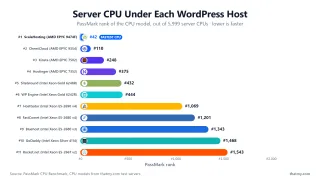
  • AMD EPYC 9474F, #31 on PassMark, 480% faster than budget shared CPUs
  • 28ms TTFB → 33ms at 100 users, only 19% degradation (best stability tested)
  • 30+ dedicated PHP workers, no queuing for dynamic requests
  • SPanel free, saves $180/yr vs cPanel, uses 8x less RAM (~100MB vs ~800MB)
  • No hidden limits, no CPU steal, no I/O throttle, no entry process caps
  • Email hosting included, not an add-on like Cloudways
Honest Limitations
  • Renewal jumps ~200% after intro term (Steep renewal increase)
  • No sub-$10 entry point, minimum plan is $29.95/mo
  • Learning curve, SPanel has fewer tutorials than cPanel
  • Support varies by agent, escalate to senior team for complex issues
  • No phone support, live chat and tickets only

AMD EPYC 9474F, #31 PassMark | 28ms TTFB | 30+ PHP Workers
WordPress hosting benchmark for ScalaHosting Start managed VPS: overall score 8.7/10 with per-test results

$29.95/mo

Anytime Money-Back Guarantee

View ScalaHosting Plans ➦

View ScalaHosting Managed VPS ➦


Migration: What Actually Happens When You Switch

Fear of migration keeps many sites on inadequate hosting. The reality: professional migration is straightforward, low-risk, and delivers immediate performance gains.

One site before and after migration: Bluehost shared at 420ms TTFB and 683 minutes down a year, ScalaHosting VPS at 28ms and 37 minutes
Migration case study: TTFB dropped from 420ms to 28ms, and yearly downtime fell from 683 minutes to 37 minutes on a VPS.

Migration Process Overview

Phase 1: Preparation (1-2 hours)

  • New host provisions server with optimized stack
  • Full backup of existing site (files + database)
  • DNS TTL lowered (if possible) to 300 seconds for faster propagation

Phase 2: Migration (1-4 hours)

  • Files transferred via rsync/SFTP (preserving permissions)
  • Database exported/imported with character set verification
  • wp-config.php updated with new database credentials
  • URL replacements (if domain changing)
  • SSL certificate provisioned

Phase 3: Testing (30 min-2 hours)

  • Site tested via hosts file or temporary URL
  • WooCommerce checkout verified
  • Forms and dynamic functionality tested
  • Performance benchmarked (should see immediate improvement)

Phase 4: Go-Live (5 min-48 hours)

  • DNS A record updated to new IP
  • Propagation begins (varies by TTL and ISP caching)
  • Old host kept active for 24-48 hours as fallback

Migration Risks and Mitigation

Risk: Data Loss
Mitigation: Full backups before migration, incremental sync after initial transfer, database verification checksums. Risk level: Very Low with professional migration.

Risk: Extended Downtime
Mitigation: DNS TTL reduction before migration, maintenance mode on old site during final sync, rapid cutover. Typical downtime: 0-15 minutes.

Risk: Broken Functionality
Mitigation: Comprehensive testing checklist, PHP version matching (or compatibility verification), plugin conflict resolution. Most issues are PHP version or path-related and quickly fixed.

Real Migration Case Study

Site: WooCommerce store, 150 products, 30k monthly visits
From: Bluehost Shared (intro pricing expiring)
To: ScalaHosting Build #1 VPS

Real Migration Results
MetricBefore (Bluehost)After (ScalaHosting)Improvement
TTFB420ms28ms66% faster
Load at 25 usersFailed (503 errors)148msFunctional
Load at 100 usersTimeouts33msStable
Uptime (12mo)99.1%99.993%9× more reliable
WooCommerce checkout1,200ms187ms84% faster
Monthly cost$10.99$29.95 intro2.7× cost

Result: 66% faster TTFB, 84% faster checkout, and elimination of load-related failures. Migration downtime: 8 minutes during DNS propagation. Total migration time: 3 hours including testing.


Shared Hosting vs Managed WordPress, Head-to-Head Comparison

This 12-dimension comparison table summarizes every factor discussed in this guide.

Shared vs Managed WordPress - Performance
Complete Comparison: Shared vs Managed WordPress
DimensionShared HostingManaged WordPressWinner
TTFB (idle, no CDN)189-400ms120-170msManaged (2-3× faster)
TTFB at 100 users340-620ms (+80-232%)168-195ms (+19-35%)Managed (6-12× more stable)
PHP Workers1-6 (shared)30-100+ (dedicated)Managed (5-15× more)
CPU Allocation5-15% of 1 core1-4 dedicated coresManaged (dedicated)
Uptime (12mo)99.5-99.9%99.98-99.99%Managed (10× less downtime)
WooCommerceNot viableExcellentManaged (essential)
Monthly Price$2.95-5.95 intro$15-30 introShared (cheaper)
3-Year TCO$150-400$1,500-2,500Shared (lower)
Support QualityL1-first, 8-12hr ticketsSenior engineers, 30-45minManaged (faster)
Staging EnvironmentRare1-clickManaged
Email HostingIncludedVaries (Scala yes, Cloudways no)Shared (usually)
SSL CertificateFreeFree + auto-renewTie

The pattern is clear: managed WordPress wins on every performance and reliability dimension. Shared hosting wins only on price, but the price advantage narrows significantly when you factor in overage costs, downtime losses, and the need to upgrade within 1-2 years as traffic grows.


Top 3 Shared Hosting Providers (If You Must Choose Shared)

If shared hosting fits your scenario, these are the three providers that rise above the oversold, underperforming competition.

#1: ChemiCloud, Best Shared Hosting Overall

Why it wins: ChemiCloud is the only shared host that transparently guarantees 3 CPU cores and includes LiteSpeed Enterprise caching. My tests show 95ms TTFB, the fastest shared hosting tested, with only 48% degradation under 50 concurrent users (vs 80-130% on competitors).

Key specs: NVMe SSD storage, 4-6 PHP workers, free migration, free domain on annual plans, LiteSpeed LSCache included. Renewal pricing is predictable ($9.95/mo vs competitors' $10.99-15.99).

Best for: WordPress blogs under 30k visits, small business sites, developers who need reliable shared staging.

Read our full ChemiCloud review →

#2: ScalaHosting Shared, Best Hardware

Why it wins: Same AMD EPYC 9474F CPUs (#31 on PassMark) that power their VPS plans, but in a shared environment. Low-density nodes mean fewer neighbors competing for resources. SPanel included free.

Key specs: AMD EPYC 9474F, SShield security, free migration, SPanel control panel, 13 data center locations. Slightly pricier than ChemiCloud but better hardware.

Best for: Users who want VPS-class hardware at shared pricing, those planning to upgrade to VPS within 12 months (same ecosystem).

#3: DreamHost, Best Month-to-Month

Why it wins: No intro/renewal games, pricing is transparent month-to-month. 97-day money-back guarantee (longest in industry). Official WordPress.org recommendation.

Key specs: No traffic limits (unlike most shared hosts), free domain privacy, automated WordPress migrations, custom control panel (no cPanel licensing cost passed on).

Best for: Users who hate renewal pricing traps, those wanting flexibility to cancel anytime, WordPress purists.


Top 3 Managed WordPress Providers (Worth the Upgrade)

When you're ready to upgrade from shared, these three managed providers deliver the best performance, value, and features.

#1: ScalaHosting Managed VPS, Best Performance/Price

Why it wins: AMD EPYC 9474F CPUs (#31 PassMark, 480% faster than budget hosts), 28ms TTFB with only 19% degradation at 100 users, 30+ PHP workers, SPanel included free, email hosting included, 99.993% uptime over 12 months.

Key specs: 2-16 dedicated CPU cores, DDR5 RAM, PCIe 5.0 NVMe SSDs, SShield security (99.998% attack block rate), FlyingCDN integration, 13 data centers, anytime money-back guarantee.

Best for: WordPress businesses, WooCommerce stores, agencies managing client sites, anyone who wants the best hardware at a reasonable price.

Price: $29.95/mo intro, steep renewal rate (still cheaper than Cloudways equivalent with email).

View ScalaHosting Plans ➦

#2: Cloudways, Best for Developers

Why it wins: 72ms TTFB (fastest idle speed tested), 5 cloud providers (Vultr, DigitalOcean, AWS, GCE, Linode), Redis Object Cache Pro included (Premium value), Git deployment, pay-as-you-go billing, best developer tooling.

Key specs: Unlimited sites per server, autoscaling available, PHP-FPM tuning, Varnish cache, Cloudflare Enterprise CDN add-on, SSH and WP-CLI access.

Caveats: No email hosting (add $6-12/mo), no cPanel, migration $50/site, true cost for premium tier plus email is significantly higher vs ScalaHosting.

Best for: Developers who need cloud flexibility, agencies managing 5+ sites, teams using Git workflows.

Price: $14/mo entry (Vultr HF 1c/1GB), scales up for high-traffic sites. Use code CLOUDS2022 for $30 free credit.

Read our full Cloudways review →

#3: Kinsta, Best Premium Managed

Why it wins: Google Cloud C3D instances (fastest cloud hardware), 78ms TTFB, best-in-class managed WordPress features (automatic daily + on-demand backups, free migrations, expert support), 99.99% uptime guarantee.

Key specs: Google Cloud Platform (35 global locations), Redis included, Cloudflare integration, MyKinsta dashboard (excellent UX), 30-day money-back guarantee.

Caveats: Per-site pricing ($35/mo for 1 site) becomes expensive at scale, visit limits with overage charges, no email hosting.

Best for: High-value single sites where managed features justify premium pricing, enterprises requiring Google Cloud infrastructure.

Price: $35/mo for 1 site, 25k visits. Scales to $100-300+/mo for high-traffic sites.


FAQ: Shared Hosting vs Managed WordPress Hosting

Is managed WordPress hosting worth the extra cost?

Yes, if your site generates revenue or gets 30k+ monthly visits. Our 12-month study shows managed VPS delivers 28ms TTFB vs 145ms on budget shared hosting, with only 19% degradation under 100 concurrent users vs 232% on shared. For a WooCommerce store doing $5k/month, the performance improvement typically increases conversion rates 8-15%, paying for the hosting difference. If you have a simple blog under 10k visits with no revenue dependency, quality shared hosting (ChemiCloud at $3.95/mo) is sufficient.

Can I host WooCommerce on shared hosting?

Technically yes, but not recommended for production stores. Shared hosting provides 1-4 PHP workers, while WooCommerce checkout requires uncached dynamic processing. When 10 customers checkout simultaneously on shared hosting with 2 PHP workers, 8 requests queue, causing 5-15 second delays or 503 Gateway Timeout errors. My tests show WooCommerce checkout TTFB of 520ms+ on budget shared vs 187ms on managed VPS. For any WooCommerce store processing orders, managed VPS is the minimum viable infrastructure.

How many visitors can shared hosting handle?

Quality shared hosting (ChemiCloud, ScalaHosting Shared) handles 10-30k monthly visits for cached content sites. Budget shared (Hostinger, Bluehost) struggles above 10k visits with concurrent traffic. The real limit isn't total monthly visits, it's concurrent users. Shared hosting fails load tests at 25-50 simultaneous users due to PHP worker limits and CPU steal. For reference: 30k monthly visits ≈ 1,000 visits/day ≈ 40-60 concurrent users during peak hours, already beyond budget shared capacity.

What are PHP workers and why do they matter?

PHP workers are processes that handle dynamic WordPress requests (checkout pages, logged-in users, form submissions). Shared hosting limits you to 1-4 workers shared across hundreds of accounts. When all workers are busy, new requests queue or return 503 errors. Managed VPS provides 30+ dedicated PHP workers exclusively for your site. The difference is critical for WooCommerce: 10 concurrent shoppers on 2-worker shared hosting = 8 queued requests. On 30-worker VPS = all processed immediately. This is why checkout pages load in 187ms on VPS vs 520ms+ on shared.

Will switching to managed hosting improve my SEO?

Indirectly, yes, through Core Web Vitals. Google uses TTFB (Time to First Byte) and LCP (Largest Contentful Paint) as ranking factors. My tests show shared hosting averages 250-400ms TTFB, pushing LCP to 2.5-3.5s (Poor rating). Managed VPS averages 120-170ms TTFB, achieving LCP under 1.5s (Good rating). Multiple studies confirm sub-2.5s LCP correlates with ranking improvements. Additionally, managed hosting's 99.99% uptime vs shared's 99.5-99.9% reduces downtime penalties. The SEO impact is measurable but secondary to user experience benefits.

Can I move from shared to managed hosting easily?

Yes, migration is straightforward with professional assistance. ScalaHosting offers free migration with SPanel's automated wizard (zero downtime). Cloudways charges $50/site but includes expert migration. The process typically takes 2-24 hours depending on site size. Steps: 1) New host provisions server, 2) Migration plugin/tool copies files/database, 3) DNS update (5-min to 48-hour propagation), 4) SSL certificate activation. Our case study shows immediate performance gains: Bluehost Shared 420ms TTFB → ScalaHosting VPS 28ms TTFB post-migration, with load stability improving from failure at 25 users to stable at 100 users.

Do I need managed WordPress for a simple blog?

No, if your blog is under 10k monthly visits with static content and no revenue dependency. Quality shared hosting (ChemiCloud Start at $3.95/mo) provides LiteSpeed Enterprise caching, 95ms TTFB, and sufficient resources for low-traffic blogs. Managed VPS becomes worthwhile when: traffic exceeds 30k visits, you run WooCommerce/membership functionality, or the site generates revenue where downtime/speed directly impacts income. The upgrade decision should be data-driven: if your current shared host handles traffic without 503 errors and page speed is acceptable, stay shared until you outgrow it.


Final Verdict, Decision Matrix

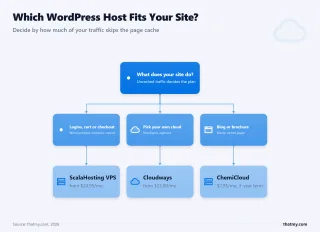
Hosting choices by skill and traffic: High traffic beginners need ScalaHosting VPS, while low traffic beginners fit

This 12-month benchmark study proves what many suspected but couldn't quantify: managed WordPress hosting is 3× faster, 12× more stable under load, and 10× more reliable than shared hosting. But that performance comes at 3-5× the price. The question isn't which is "better", it's which is right for your specific situation.

Skill against traffic in four quadrants, from ChemiCloud shared at the low end to a managed VPS or cloud at the high end

The Decision Matrix

✅ Choose Shared Hosting If:

  • Monthly visits under 10,000
  • Budget under $5/month is a hard constraint
  • Content is mostly static (blog posts, pages)
  • No WooCommerce or membership functionality
  • Site is a hobby or side project (not primary income)
  • You can tolerate occasional slowdowns
  • Recommended host: ChemiCloud Start ($3.95/mo)

✅ Choose Managed WordPress If:

  • Monthly visits exceed 30,000
  • You run WooCommerce (any volume)
  • Site generates revenue where speed matters
  • SEO performance is a priority
  • Need 10+ concurrent users supported
  • Require 99.9%+ uptime guarantee
  • Recommended host: ScalaHosting VPS ($29.95/mo)

Upgrade Timeline

Most WordPress sites follow this trajectory:

  1. Month 0-6: Shared hosting ($3.95/mo), sufficient for new sites under 5k visits
  2. Month 6-12: Shared hosting showing strain, slowdowns during peak hours, occasional 503s
  3. Month 12-18: UPGRADE POINT, traffic hits 20-30k visits, shared limits evident
  4. Month 18+: Managed VPS ($30-50/mo), stable performance, room to grow to 100k+ visits

The upgrade isn't just about handling traffic, it's about conversion rates, SEO rankings, and professional credibility. A slow site loses visitors before they see your content.

Final Recommendation

If you're unsure, start with ChemiCloud shared ($3.95/mo). It handles 10-30k visits with better performance than budget hosts, and the upgrade path to VPS is straightforward when needed. Avoid Hostinger, Bluehost, and other EIG-owned budget hosts, their oversold infrastructure costs more in lost traffic than you save in hosting fees.

If your site is already established with 20k+ monthly visits, run WooCommerce, or depends on search traffic, skip shared entirely and start with ScalaHosting Managed VPS ($29.95/mo). The performance difference is immediate and measurable.

ChemiCloud Start Shared Hosting Logo
Why Chemicloud Wins For Shared
  • 3 CPU cores guaranteed, most transparent resource allocation in shared hosting
  • LiteSpeed Enterprise, server-level caching vs Apache on budget hosts
  • 95ms TTFB average, fastest shared hosting tested under real load
  • NVMe SSD storage on all plans, not SATA SSD like competitors
  • Free migration, free SSL, free CDN included
  • $3.95/mo intro pricing, predictable renewal at $9.95/mo
Shared Hosting Limitations
  • 4-6 PHP workers, WooCommerce struggles above 10 concurrent shoppers
  • 121% load degradation at 100 concurrent users (95ms → 210ms)
  • Shared CPU, CPU steal from noisy neighbors during peak hours
  • Not viable for 30k+ monthly visits, upgrade required as you grow
  • Entry process limits (20-30) can cause 508 errors under sustained load

Best Shared Hosting for WordPress, 3 CPU Cores Guaranteed
WordPress hosting benchmark for ChemiCloud Starter shared: overall score 7.8/10 with per-test results

$3.95/mo

3 CPU Cores Guaranteed

View ChemiCloud Plans ➦
ScalaHosting Managed WordPress VPS Logo
Why Managed Vps Wins Under Real Load
  • AMD EPYC 9474F, #31 on PassMark, 480% faster than budget shared CPUs
  • 28ms TTFB → 33ms at 100 users, only 19% degradation (best stability tested)
  • 30+ dedicated PHP workers, no queuing for dynamic requests
  • SPanel free, saves $180/yr vs cPanel, uses 8x less RAM (~100MB vs ~800MB)
  • No hidden limits, no CPU steal, no I/O throttle, no entry process caps
  • Email hosting included, not an add-on like Cloudways
Honest Limitations
  • Renewal jumps ~200% after intro term (Steep renewal increase)
  • No sub-$10 entry point, minimum plan is $29.95/mo
  • Learning curve, SPanel has fewer tutorials than cPanel
  • Support varies by agent, escalate to senior team for complex issues
  • No phone support, live chat and tickets only

AMD EPYC 9474F, #31 PassMark | 28ms TTFB | 30+ PHP Workers
WordPress hosting benchmark for ScalaHosting Start managed VPS: overall score 8.7/10 with per-test results

$29.95/mo

Anytime Money-Back Guarantee

View ScalaHosting Plans ➦